So I've been able to make a list given by
list = Table[{xValues, f[xValues, t (*fixed*)]}, {xValues, xmin, xmax}]
For example:
list =
 Table[{x, Sin[x/(2*Pi)*1/10]*Cos[1/(2*Pi)]}, {x, 1, 10}]
this list is easily plotted with the command ListPlot[list] (or even ListLinePlot if I wanted some kind of interpolation between my points).
Now if I go to the 3D-case it becomes slightly harder! So I again make my list of data, this time given by:
Plotdata =
 Table[{x, y, Sin[x/(2*Pi)*1/10]*Cos[y/(2*Pi)*1/10]}, {x, 1, 10}, {y,
   1, 10}]
This now gives me a nested list, and my attempt to plot it with ListPlot3D is futile. I'm wondering if I need to do something special to get this done? My goal would be to get a nice 3D-plot of the whole.
I know I could do it for my example with the regular Plot3D command, but that's just an example, the real case involves a lot of functions which can't be done by the plot-command (or would demand to much time). My problem comes essentially down to the above. I'm hoping someone could help me.


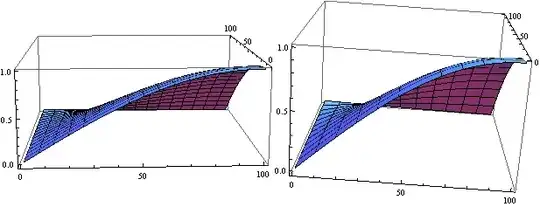

ListPlot3D[Flatten[Plotdata, 1]? (if so, you might want to look at documentation ofListPlot3D) – Pinguin Dirk Oct 14 '13 at 13:472 * Piinstead of divide? – Michael E2 Oct 14 '13 at 14:01Plotdata = Table[{x, y, Sin[x]*Cos[y]}, {x, 0, 2 Pi, 0.1}, {y, 0, 2 Pi, 0.1}]– Pinguin Dirk Oct 14 '13 at 14:02