3

There have been a couple studies done that showed that white text on a black background increase recall of data.

Although this is certainly debatable how might I invert the colors of Notebook font and background in Mathematica?

There are likely more then a couple ways to do this(external software vs stylesheet). Currently I think the best solution likely involves using the built in Mathematica stylesheets, but currently(as mentioned in the comments) there doesn't appear to be a great way to do such.

William
  • 7,595
  • 2
  • 22
  • 70
  • Is your question how to change the colors of the notebook font and background? What is your criterion for success? Are you looking for a more elegant solution than what you have? PS: Strongly related: http://mathematica.stackexchange.com/questions/1389/how-to-change-default-notebook-background-color?rq=1 – Verbeia Oct 18 '13 at 02:46
  • @Verbeia Ideally I would like a solution that involves using Mathematica's stylesheet system. It appears just adding FontColor -> GrayLevel[1], Background -> GrayLevel[0] works for change both the font color and background but only partially. Take a look at the picture here generated from the following code: NotebookPut[Notebook[{Cell[BoxData[RowBox[{"Print", "[", "\"\<test\>\"", "]"}]], "Input"]}, FontColor -> GrayLevel[1], Background -> GrayLevel[0]]] – William Oct 18 '13 at 02:58
  • 3
    But every white-text on black-background web page or printed page I've ever seen is unpleasantly difficult to read. (Perhaps the extra effort to read such is what makes retention better?) I strongly discourage anybody from using white-on-black. – murray Oct 20 '13 at 22:32
  • @murray Terminals are white on black. Yes IMO it makes reading text/sentences more difficult. – William Oct 20 '13 at 22:35
  • 1
    You should indeed be able to do this using style sheets, but I think you will need to manually provide styling for every type. Possibly you could automate this by processing the style sheet data itself but given that styles are spread between at least the Default and Core style sheet Notebooks this may be more complicated than doing it manually. – Mr.Wizard Oct 21 '13 at 02:35
  • If the older one hasn't been answered because it is difficult, then yours won't be either. If the older one wasn't answered because it wasn't interesting, then yours probably won't be either... questions on stylesheets are fickle and often it's the case that the answer is "straightforward" but no one wants to do the grunt work. In any case, you might try sweetening the deal with a bounty on the original and see if someone will take the bait :) – rm -rf Jan 10 '15 at 21:27
  • 2
    You can also look at this answer of mine for some hints on what to change and where, and maybe also look through Mike Honeychurch's answers in notebooks/stylesheets tags. Also look through the Default.nb and Core.nb stylesheets for the base styles that you can modify. It's a lot of boring work. – rm -rf Jan 10 '15 at 21:30
  • 1
    How about Format->StyleSheet->Reverse Color? – bill s Jan 10 '15 at 21:43
  • @rm-rf thanks for the link ;) – An old man in the sea. Jan 11 '15 at 10:04
  • Just want to link this topic as very closely related: Where can I find a dark stylesheet for mathematica? – Kuba Apr 30 '15 at 11:15

1 Answers1

7

The easiest way is to evaluate this:

SetOptions[EvaluationNotebook[], StyleDefinitions -> Notebook[{
    Cell[StyleData[StyleDefinitions -> "Default.nb"]], 
    Cell[StyleData[All], FontColor -> GrayLevel[1], 
     Background -> GrayLevel[0]]}, Visible -> False,
   StyleDefinitions -> "PrivateStylesheetFormatting.nb"]
 ]

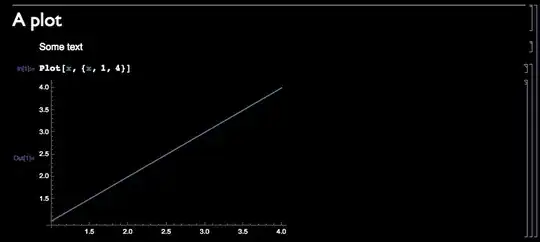
However as you can see in the pic below you will probably also need to change the syntax styling and cell label colour and possibly other styles.

enter image description here

Mike Honeychurch
  • 37,541
  • 3
  • 85
  • 158