Kuba has shown us how to generate the table you want, but didn't give any advice about displaying it in a way looks nice. I'm assuming you are interested in learning a little about formatting as well.
There are, of course, an unlimited number of ways to format data in Mathematica. I will discuss just two, one using TableForm and the other using Grid.
data = {##, f[##]} & @@@ Tuples[{-1, 0, 1}, {3}];
A quick and somewhat dirty method using TableForm:
TableForm[data,
  TableHeadings -> {None, {"x", "y", "z", "f(x,y,z)"}},
  TableAlignments -> Right]
This produces
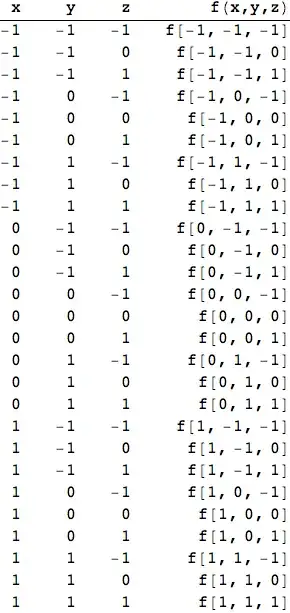
The one glaring problem with TableForm is that the right-aligned last column is ugly. Unfortunately, TableForm AFAIK doesn't allow controlling the alignments on a column-by-column basis.
Edit
Thanks to Kuba for pointing out that my formatting expression using Grid could be much simplified.
A better method using Grid:
Grid and its associated functions, such as Item and others, allow for much finer control over table formatting. But Grid is not always easy to use. Indeed, it can sometimes seem difficult even to accomplish what one hopes will be a trivial bit of formatting. I have seen posts cursing Grid as even dirtier than TableForm. In this case, Grid is easy and gives good results.
labeledData = Prepend[data, {"x", "y", "z", "f(x,y,z)"}];
Grid[labeledData,
  Alignment -> {{Right, Right, Right, Left}},
  Dividers -> {{-2 -> True}, {2 -> True}},
  Spacings -> {2, Automatic}]


{##, f[##]} & @@@ Tuples[{-1, 0, 1}, {3}]but this is very likely a duplicate. Also, Hello :), have you tried anything? What with the documentation for "table"? Is it about Mathematica? I'm asking because your syntax does not seem to reflect it is so. – Kuba Oct 25 '13 at 19:50