6

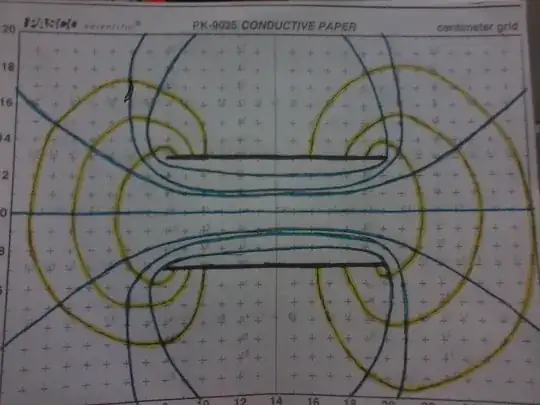
I am trying to plot this graph showing the electric field lines and lines of equipotential based off the electrode configuration(in black) of two parallel lines. This is what I've been using for other electrode configurations:

 gradientFieldPlot[(y^2 + (x - 7/2)^2)^(-1/2) - (y^2 + (x + 7/2)^2)^(-1/2), {x, -7, 7},  
                   {y, -5, 5}, PlotPoints -> 50, ColorFunction -> "BlueGreenYellow",  
                   Contours -> 15,ContourStyle -> White, Frame -> True,
                   FrameLabel -> {"x", "y"}, ClippingStyle -> Automatic, Axes -> True,
                   StreamStyle -> Orange]

and am trying to do it in a similar manner, but I do not know how to express the equations for these two finite parallel lines in the [ ]. Can any one help? Thanks sooo much!!

enter image description here

Sektor
  • 3,320
  • 7
  • 27
  • 36
Logan
  • 517
  • 1
  • 6
  • 15
  • 1
    Take a look at the ElectroStaticPotential example in the ContourPlot[] help – Dr. belisarius Oct 27 '13 at 03:49
  • I've been trying everything, no luck :( – Logan Oct 27 '13 at 04:20
  • Direct link to the ElectroStaticPotential example in the Documentation: http://reference.wolfram.com/mathematica/ref/ContourPlot.html#14946033 – Alexey Popkov Oct 27 '13 at 07:10
  • 1
    @Logan, When editing a question, it is best to not change the question entirely as it leaves answers hanging (why am I plotting a point charge instead of line charges?). Instead, you should add clarifying information. As for the line segments, experiment with f[x,y]=h[x-x0,y-y0,L]-h[x-x1,y-y1,L] in my answer. – Timothy Wofford Oct 27 '13 at 07:31
  • Alright, I'll keep that in mind. Thanks for your help Timothy!! – Logan Oct 27 '13 at 09:12
  • 1
    Logan, you should read the comments to this question. I think you are probably referring to a custom plot command made by @Jens. – Timothy Wofford Oct 27 '13 at 17:08

2 Answers2

11

I'm going to assume that "everything" includes some simple ContourPlot and StreamPlot attempts, but that you are getting mired in the style details of your plots (missing streamlines, streamlines not where you want them, colors, etc.)

To draw the charge distributions, we can use Graphics.

gP1 = Graphics[{PointSize[Large], Point[{14, 10}]}];
gP2 = Graphics[{PointSize[Large], Point[{7, 10}], Point[{21, 10}]}];
gP3 = Graphics[{Thickness[Large], Line[{{8, 7}, {20, 7}}], Line[{{8, 13}, {20, 13}}]}];

For the plots, we first need to look up the expressions for the potentials of a point charge and a charged line segment.

h[x_, y_] = 1/Sqrt[x^2 + y^2];
h[x_, y_, L_] = Log[(Sqrt[(x - L/2)^2 + y^2] - (x - L/2))/
                    (Sqrt[(x + L/2)^2 + y^2] - (x + L/2))];

Then we need to move these expressions around to represent our charge distributions.

f1[x_, y_] = h[x - 14, y - 10];

We can use ContourPlot on the f functions to get the equipotential lines. Note that ContourPlot uses ContourStyle instead of PlotStyle to change the color of the lines.

cP = ContourPlot[f1[x, y], {x, 0, 28}, {y, 0, 20},
       Contours -> 4, ContourShading -> None, ContourStyle -> Blue, 
       FrameTicks -> {Range[0, 28, 2], Range[0, 20, 2]}];

The field lines are perpendicular to the equipotential lines, so they are related to the gradient of the potential functions.

g1[x_, y_] = D[f1[x, y], {{x, y}}];

We can plot the field lines using StreamPlot. Here is where getting to know the options pays off. First, we don't want arrowheads on our lines, so we put StreamStyle->"Line". In your picture, you only have 8 streamlines, so we try StreamPoints->8 which may give unsatisfactory results depending on the plot (it worked great for PlotRange->{{0,20},{0,20}}). So, we take more control and indicate exactly which points we want to start our streams. Note that StreamPlot uses StreamColorFunction instead of PlotStyle to change the color of the lines.

sP = StreamPlot[g1[x, y], {x, 0, 28}, {y, 0, 20}, 
  StreamStyle -> "Line", 
  StreamPoints -> ({14, 10} + {Cos[#], Sin[#]} & /@ Range[0, 7Pi/4, Pi/4]), 
  StreamColorFunction -> Function[{x, y}, Darker@Yellow]];

Finally, we combine the plots. I start with the contour plot because it has the plot range and ticks defined.

Show[cP, sP, gP1, AspectRatio -> Automatic]

field lines and equipotential lines of point charge

After defining your f functions and adjusting the options on the plots, you can generate plots for the other two examples.

equipotential and field lines of dipole

equipotential and field lines of oppositely charged line segments

Timothy Wofford
  • 3,803
  • 2
  • 19
  • 24
11

I would check out first Michael Trott blog: On the Importance of Being Edgy—Electrostatic and Magnetostatic Problems with Sharp Edges. From that you can easily construct:

ϕLineSegment[{x_, y_, z_}] = 
 WolframAlpha[
    "electric potential of a charged line segment", {{"Result", 1}, 
     "Input"}][[1]] /. {Subscript[ϵ, 0] -> 1/(4 Pi), l -> 1, 
   Q -> 1}

enter image description here

Show[

 ContourPlot[ϕLineSegment[{x - 1/2, 0, 
     z}] + ϕLineSegment[{x + 1/2, 0, z}], {x, -1.5, 
   1.5}, {z, -1.5, 1.5}, ColorFunction -> "BeachColors", 
  Contours -> 10, PlotPoints -> 60],


 StreamPlot[
  Evaluate@Grad[ϕLineSegment[{x - 1/2, 0, 
       z}] + ϕLineSegment[{x + 1/2, 0, z}], {x, z}], {x, -1.5, 
   1.5}, {z, -1.5, 1.5}, StreamStyle -> Black],

 Graphics[{Red, Thick, Line[{{-.5, -.5}, {-.5, .5}}], 
   Line[{{.5, -.5}, {.5, .5}}]}]

 ]

enter image description here

For the rest of your plots there are quite a few Demonstrations. For example:

Electric Field Lines Due to a Collection of Point Charges

**Electric Field Lines Due to a Collection of Point Charges**

LCarvalho
  • 9,233
  • 4
  • 40
  • 96
Vitaliy Kaurov
  • 73,078
  • 9
  • 204
  • 355