4

After finishing a few tutorials, I thought I was ready to calculate the pixel values of a large (smaller numbers 20x20 used here) image and export to a standard format (.jpg) but my code doesn't work. I am clearly missing something important. I thought it might be best to see if someone would look at a small segment of the code and comment.

(* image calc *)
numrow = 20;
numcol = 20;

(* midpoint of image *)
midrow = N[numrow/2];
midcol = N[numcol/2];

(* azimuth angle of pixel from center point *) 
(* mixed symbolic and numeric results *)
patfun[i_,j_] := N[ArcTan[i-midrow,j-midcol]];

(* spoke-like image *)
pat = Array[patfun[i,j], 20, 20];
rm -rf
  • 88,781
  • 21
  • 293
  • 472
shanman
  • 41
  • 2

4 Answers4

3

Here is another way to do it, which keeps the auxiliary variables localized.

pixelData =
  With[{numrow = 200, numcol = 200}, 
    With[{midrow = numrow/2, midcol = numcol/2},
      Block[{patfun},
        patfun[midrow, midcol] = 0.; 
        patfun[i_, j_] := N[ArcTan[i - midrow, j - midcol]];
        Table[patfun[i, j], {i, 0, numrow}, {j, 0, numcol}]]]];
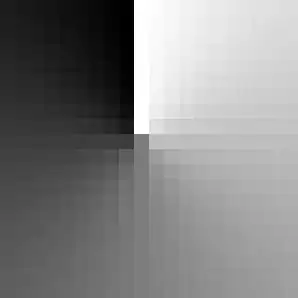
img = Image @ Rescale @ pixelData

image.png

m_goldberg
  • 107,779
  • 16
  • 103
  • 257
3

Here's another way: Especially for listable built in functions like ArcTan using (packed) arrays for coordinates might be faster than calling ArcTan for every single pixel.

dim={20,20};
x=Array[#1&,dim,{{-1.,1.},{-1.,1.}}];
y=Array[#2&,dim,{{-1.,1.},{-1.,1.}}];
img=Image[Rescale[ArcTan[x,y]]]

enter image description here

Export["filename here",img];

(And to prevent the division by zero at x/y=0, if the dimensions aren't even, I usually just cheat and add a small number like 10^-10 or $MachineEpsilon to x or y.)

Niki Estner
  • 36,101
  • 3
  • 92
  • 152
3

To supplement the other answers: by adding a semicolon at the end of every line, you sometimes don't spot the errors soon enough. For example, after:

pat = Array[patfun[i, j], {20, 20}]

you would have seen a list of

{{ArcTan[-10. + i, -10. + j][1, 1], ...

where the i and j are hanging around like uninvited guests.

After 'correcting' this line to:

pat = Array[patfun, {20, 20}]

you see an error message:

ArcTan::indet: Indeterminate expression ArcTan[0.,0.] encountered. >>

and, halfway down (if you've left the semicolon off):

{-1.5708, -1.5708, -1.5708, -1.5708, -1.5708, -1.5708, -1.5708, -1.5708,
 -1.5708, Indeterminate, 1.5708, 1.5708, 1.5708, 1.5708, 1.5708, 1.5708, 1.5708,
 1.5708, 1.5708, 1.5708},

and that Indeterminate will frustrate a subsequent attempt to apply the Image function to your data. You could, I suppose, do this:

Image[pat /. Indeterminate -> 0]

but I think the other solutions here - avoiding errors rather than cleaning up after them - are better.

cormullion
  • 24,243
  • 4
  • 64
  • 133
  • 1
    +1, but don't do this for images from a typical megapixel camera. I regularly loose hours of unsaved work by doing just that... – Niki Estner Oct 30 '13 at 09:24
2

Several coding problems addressed. Take a look:

hNumrow = hNumcol = 10;
patfun[i_, j_] := If[i - hNumrow == 0, Pi/2 Sign[j - hNumcol], ArcTan[i - hNumrow, j - hNumcol]];
pat = Rescale@Array[patfun[#1, #2] &, 2 {hNumrow, hNumcol}];
Image@pat
Export["\\yourFile.jpg", Image@pat]

Mathematica graphics

Dr. belisarius
  • 115,881
  • 13
  • 203
  • 453