(*let's simmulate your environment*)

(*First we create a notebook*)
nb1 = CreateDocument[ExpressionCell[Defer[p1 = Plot[Sin[x], {x, 0, 2 Pi}]], "Input"]];
(* The another one *)
nb2 = CreateDocument[ExpressionCell[Defer[p2 = Plot[Cos[x], {x, 0, 2 Pi}]], "Input"]];
(*pause*)
DialogInput[ DialogNotebook[{TextCell[
               "We have created two NBs (Check the open windows) \n Press OK to calculate both NBs"],
             Button["OK", DialogReturn[]]}]];
NotebookEvaluate[nb1, InsertResults -> True];
NotebookEvaluate[nb2, InsertResults -> True];
DialogInput[
 DialogNotebook[{TextCell[
   "Now we have evaluated both Notebooks \n Press OK to close the Nbs and show both plots together"],
                Button["OK", DialogReturn[]]}]]
NotebookClose /@ {nb1, nb2};
Show[p1, p2]

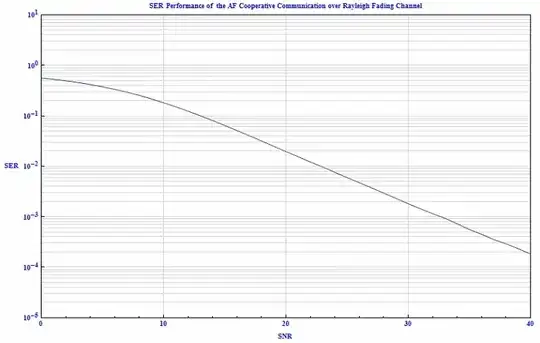


Show? – C. E. Nov 04 '13 at 18:00Showcommand. but this command is for the case when you have both result in the same program. but in my case I have two different programs, so I can't sayShow[Plot1, Plot2]– sky-light Nov 04 '13 at 19:33g1=then hit paste, and enter. Do the same with notebook 2, naming that graphicg2. Finally, just enterShow[g1,g2]. You should get what you want. – Jason B. Nov 04 '13 at 21:20