14

My minimal example

Panel[Column[{
   Row[{"Board size: ", InputField[Dynamic[max], Number, FieldSize -> 3],
      Button["Clear Board"]}], "A graphic object which is large enough"}]]

evaluates to
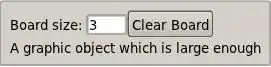
enter image description here

Since I have a large graphic object underneath the first row, there is some space to the right of the "Clear Board" button. I would like to move the button to the right so that it is flush with the boundary of the panel -- basically the effect of the LaTeX command \hfill if I were typesetting.

I have been messing with Alignment and ControlPlacement, but no luck so far.

Michael Wijaya
  • 2,197
  • 16
  • 29

2 Answers2

16

You want to use Grid.

Code

Panel[
 Grid[
  {
    (* The 1st row *)
    {
      Row[{"Board size: ", InputField[Dynamic[max], Number, FieldSize -> 3]}], 
      Button["Clear Board", ImageSize -> All]
    },
    (* The 2nd row *)
    {
      Graphics[Circle[], ImageSize -> 300], SpanFromLeft
    }
  }, Alignment -> {{Left, Right}, Baseline}]
]

Result

Output

Few things

  1. SpanFromLeft is used so that the first column of the second row would occupy the second column too.

    Grid[{
      {"A", "B"},
      {"C", SpanFromLeft}
     }, Frame -> All, BaseStyle -> {FontSize -> 36}]
    

    spanfromleft

  2. Button's default ImageSize is Full, which makes it stretched so that it would fill all cell. So I changed it to All which makes its width just enough for the text.

    • Button[..., ImageSize->Full] (or the default)

    full

    • Button[..., ImageSize->All]

    all

  3. Alignment can be specified in {horizontal, vertical} order. Within each, you can specify them for each row / column by giving a list (in this case, Left for the first column, Right for the second column).

Grid has a very rich syntax. The reference is always a good source.

Yu-Sung Chang
  • 7,061
  • 1
  • 39
  • 31
10

This solution illustrates using Spacer. Move the slider to place the button anywhere you want along the width of interface:

Manipulate[Panel[Column[{Row[{"Board size: ",InputField[Dynamic[max], Number, 
FieldSize -> 3], Spacer[spacer], Button["Clear Board"]}], Plot[Sin[x], {x, -3, 3}, 
ImageSize -> 400]}]], {{spacer, 100}, 0, 220}, FrameMargins -> 0, Paneled ->False]

enter image description here

This one is good for precise placement inside a Row. For cool Grid options see @Yu-Sung answer.

Vitaliy Kaurov
  • 73,078
  • 9
  • 204
  • 355