I would like to combine a dynamic module with a manipulation, whilst maintaining the functionality of both. I have tried things like Show and Epilog -> Inset@..., but neither seem to work. The code for both dynamic module & manipulation are as follows:
Manipulate[
Plot[x^n, {x, 0, 5}, PlotRange -> {{0, 5}, {0, 5}}, GridLines -> {Range@5, Range@5},
GridLinesStyle -> Directive[GrayLevel[0.8], Dashed], AspectRatio -> Automatic,
PlotStyle -> Thick, Axes -> False, ImageSize -> 200], {n, -3, 3},

DynamicModule[{x = 11}, Grid[Map[Button[ToString@#, x = #, Background ->
Dynamic[If[Divisible[#, x], Green, Red]], ImageSize -> {40, 40}, Appearance ->
"Frameless"] &, RandomInteger[{1, 10}, {5, 5}], {2}], Frame -> All,
FrameStyle -> Dashed, Spacings -> {.2, .2}]]]
produces:
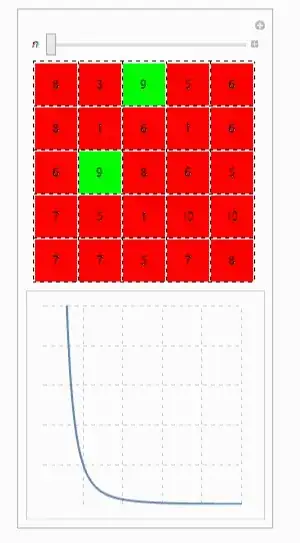
Functionality in the above illustration is preserved, but I would really like one to overlay the other (plot on top 'layer'). I have included the grid on both to show how I would like to align them.
I have looked here, and here, to no avail :(
This is a slimmed-down version of a previous (deleted) post - I hope it is a little clearer :)


ClickPane[graphics, func]instead ofButton. You can usefuncto set your variablexand change the color ofRectangles(like you do the background) in response to mouse clicks. It's easier to combine graphics than mix graphics and non-graphics. – Michael E2 Nov 22 '13 at 03:36