I want to make use of Mathematica as the backend to solve some computations used in my LaTeX input file. As I have no knowledge to make it in Mathematica, I used Maxima as explained in the following steps that I got somewhere on the internet.
Step 1
Download and install Maxima.
Step 2
Create a batch file named cas.bat (for example) as follows.
rem cas.bat
echo off
set PATH=%PATH%;"C:\Program Files (x86)\Maxima-5.31.2\bin"
maxima --very-quiet -r %1 > solution.tex
Save the batch in the same directory in which your input file below exists. It is just for the sake of simplicity.
Step 3
Create the input file named main.tex (for example) as follows.
% main.tex
\documentclass[preview,border=12pt,12pt]{standalone}
\usepackage{amsmath}

\def\f(#1){(#1)^2-5*(#1)+6}


\begin{document}

\section{Problem}
Evaluate $\f(x)$ for $x=\frac 1 2$.

\section{Solution}
\immediate\write18{cas "x: 1/2;tex(\f(x));"}

\input{solution}

\end{document}
Step 4
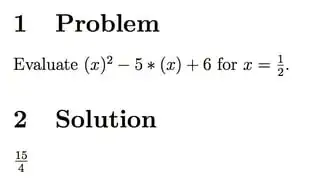
Compile the input file with pdflatex -shell-escape main and you will get a nice output as follows.

Questions
Apparently the output of Maxima is as follows. I don't know how to make it cleaner.
solution.tex

                                       1
                                       -
                                       2
$${{15}\over{4}}$$
                                     false
Now, my questions are
- how to implement the scenario above in Mathematica?
- if Mathematica also produces the unnecessary texts, how to remove such texts?
- if Mathematica also produces the same output format, how to obtain just
\frac{15}{4}without$$...$$?



MathematicaScript. I don't have the time to do this now, but you can look at questions and answers here using this. How to use Mathematica functions in Python programs? and Reading from STDIN, or: how to pipe data into Mathematica might be of use. – rm -rf Dec 02 '13 at 02:45*for multiplication inx^2 -5 x+6produced bySplice? Some plotting macros (PSTricks) need the*. – kiss my armpit Dec 02 '13 at 03:20Splicehas been superseded byFileTemplateas the documentation tells me. – gwr Sep 25 '15 at 15:16FileTemplatein spite ofSplicethat has been superseded? – Display Name Aug 06 '16 at 16:23