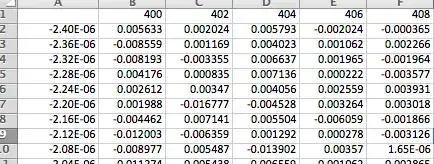
Given an excel file that resides in the same directory as your notebook you import the data with
data = Import[NotebookDirectory[] <> "data.xls"][[1]]
where "[[1]]" selects the first excel sheet.
Then you check the dimensions of your data
dims = Dimensions[data]

{25, 9}
and extract the values for the axes.
axisx = Transpose[data][[1]][[2 ;; dims[[1]]]]

{-2.4*10^-6, -2.36*10^-6, -2.32*10^-6, -2.28*10^-6, -2.24*10^-6, \
-2.2*10^-6, -2.16*10^-6, -2.12*10^-6, -2.08*10^-6, -2.04*10^-6, \
-2.*10^-6, -1.96*10^-6, -1.92*10^-6, -1.88*10^-6, -1.84*10^-6, \
-1.8*10^-6, -1.76*10^-6, -1.72*10^-6, -1.68*10^-6, -1.64*10^-6, \
-1.6*10^-6, -1.56*10^-6, -1.52*10^-6, -1.48*10^-6}

axisy = data[[1]][[2 ;; dims[[2]]]]

{400., 402., 404., 406., 408., 410., 412., 414.}
Then you extract the data for plotting by removing values for x- and y-axes.
plotdata = Take[data, -dims[[1]] + 1, -dims[[2]] + 1];
And finally you plot the data with specified axes values and ranges
ListPlot3D[plotdata, InterpolationOrder -> 3,
DataRange -> {{First[axisx], Last[axisx]}, {First[axisy],
Last[axisy]}, Automatic}]



Import[]? What did you get? What problems did you find? Please try that your questions here don't resemble a "please do that for me" thing. – Dr. belisarius Dec 10 '13 at 04:43Import["c:\\test.xlsx"]– Dr. belisarius Dec 10 '13 at 05:26