An alternative to setting the input precision is to ask for enough output accuracy. The main idea is to set the precision of the input to Infinity and use N to get the desired accuracy -- something like this:
N[f[SetPrecision[x, Infinity], 6]
Here's such an wrapper for a function:
Options[nEval] := {AccuracyGoal -> Automatic, "MaxExtraPrecision" -> Automatic};
nEval[f_, x_?NumericQ, OptionsPattern[]] :=
  Block[{$MaxExtraPrecision =
     OptionValue["MaxExtraPrecision"] /. Automatic -> $MaxExtraPrecision},
   N[f[SetPrecision[x, Infinity]], OptionValue[AccuracyGoal] /. Automatic -> 6]
   ];
Then
myF[x_] := CoshIntegral[x] Sinh[x] - Cosh[x] SinhIntegral[x];

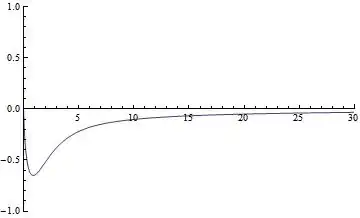
Plot[nEval[myF, x], {x, 0, 30}, PlotRange -> {{0, 30}, {-1, 1}}]

The precision is adapted to what is needed.
Plot[nEval[myF, x], {x, 30, 60}, PlotRange -> {Automatic, {-0.35, 0}}]

But one can still get a catastrophic loss of precision, due to the limit $MaxExtraPrecision.
Plot[nEval[myF, x], {x, 30, 100}, PlotRange -> {Automatic, {-0.35, 0}}]
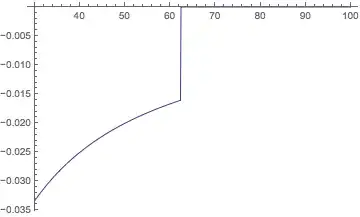
In that case, one can raise the amount of extra precision allowed, even to Infinity. (In some cases, it might take an exorbitant amount of time to finish, but in this case, it is still quick.)
Plot[nEval[myF, x, "MaxExtraPrecision" -> Infinity], {x, 30, 100},
 PlotRange -> {Automatic, {-0.35, 0}}]