I am developping a 3D reconstruction application. I recuperate the voxels coordinates (the coordinate of each voxel) of the object that I need to reconstruct. Each voxel have a dimensions like this 5cm*5cm*5cm. I need to reconstruct this volume. I try to use Image3D function by put just a 3d binary table representing the voxels that belongs to volume but I could not change the size of each voxel. Any help please?
Asked
Active
Viewed 1,213 times
2

phdstudent
- 423
- 3
- 12
3 Answers
3
Another way to get pseudo-voxels using Cuboid (mainly for versions <9):
{dx, dy, dz} = {5, 5, 5};

Graphics3D[
 Table[{EdgeForm[], Opacity[.1], Hue[Sqrt[x^2 + y^2 + z^2]/25],
   Cuboid[{x, y, z} - {dx, dy, dz}/2, {x, y, z} + {dx, dy, dz}/
      2]}, {x, -25, 25, dx}, {y, -25, 25, dy}, {z, -25, 25, dz}]]

or using other increments:

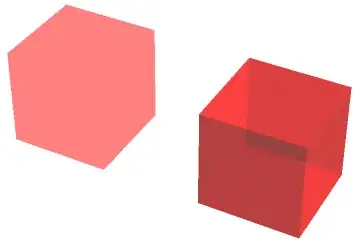
... and just to give an impression of the visual differences between Raster3D (left) and Cuboid (right):
Graphics3D[{Opacity[.5], Raster3D[{{{{1, 0, 0}}}}], EdgeForm[None],
Red, Cuboid[{2, 0, 0}]}, Lighting -> "Neutral", Boxed -> False]

Yves Klett
- 15,383
- 5
- 57
- 124
3
Using Raster3D :
Graphics3D[{Opacity[.5],Raster3D[RandomReal[1,{5,5,5,3}]]}, Axes-> True]

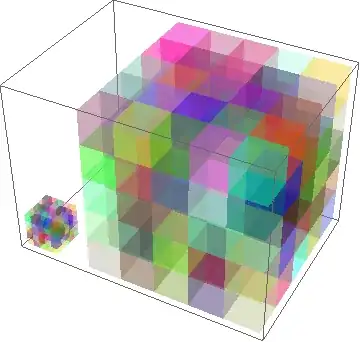
This will generate unit voxels, while the following creates 5x5x5 unit voxels:
Graphics3D[{Opacity[.5],Raster3D[RandomReal[1,{5,5,5,3}],{{0,0,0},{25,25,25}}]}, Axes-> True]

Perhaps this will clarify the sizes:
Show[{
Graphics3D[{Opacity[.5],Raster3D[RandomReal[1,{5,5,5,3}]]}],
Graphics3D[{Opacity[.5],Raster3D[RandomReal[1,{5,5,5,3}],{{10,0,0},{35,25,25}}]}]
}]

chuy
- 11,205
- 28
- 48
-
-
1
-
@YvesKlett What is the information illustrated by
RandomReal[1,{5,5,5,3}]? Is this matrix contains the center or the opposite corner of each voxel or… what? – phdstudent Dec 17 '13 at 22:54 -
@phdstudent please look up the documentation for
Raster3D, esp. under Scope->Specification. – Yves Klett Dec 18 '13 at 07:57
1
Here is the code for Plotting voxel grid:
   PlottingVoxel[{VoxCenter_, VoxH_, VoxL_, VoxP_}] :=
   Module[{Ip, CoordVox}, (
  Ip = VoxCenter - N[{VoxH/2, VoxL/2, VoxP/2}];
  CoordVox = {{Ip, Ip + {VoxH, 0, 0}, Ip + {VoxH, VoxP, 0},
  Ip + {0, VoxP, 0}},
  {Ip, Ip + {VoxH, 0, 0}, Ip + {VoxH, 0, VoxL},
  Ip + {0, 0, VoxL}},
  {Ip + {0, 0, VoxL}, Ip + {VoxH, 0, VoxL},
  Ip + {VoxH, VoxL, VoxL}, Ip + {0, VoxP, VoxL}},
  {Ip + {0, 0, VoxL}, Ip + {0, VoxP, VoxL}, Ip + {0, VoxP, 0},
  Ip},
   {Ip + {0, VoxP, 0}, Ip + {VoxH, VoxP, 0},
  Ip + {VoxH, VoxP, VoxL}, Ip + {0, VoxP, VoxL}},
  {Ip + {VoxH, 0, 0}, Ip + {VoxH, VoxP, 0},
  Ip + {VoxH, VoxP, VoxL}, Ip + {VoxH, 0, VoxL}}};
  Polygon[CoordVox]

  )]

  Note:
  VoxCenter=center of voxel.
  VoxH,VoxL,VoxP is the dimension of the voxel.
Exemple:
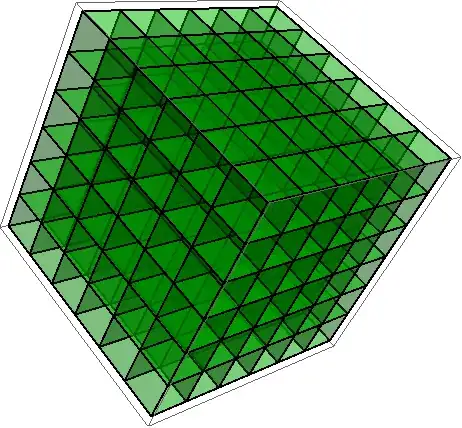
 Graphics3D[{FaceForm[Green], EdgeForm[Thick], Opacity[0.3],
 PlottingVoxel[{#, 1, 1, 1}] & /@
 Flatten[Table[{x, y, z}, {x, 0, 5}, {y, 0, 5}, {z, 0, 5}], 2],
 FaceForm[Blue], Opacity[.4]}]
Result:
phdstudent
- 423
- 3
- 12
-
Those are not really voxels, though. To similar effect, you could use
Cuboid(e.g. cribbed from the docs:Graphics3D[ Table[{EdgeForm[], Opacity[.1], Hue[RandomReal[]], Cuboid[RandomReal[4, 3]]}, {40}]]) – Yves Klett Dec 17 '13 at 08:11 -
@YvesKlett, Why did you say that my solution is not a real voxels? I do not understand the difference? I used the polygon to make a cuboid and you used the cuboid directly. – phdstudent Dec 17 '13 at 15:19
-
Another things, I try your solution and it get the same excution time that my own!Please do you can try the code for a grid with dimensions 300,300,300 and the diemension of each voxels is 555? – phdstudent Dec 17 '13 at 15:27
-
From a rendering point, a cuboid set of polygon faces is not the same as a voxel (think ray-tracing). – Yves Klett Dec 17 '13 at 15:27
-
Ok! may be you are right! I have not a deep idea about ray tracing. But, How can I fix the computation problem? – phdstudent Dec 17 '13 at 15:30
-
My version will not differ much in terms of performance.I would recommend to go with @chuy´s solution, which is the way to go starting with V9. – Yves Klett Dec 17 '13 at 15:32
Inset3D..:-) – george2079 Dec 18 '13 at 20:14