Sometimes I run into a situation when there are graphics objects (mostly plots) that take a while to draw. Good practice would suggest you do all your evaluation outside Plot or whatever other plotting function, but sometimes one forgets or it is the drawing process that takes so much time. So the question is whether it is possible to change things such as PlotLabel font, PlotStyle or other strictly aesthetic properties of the plot without asking Mathematica to recalculate all the points.
Asked
Active
Viewed 1,705 times
4

Jānis Šmits
- 431
- 3
- 10
1 Answers
9
It depends. Some options, like e.g. PlotStyle are directly incorporated into the graphics itself. Others, like PlotLabel, are still there as options in the graphics and can be changed.
gr = Plot[Sin[x], {x, 0, 2 Pi}];
Show[gr, PlotLabel -> "Boing"]
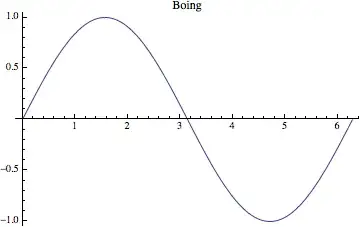
Please have a look at AbsoluteOptions[gr] to see which options are still available. I'm not entirely sure whether the above approach with Show works always but there are of course many alternatives. One of them is to build a new Graphics object. For this you take the first part, which consists of all the graphics primitives and you use the AbsoluteOptions. To replace the GridLines for instance, you could use
Graphics[First[gr],
 Sequence @@ (AbsoluteOptions[gr] /.
 (GridLines -> _) :> (GridLines -> {{{Pi, Dashed}, {2 Pi, Thick}},
  {{-1, Orange}, -.5, .5, {1, Orange}}}))]
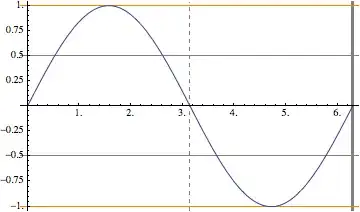
Be aware that usually you don't need to replace the options. If you put the same option twice, it's always first comes first serves. Therefore, this works too
Graphics[First[gr],
 GridLines -> {{{Pi, Dashed}, {2 Pi, Thick}}, {{-1,
     Orange}, -.5, .5, {1, Orange}}}, Sequence @@ AbsoluteOptions[gr]]
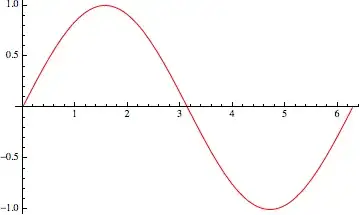
Additionally, you should be aware that you can work with a Graphics object like with any other expression in Mathematica. Therefore, even if it is not as simple as setting an option, you can still change every detail of the graphics. this needs quite some knowledge about the structure of Graphics itself, but it is not impossible. Just like Öska said, look at the InputForm
gr /. _Hue :> Red

halirutan
- 112,764
- 7
- 263
- 474
-
So just to be clear - options shown under
AbsoluteOptionsare editable? There are some things you can change in the style of the plot by what @Öskå proposed (I managed to change the color of a particular line segment and such) but it is very bothersome and I can't think of the top of my head when redrawing wouldn't e be simpler.Edited: you updated your answer with the things I commented here.
– Jānis Šmits Dec 17 '13 at 15:00 -
@JānisŠmits I'm not sure whether every option can be set with this simple
Show[..]construct I used, but you can always build a new graphics with something likeGraphics[First[gr], Sequence@@AbsoluteOptions[gr]]and here, you you simply replace an option by something you like. Should I give full example in the answer? – halirutan Dec 17 '13 at 15:07 -
If it isn't too much of a hassle, this is the first time I have heard of the Sequence function, I looked it up, but I think it would be very nice to have an example of how to do this in this situation. – Jānis Šmits Dec 17 '13 at 15:11
-
I feel that this question is a duplicate and that it would be better to gather all answers under the following question: (17250) – Mr.Wizard Dec 17 '13 at 15:50
-
@Mr.Wizard How do we do that except of closing this question here? The problem is that the title "Is it possible to change the color of plot in Show?" does not reflect what has been asked here (at least not, if you don't know the answer anyway). That might be one reason why the OP hasn't found the other thread. – halirutan Dec 17 '13 at 20:57
-
As you can see I did not close this question as work would be needed. Should you agree you could edit the original question to reflect both aspects, then have me merge the questions to move your answer there. If you disagree that's fine too. – Mr.Wizard Dec 18 '13 at 00:52
FullForm/InputFormand change theOptions– Öskå Dec 17 '13 at 14:49FullFormso I didn't think of it. – Jānis Šmits Dec 17 '13 at 14:53