5

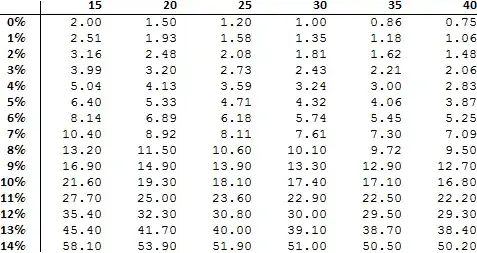
Basically I want to build a chart like something I would do in Excel. It should look like this:

enter image description here

Here is the formula I'm using and what I've done so far

a[r_, n_, d_] := (((1 + r)^n) - 1)/(1 - (1 + r)^-d)

TableForm[
   Table[AccountingForm[a[r, 30, d], 3],
         {r, .000000000001, .15, .01}, {d, 15, 40, 5}],
   TableHeadings -> {
          {"0%","1%","2%","3%","4%","5%","6%","7%","8%","9%","10%","11%","12%","13%","14%"},
          {"15", "20", "25", "30", "35", "40"}
     }]

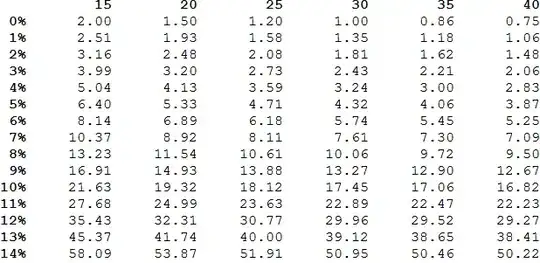
This is the output I'm getting:

enter image description here

Basically all I want is the integer plus 2 decimal places. What am I missing?

Is there a way to automatically generate the headings based on the changing value of r and d?

Silvia
  • 27,556
  • 3
  • 84
  • 164
RobK
  • 417
  • 2
  • 7

4 Answers4

5

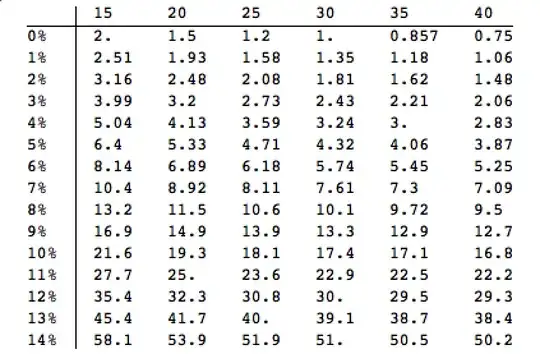
You can use Accounting to do this. It has the options available.

a[r_, n_, d_] := (((1 + r)^n) - 1)/(1 - (1 + r)^-d)
padIt[v_?(Element[#, Reals] &), f_List] := 
  AccountingForm[v, f, NumberSigns -> {"-", "+"}, 
   NumberPadding -> {"0", "0"}, SignPadding -> True];

TableForm[
 Table[padIt[a[r, 30, d], {3, 2}], {r, .000000000001, .15, .01}, {d,15, 40, 5}], 
 TableHeadings -> {{"0%", "1%", "2%", "3%", "4%", "5%", "6%", "7%", 
    "8%", "9%", "10%", "11%", "12%", "13%", "14%"}, {"15", "20", "25",
     "30", "35", "40"}}]

Mathematica graphics

If you do want exact size of columns, with the sign there, use {4, 2} instead of {3,2} in the call above
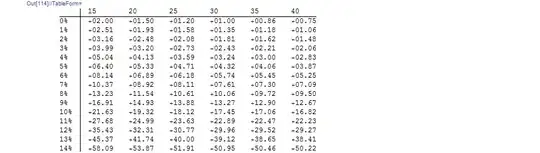
Mathematica graphics

If you do not want the sign at all, use NumberSigns -> {"", ""} instead and to get the same output as excel, use

padIt[v_?(Element[#, Reals] &), f_List] := 
  AccountingForm[v, f, NumberSigns -> {"", ""}, 
   NumberPadding -> {" ", "0"}, SignPadding -> False];
TableForm[
 Table[padIt[a[r, 30, d], {4, 2}], {r, .000000000001, .15, .01}, {d,15, 40, 5}], 
 TableHeadings -> {{"0%", "1%", "2%", "3%", "4%", "5%", "6%", "7%", 
    "8%", "9%", "10%", "11%", "12%", "13%", "14%"}, {"15", "20", "25",
     "30", "35", "40"}}]

Mathematica graphics

And If you want to left-justify the columns, use

padIt[v_?(Element[#, Reals] &), f_List] := 
  AccountingForm[v, f, NumberSigns -> {"", ""}, 
   NumberPadding -> {" ", "0"}, SignPadding -> False];

TableForm[
 Table[padIt[a[r, 30, d], {3, 2}], {r, .000000000001, .15, .01}, {d,15, 40, 5}], 
 TableHeadings -> {{"0%", "1%", "2%", "3%", "4%", "5%", "6%", "7%", 
    "8%", "9%", "10%", "11%", "12%", "13%", "14%"}, {"15", "20", "25",
     "30", "35", "40"}}]

Mathematica graphics

and finally, if you do not want space in the columns, you can use

padIt[v_?(Element[#, Reals] &), f_List] := 
  AccountingForm[v, f, NumberSigns -> {"", ""}, 
   NumberPadding -> {"0", "0"}, SignPadding -> False];
TableForm[
 Table[padIt[a[r, 30, d], {4, 2}], {r, .000000000001, .15, .01}, {d, 15, 40, 5}], 
 TableHeadings -> {{"0%", "1%", "2%", "3%", "4%", "5%", "6%", "7%", 
    "8%", "9%", "10%", "11%", "12%", "13%", "14%"}, {"15", "20", "25",
     "30", "35", "40"}}]

Mathematica graphics

Nasser
  • 143,286
  • 11
  • 154
  • 359
4

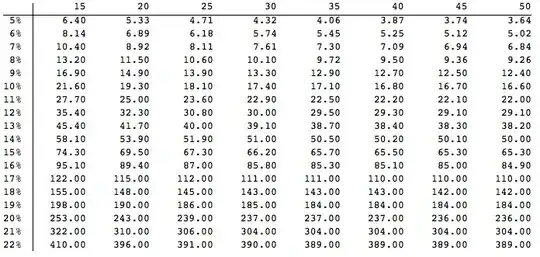
While ubpdqn has ansered the first of your questions already here a solution to your second question:

    robksTable[rstart_, rend_, dstart_, dend_] := 
 TableForm[
  Table[PaddedForm[a[r, 30, d], {3, 2}], {r, rstart, rend, .01}, {d, dstart, dend, 5}], 
  TableHeadings -> {(ToString[#] <> "%") & /@ IntegerPart[100 Range[rstart, rend, 0.01]], 
    ToString /@ Range[dstart, dend, 5]}, TableAlignments -> Right]

robksTable[0.05, .22, 15, 50]

enter image description here

Matariki
  • 3,382
  • 1
  • 23
  • 23
3

You can modify options :

a[r_, n_, d_] := (((1 + r)^n) - 1)/(1 - (1 + r)^-d)

TableForm[
  Table[PaddedForm[
    a[r, 30, d], {3, 2}], {r, .000000000001, .15, .01}, {d, 15, 40, 
    5}], TableHeadings -> {Style[#, Bold, 
       FontFamily -> "Calibri"] & /@ {"0%", "1%", "2%", "3%", "4%", 
      "5%", "6%", "7%", "8%", "9%", "10%", "11%", "12%", "13%", 
      "14%"}, Style[#, Bold, FontFamily -> "Calibri"] & /@ {"15", 
      "20", "25", "30", "35", "40"}}, TableAlignments -> Right]    

enter image description here

UPDATE

As pointed out by Matiriki, I failed to see (and therefore address the second part):

tabf[n_, r0_, r1_, d0_, d1_] := Module[{rs = {}, ds = {}, dat},
  dat = Table[AppendTo[rs, r]; AppendTo[ds, d]; 
    PaddedForm[
     a[r, n, d], {3, 2}], {r, r0, r1, .01}, {d, d0, d1, 5}];
  TableForm[dat, 
   TableHeadings -> {Style[
        ToString[ToString[NumberForm[100 #, {2, 1}]] <> "%"], Bold, 
        FontFamily -> "Calibri"] & /@ Union@rs, 
     Style[ToString[#], Bold, FontFamily -> "Calibri"] & /@ ds}, 
   TableAlignments -> Right]]

Testing:

tabf[30, 0.0001, 0.15, 5, 40]

gives:

enter image description here

Apologies for the lazy use of AppendTo (but this is most likely to be small scale).

ubpdqn
  • 60,617
  • 3
  • 59
  • 148
3
a[r_, n_, d_] := (((1 + r)^n) - 1)/(1 - (1 + r)^-d)

format[n_?NumberQ] := NumberForm[n, {10, 2}]

rlist = Range[1`*^-12, .15, .01];
dlist = Range[15, 40, 5];

table = Outer[format @ a[#, 30, #2] &, rlist, dlist];

rlbl = {Row[{Round[100 #], "%"}] ~Style~ Bold} & /@ rlist;

clbl = Style[#, Bold] & /@ dlist;

Grid[
 ArrayFlatten[{{"", {clbl}}, {rlbl, table}}],
 Alignment -> Right,
 Spacings -> 3
]

enter image description here

Compared to your request:

Mr.Wizard
  • 271,378
  • 34
  • 587
  • 1,371