11

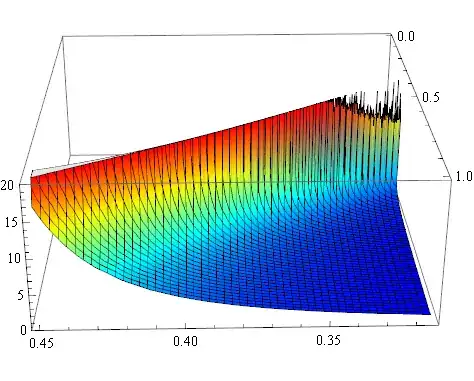
example figure

I want to get the effect in the above Figure. Here is my code:

Plot3D[Log[
   4*((1 + x)^2)*(0.0065^2)*Log[y]/(3*((1 - 2 x))^2*(0.0267^2)) + 1]/
  Log[y], {x, 0.315, 0.45}, {y, 0, 1}, Mesh -> 50, ImageSize -> 600, 
 AspectRatio -> 0.8, PlotRange -> {0, 20}, 
 PerformanceGoal -> "Quality", 
 LabelStyle -> Directive[Bold, FontFamily -> "Times New Roman", 24], 
 AxesStyle -> {Thick, Thick, Thick}, AxesOrigin -> {0.315, 0, 0}, 
 AxesLabel -> {ν, n, l}, MaxRecursion -> 6, ClippingStyle -> None,
  ColorFunction -> "Rainbow", 
 PlotLegends -> BarLegend[Automatic, LegendMarkerSize -> {20, 300}]]
J. M.'s missing motivation
  • 124,525
  • 11
  • 401
  • 574
Scott Wang
  • 867
  • 7
  • 10

3 Answers3

18

The color function used is the standard "jet" colormap that is ubiquitous in figures generated using MATLAB. This answer (by J. M.) has an exact ColorFunction for reproducing the jet colormap:

jet[u_?NumericQ] := Blend[
    {{0, RGBColor[0, 0, 9/16]}, {1/9, Blue}, {23/63, Cyan}, {13/21, Yellow},
    {47/63, Orange}, {55/63, Red}, {1, RGBColor[1/2, 0, 0]}}, 
    u] /; 0 <= u <= 1

rm -rf
  • 88,781
  • 21
  • 293
  • 472
  • Is it just me or does this actually not match the original images very well? Maybe it's the shape of the surface. *shrug* – Mr.Wizard Dec 23 '13 at 12:04
  • @Mr.Wizard OP never included a plot of the original image, so it's all in the scaling. If you observe carefully, the colors in my bar legend matches that in OP's examples. I do not think yours (Yves') is correct or that Glow is necessary here. – rm -rf Dec 23 '13 at 12:07
  • Yeah, it's the shape of the surface. This looks right: Plot3D[x + y, {x, 0, 1}, {y, 0, 1}, ColorFunction -> (jet[#3] &)] (+1 of course) – Mr.Wizard Dec 23 '13 at 12:07
  • @rm-rf I was just pointing to Blend, no claim to the correct ingredients thereof. – Yves Klett Dec 27 '13 at 18:24
  • Somehow, I am now having misgivings for having contributed to "rainbow abuse" in data visualization… :o personally, I only used jet[] for artwork, but went with things like "ThermometerColors" for actual data visualization. – J. M.'s missing motivation May 06 '15 at 04:17
  • 1
    @J. M. Don't worry, I fixed it for you :) Now people have no excuse to not make their own abominations :P – rm -rf May 10 '15 at 00:15
7

I am betting that you are seeking Glow. Using Yves's gradient in:

Edit: Looking again at your gradient it is closer to leave out Green entirely:

ColorFunction -> (Glow @ Blend[{Blue, Cyan, Yellow, Red}, #3] &)

We get:

Plot3D[
  Log[4*((1 + x)^2)*(0.0065^2)*Log[y]/(3*((1 - 2 x))^2*(0.0267^2)) + 1]/Log[y], 
  {x, 0.315, 0.45}, {y, 0, 1},
  PlotRange -> {0, 20}, Mesh -> 50, MaxRecursion -> 6, 
  ColorFunction -> (Glow @ Blend[{Blue, Cyan, Yellow, Red}, #3] &)
]
enter image description here

Notably the back side remains bright:

enter image description here

You may also wish to make the ends Darker, e.g.:

ColorFunction -> (Glow @ 
    Blend[{Darker@Blue, Blue, Cyan, Yellow, Red, Darker@Red}, #3] &)
Mr.Wizard
  • 271,378
  • 34
  • 587
  • 1,371
6

I would like to draw your attention to Blend, which is very useful for custom gradient coloring. Taken more or less directly from the documention:

Graphics[Table[{Blend[{Blue, Cyan, Green, Yellow, Red}, x], 
   Disk[{8 x, 0}]}, {x, 0, 1, 1/8}]]

Mathematica graphics

You may want to adjust/weigh the blending to your liking - see the docs for further enlightment.

Yves Klett
  • 15,383
  • 5
  • 57
  • 124