4

I am having a problem saving a long complicated string with Unicode characters in it. I have boiled the problem down, I think, to this minimal example:

hw = {72, 101, 108, 108, 111, 32, 8594, 32, 
    87, 111, 114, 108, 100, 33};
str = FromCharacterCode[hw]

which assigns a hello world string with a right arrow (the Unicode 8594 character) to str. If I then

ExportString[str, "Text"]

I get a different string, as the second line in

right and wrong hello world strings

instead of the first line. I have a program that reads cells from a Notebook and custom converts it to a LaTeX string. I just cannot save the string. What am I doing wrong?

Sjoerd C. de Vries
  • 65,815
  • 14
  • 188
  • 323
Hbar
  • 245
  • 1
  • 8

3 Answers3

9

The correct character encoding for Export may help.

Export["hello.txt", str, "Text", CharacterEncoding -> "Unicode"]

does the trick for me:

Mathematica graphics

Sjoerd C. de Vries
  • 65,815
  • 14
  • 188
  • 323
3

Hbar asked:

What is the logic of the junk ExportString prints into a cell?

On my system (Mathematica 7, Windows 7) I don't get quite the same result, but I assume the mechanism is similar. If we use ToCharacterCode to convert our intended string into UTF-8 we get multi-byte encoding:

utf8 = ToCharacterCode["Hello \[RightArrow] World!", "UTF8"]
{72, 101, 108, 108, 111, 32, 226, 134, 146, 32, 87, 111, 114, 108, 100, 33}

However when we convert this to a string using default encoding we do not get the original:

FromCharacterCode[utf8]
"Hello â World!"

This is what I get when I use ExportString[str, "Text"] as shown in the question. I assume that a similar conversion is taking place.

Mr.Wizard
  • 271,378
  • 34
  • 587
  • 1,371
1

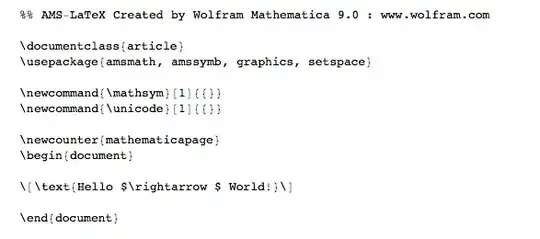
If the goal is to write latex, why not use "Tex" export which gives nice looking Latex

hw = {72, 101, 108, 108, 111, 32, 8594, 32, 87, 111, 114, 108, 100, 33};
str = FromCharacterCode[hw];
ExportString[str, "Tex"]

enter image description here

or more simply

TeXForm[str]
\text{Hello $\rightarrow $ World!}
bill s
  • 68,936
  • 4
  • 101
  • 191
  • Thanks for the prompt answer. I would like to use the listings package for Input cells instead of line-by-line pmbs. Also, Mathematica notebooks have more structure than LaTeX, so they are easier to pre-process, allowing me to have cells marked latex, process grids as tabular when needed, ignore closed cells, etc. – Hbar Jan 06 '14 at 19:40
  • Sorry Hbar, but I have never used the listings package and don't know that pmbs is. I just was trying to give an easy way to "read from a Notebook and convert to a Latex string". – bill s Jan 06 '14 at 20:25
  • listings is a LaTeX package that helps one pretty-print programs and pmb (poor man's bold) is a macro from the TeXbook that creates bold characters by printing three slightly offset copies of its argument. – Hbar Jan 07 '14 at 05:29