6

One image is worth one thousand words, so:

enter image description here

Question: At what options should I be looking, so that what I see in my notebook is what I get in my printed pdf ?

Here is the code I'm using:

deq = x''[t] == x[t] - x[t]^3 + x[t]^2 + a Cos[t];

genPoincareMapPoints[deq_] :=
  Module[{},
    Reap[
     NDSolve[{deq,
       WhenEvent[
        Mod[t, 2 \[Pi]] == 0,
        Sow[{x[t], x'[t]}]]
       }, {}, {t, 0, 5 10^4},
      AccuracyGoal -> 10, PrecisionGoal -> 10, 
      MaxSteps -> ∞]]][[-1, 1]];

Style[
 Grid@{
   Parallelize[
    ListPlot[
       genPoincareMapPoints[
        {deq /. a -> #, x[0] == 0, x'[0] == 0.0}],
       AxesLabel -> {"x[t]", "x'[t]"},
       PlotRange -> All, 
       PlotLabel -> "Poincare Map for a=" <> ToString@#,
       PlotStyle -> AbsolutePointSize[0.5]] &
     /@ {0.03, 0.3, 3}]
   }, ImageSizeMultipliers -> 1]

EDIT: Mac OSX 10.9, Mathematica 9.0.1. I am printing with 'File -> Print... -> PDF -> Save as PDF...'. I'm viewing the PDF with 'Preview' app of Mac OSX.

stathisk
  • 3,054
  • 20
  • 37

1 Answers1

7

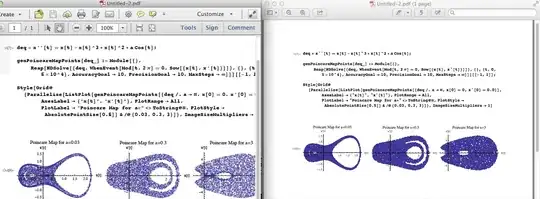
This seems to be a problem with the "Preview" application from Mac OSX. Viewing both at 100%, Preview renders the points very large while Acrobat does not. I blame Preview. I'm not sure how to fix it for Preview only.

"Preview" vs "Acrobat"


This should be a comment but I can't post those yet.

printedpdf

Using the built in "Save as PDF" dialog from the print menu works fine for me. Having code and knowing your OS X version, whether you're printing to an Adobe PDF module or using the system dialog, and what you're viewing it in would help to narrow down the issues.

Glorfindel
  • 547
  • 1
  • 8
  • 14
Sara Lily
  • 128
  • 1
  • 8
  • Thanks @jtth. I will provide code in the next couple of hours. – stathisk Jan 12 '14 at 20:08
  • What PDF viewer are you using? Or is it the same in, say, Preview and Acrobat? – Sara Lily Jan 12 '14 at 21:21
  • 'Preview' app from Mac OSX. – stathisk Jan 12 '14 at 21:48
  • Thanks for posting screenshot from Acrobat @jtth! I will leave the question open for a couple of days -top- and then I will accept your answer. Welcome to Mathematica.SE! – stathisk Jan 12 '14 at 22:24
  • Thank you. I've had a couple of problems with Preview not rendering particularly complicated bitmaps or pieces of heavily-typset LaTeX, so I always check my work in Acrobat or Reader. Most people on Windows will be using Acrobat or Reader anyhow, not OS X's built-in PDF viewing tech. – Sara Lily Jan 12 '14 at 22:42
  • you might want to have a look at this https://mathematica.stackexchange.com/a/11283/1089 – chris May 10 '20 at 10:59