I'm putting together a Demonstration which utilizes a function which operates on a (manipulated) String, and I'd like the InputField to be of the form InputField[col,String,FieldSize->3]. Using the default format gives something like this:
Manipulate[col, {{col, "AB"}}]

which requires use of quotation marks.
I'm able to hack the function to take expressions and convert them to strings
f[column_String] := column
f[column_] := ToString@HoldForm@column
but then the InputField looks strange for I or E:
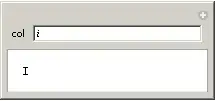
I found another possible workaround on MathGroup:
col="AB"
Manipulate[Grid[{{InputField[Dynamic[col], String, FieldSize -> 3], f@col}}]]

However, this requires pre-initializing col and messes up multiple Manipulate instances.
Is there a way to have Manipulate assume that what's entered in an InputField is a String?


{{col, "AB", "My control"}, InputField[#, String] &}— note the placement of the extra braces inside. – Ruslan Apr 14 '20 at 10:09