With Manipulate, you can demonstrate the relationship of the three simplex coordinates. Since x and x2 define the value of x3, I added Enabled -> False to its controller. Another way would be to set up some rules about which variable to decrease if any of the three variables is increased (i.e. decrease x3 if x or x2 is increased, decrease x if x3 or x2 is increased, etc.) but it seems a bit unnecessary.
Manipulate[
 {{x, x2, x3}, Total@{x, x2, x3}} // Column,
 {{x, .5}, 0, 1 - x2, Appearance -> "Labeled"},
 {{x2, .3}, 0, 1 - x, Appearance -> "Labeled"},
 {{x3, .2}, 0, 1, Appearance -> "Labeled", Enabled -> False},
 Initialization :> {x3 := (1 - x - x2)}
 ]

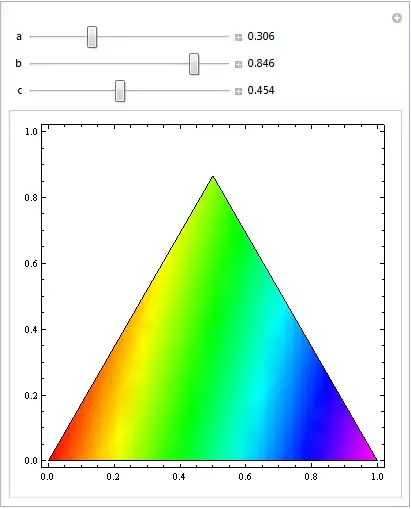
With another Manipulate, you can visualize the behaviour of your function (f here) depending on the values of a, b and c:
Manipulate[
 Dynamic@DensityPlot[f@trans@{x, y}, {x, 0, 1}, {y, 0, 1},
   ColorFunction -> (Hue[0.85 #] &), BoundaryStyle -> Black,
   RegionFunction -> (inQ@transform@{#1, #2} &)],
 {{a, 1., "a"}, 0, 1, Appearance -> "Labeled"},
 {{b, .5, "b"}, 0, 1, Appearance -> "Labeled"},
 {{c, .3, "c"}, 0, 1, Appearance -> "Labeled"},
 Initialization :> {
   x3 := (1 - x1 - x2),
   f[{x_, x2_, x3_}] := x a + x2 b + (1 - x - x2) c;
   inQ[pt_List] := (Total@pt == 1 && And @@ NonNegative@pt);
   trans[{x_, y_}] := {1, 0, 0} + x*{-1, 1, 0} +
       y*{-1/Sqrt@3, -1/Sqrt@3, 2/Sqrt@3};
   }
 ]