0

I have a $300$ by $2$ matrix called r which its elements depend on parameter g. I would like to plot this matrix and change the g to see how the graph changes. I have used this code:

Manipulate[ListPlot[r], {g, 0, 10}] 

However, nothing happens. If I determine the parameter g, then I can plot it with ListPlot[r]. But, when I use manipulate, I cannot plot it.

Any suggestion?

Thank you in advance.

Pinguin Dirk
  • 6,519
  • 1
  • 26
  • 36
MOON
  • 3,864
  • 23
  • 49
  • 1
    Please post short, but complete examples for questions like this. Here the definition of r is missing, so I could only guess at what was going wrong. If we knew the value of r (not a 300 by 2 matrix, but a short one, say, 3 by 2), then we could give a definite solution. – Szabolcs Jan 21 '14 at 17:12

2 Answers2

2

You probably need to inline the value of r, like this:

With[{rr = r}, Manipulate[ListPlot[rr], {g, 0, 10}]]

This'll make sure that the value of r is substituted in first, and g only after.

Szabolcs
  • 234,956
  • 30
  • 623
  • 1,263
1

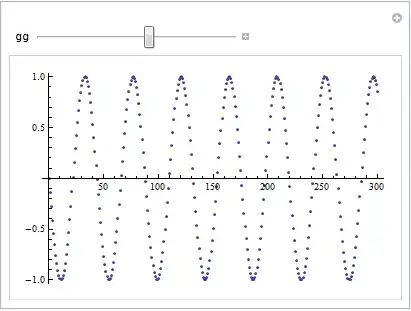
Assuming r can be defined:

r = Table[{x, Sin[g x]}, {x, 0, 300}];

Use something like this:

Manipulate[ListPlot[r /. g -> gg], {gg, 1, 10}]

Mathematica graphics

The same results is obtained as Szabolcs answer, and I don't know if there are advantages/disadvantages to either solution.

bobthechemist
  • 19,693
  • 4
  • 52
  • 138
  • This code works. Thank you. I cannot add another parameter like g and plot it by changing the two parameters. However, the other answer by Szabolcs can be easily generalize to two parameter. – MOON Jan 22 '14 at 11:36