UPDATE
While the self-posted answer below (TickLabelStyle->TraditionalForm) works for most things, it also has the following effect: Integers are given periods in the label. That is, if the ticks would be at {1,2,3,4}, the labels are given as {"1.","2.","3.","4."} instead of the more pleasing {"1","2","3","4"}. Is there a better form or formatting function to use in this case?
I'm using the CustomTicks package from LevelScheme, and am having problems with displaying things when the range is very small ($10^{-11}$). For example, with default Mathematica:
ListPlot[{RandomReal[#], RandomReal[#]} & /@ (Range[100] 10^-10),
 Frame -> True, Axes -> False]
Gives

While the equivalent, reproducible CustomTicks equivalent is:
ListPlot[{RandomReal[#], RandomReal[#]} & /@ (Range[100] 10^-10),
 Frame -> True, Axes -> False,
 FrameTicks -> {LinTicks, LinTicks, StripTickLabels@LinTicks,
   StripTickLabels@LinTicks}]
which gives:
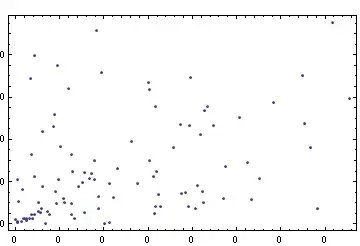
Erk. I must be missing something from the documentation, but I can't seem to find the right options. I want to eventually set more options for LinTicks (such as Tick length, etc), but this is a minimal example, and once this is solved, I can work on adding those options.
I can also double check that the range is set correctly by doing things slightly more by hand:
In[11]:= data = {RandomReal[#],
     RandomReal[#]} & /@ (Range[100] 10^-10);
xRange = {Min@data[[All, 1]], Max@data[[All, 1]]}
yRange = {Min@data[[All, 2]], Max@data[[All, 2]]}

Out[12]= {3.82894*10^-11, 9.18792*10^-9}

Out[13]= {5.96584*10^-12, 9.54224*10^-9}


In[14]:= ticks = FrameTicks -> {
    LinTicks[xRange[[1]], xRange[[2]], MajorTickLength -> {0, 0.015},
 MinorTickLength -> {0, 0.005}],
    LinTicks[yRange[[1]], yRange[[2]], MajorTickLength -> {0, 0.015},
 MinorTickLength -> {0, 0.005}],
    StripTickLabels@LinTicks[xRange[[1]], xRange[[2]]],
    StripTickLabels@LinTicks[yRange[[1]], yRange[[2]]]
}
Output omitted, but the range from LinTicks is correct. The x axis is $2\times 10^{-9}$ to $9\times 10^{-9}$, so they should output fine.
ListPlot[data, Frame -> True, Axes -> False, ticks]
Gives

Any ideas?


TickLabelFunction->TraditionalFormfor the LinTicks. I'm wondering if that breaks anything else... anyone have any insight? – tkott Apr 10 '12 at 02:42