13

Recently I bought a Raspberry Pi and I installed the Wolfram Language on it. Comparing WL 10.0's commands with Mathematica 9.0.1.0's commands, I found 328 additional commands and variables. I understand that WL is in a preliminary version so more commands may be added (or removed) in the near future but since this seems to be the future, I believe learning as quickly as possible the new possibilities would be a strong asset.

Since my PC's front end is much faster than the RPi's, I would like to call these through my Mathematica 9.0.1 front end and get the results in the same front end. This would save a lot of time lost in going forward-backward between them. So how can I call the WL kernel from my PC (I have attached both to an Ethernet LAN)?

bobthechemist
  • 19,693
  • 4
  • 52
  • 138
tchronis
  • 2,445
  • 1
  • 14
  • 26
  • 1
    When you say your PC is so much faster than the Pi is that for running mathematica/WL code? Because if you do succeed in making the connection you desire the code will still be running on the Pi and just as slow. The only gain you will make is convenience of not having to switch. – Ymareth Feb 25 '14 at 14:43
  • Asking users to comment on some 100-200 new functions is waay too broad and perhaps out of scope for this site. Besides, there is documentation for a lot of these (but not all) available online, so I don't see why you couldn't just look them up. Third, you can't run the functions available in the WL kernel on your Pi in Mathematica 9 on your PC... that's just not how it works. Besides, even if it were possible, it would probably be a violation of the license, so people might not answer that question here. – rm -rf Feb 25 '14 at 14:43
  • Yes I know - I just want to call the new commands from 9.0 in my PC. I don't mind the delay. – tchronis Feb 25 '14 at 14:44
  • 2
    I'm looking forward to version 10 too. But you know, I still haven't mastered all the commands that were new in version 7 yet! – bill s Feb 25 '14 at 14:45
  • @rm -rf I hope there is no license problem. I am a licensed MMA 9.0 user and I would like to explore the new commands from a more robust environment. It is well known that Pi's xwindows are very heavy for it. So I cannot build notebooks larger than a few kb. To produce the help file took 30 minutes. – tchronis Feb 25 '14 at 14:48
  • @bills That is so much true for me too!! My MMA plate is not finished and I am always greedy for new items...we all are human after all... – PlatoManiac Feb 25 '14 at 14:48
  • @bill s yes I am learning too and you are much more experienced than me. But getting a taste of the modern staff never heart anyone... – tchronis Feb 25 '14 at 14:49
  • I updated the link - it wasn't working so I used pastebin. Check it out :-) – tchronis Feb 25 '14 at 14:54
  • @tchronis Did you check out my link? You have the full documentation for a lot of these functions online :) – rm -rf Feb 25 '14 at 15:03
  • @rm -rf thank you , I am aware of the link you provided and has much more information than that I place in pastebin (have you checked my link ?). I just had to trace which are the new commands. I also would like to work more efficiently on RPi using the fast editor on my PC. I am really frustrated on waiting screens to refresh (especially notebooks). I have RPi-Model B with 700Mhz but... – tchronis Feb 25 '14 at 15:07
  • Related: http://community.wolfram.com/groups/-/m/t/163395?_19_redirect=http%3A%2F%2Fcommunity.wolfram.com%2Fdashboard%3Fp_p_id%3D3%26p_p_lifecycle%3D0%26p_p_state%3Dmaximized%26p_p_mode%3Dview%26_3_groupId%3D0%26_3_keywords%3DRDK%26_3_struts_action%3D%252Fsearch%252Fsearch%26_3_redirect%3D%252Fweb%252Fcommunity%252F%26_3_y%3D0%26_3_x%3D0 – Szabolcs Feb 25 '14 at 15:13
  • I have some very naive comments on some of them here http://cosmosimple.blogspot.co.uk/2013/12/a-first-and-naive-look-at-mathematica.html – Yi Wang Feb 25 '14 at 15:13
  • Thanks @Szabolcs they seem to tackle the connection in several way but after a quick look it seems they have not concluded and still face problems. I will try to connect based on their posts and will post here an answer if i succeed. Unless someone else here has already done it! :-) – tchronis Feb 25 '14 at 15:20
  • @YiWang nice link. – tchronis Feb 25 '14 at 15:22
  • @Szabolcs It worked just out of the box. I connected to Raspberry's MathKernel within 5 minutes. Thanks again. I will post an answer here about the connection ad maybe more. – tchronis Feb 25 '14 at 15:48
  • @tchronis I would really separate out part (1) from part (2). Part (1) is a clear answerable question, part (2) is not really related and there's some discussion if it has its place here ... Yes, please do post an answer for part (1). – Szabolcs Feb 25 '14 at 15:49
  • @Szabolcs ok , I will remove part 2 since it really seems too broad and I will post and answer in the next few hours. – tchronis Feb 25 '14 at 16:04
  • @tchronis Since you agreed with Szabolcs and removed the broad part of the question, I have rephrased your question slightly and also reduced its length (since that part was not relevant anymore). Please take a look – rm -rf Feb 25 '14 at 16:31
  • btw, I have successfully connected to remote kernels using this: How do you use ssh-keys instead of a password to run a remote-kernel over ssh? I think that should work with the RPi as well. – rm -rf Feb 25 '14 at 16:34
  • Thanks @rm-rf , indeed the frontend ask me for the ssh password each time i start the kernel. It will be handy if I install the ssh certificate. Thanks for the link. – tchronis Feb 25 '14 at 16:37
  • The edit is fine. I was too enthusiast trying to open a broad conversation about the new possibilities. I will attend shortly a Wolfram Language workshop and I am excited :-) – tchronis Feb 25 '14 at 16:41

2 Answers2

14

You can download the Remote Development Kit here (scroll down a bit).

It's a CDF file that shows this when opened:

Click "INSTALL" to finish the installation.

Now go to Palettes -> Remote Development Control Panel.

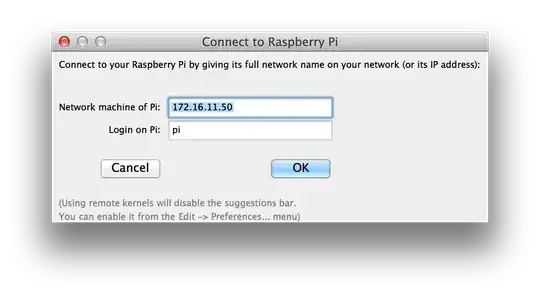
Click Configure Pi Connection and enter the IP address of your Pi, as well as the default username.

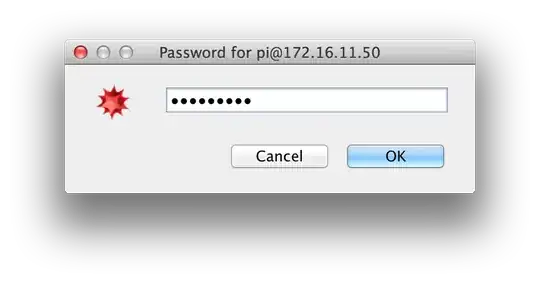
Click New Pi Notebook, enter an expression to evaluate and press Shift-Enter. A dialog will come up to enter the password for the Pi.

Now you're ready to work with the Pi kernel and a desktop front end!

This works both for front end version 9 and 10.

This sets up a remote kernel with almost the same configuration bobthechemist describes in his answer, however he runs the kernel as root on the Pi, which allows access to hardware (e.g. GPIO).

If this method doesn't work, verify that it is possible to connect to the Pi using ssh from a terminal.

Szabolcs
  • 234,956
  • 30
  • 623
  • 1,263
  • +1 for putting all the information in a convenient spot. Seems like folks who gather in WC have problems getting this option to work. Another case of YMMV. – bobthechemist Jul 11 '14 at 16:21
  • @bobthechemist Do I see it correctly that the only difference between this and your configuration is that you ran the Pi kernel as root? – Szabolcs Jul 11 '14 at 16:44
  • Yes - the benefit of running the kernel as root is to get access to commands such as DeviceWrite["GPIO", {24->1}]. – bobthechemist Jul 11 '14 at 16:49
  • 1
    I tried to connect to my pi from a remote network. I usually connect to the Pi with ssh -p 22000 pi@ip_address because I changed the default SSH port to avoid brute force attacks. I changed the launch command to java -jar "mathssh" -p 22000 pi@ip_address /usr/bin/wolfram -mathlink -LinkMode Connect -LinkProtocol TCPIP -LinkName "linkname" -LinkHost ipaddress but I can't connect to it. Am I doing it wrong? – shrx Aug 20 '14 at 13:02
  • I found this: http://quiterandomnotes.blogspot.com/2013/04/remote-kernel-for-mathematica-via-home.html Looks like it's a problem that I'm behind a router and I'll have to set up a VPN. Not that I know how to do it... – shrx Aug 20 '14 at 13:56
6

It is possible to connect to the RPi through a PC running v9 using the remote kernel options

  1. From "Kernel Configuration Options..." Add a new kernel
  2. Choose the Advanced options and ensure that Arguments to MLOpen has the following

-LinkMode Listen -LinkProtocol TCPIP -LinkOptions MLDontInteract

and the Shell command to launch kernel is

"`java`" -jar "`mathssh`" pi@192.168.1.110 sudo wolfram -mathlink -LinkMode Connect -LinkProtocol TCPIP -LinkName "`linkname`" -LinkHost `ipaddres`

Obviously, replace your ipaddress as appropriate. The sudo in the kernel launch will allow you to use DeviceWrite functions that access the GPIO; in my opinion one of the main reasons to run Mathematica on a RPi.

As a side note, if you are running avahi you can substitute hostname.local for the ipaddress and not worry about when and if your RPi IP address changes. This may require you to have Apple's bonjour software installed on your PC; however, I was unable to test if this is a requirement since I already had it installed in my case.

One last note; if you encounter problems with SSH keys, you want to look at c:\USERS\$USERNAME.ssh and delete the entries that are causing problems.

bobthechemist
  • 19,693
  • 4
  • 52
  • 138
  • Thanks @bobthechemist. I could get everything up to just before the request for the password dialogue box - the MLECONNECT error just kept appearing -, I could successfully SSH into the pi but the dialogue box requesting password just would not show. I replaced the auto-generated options with the following (plus my details) and everything started working. "java" -jar "mathssh" pi@192.168.1.110 sudo wolfram -mathlink -LinkMode Connect -LinkProtocol TCPIP -LinkName "linkname" -LinkHost ipaddres – MrSchmidtRCC Dec 12 '14 at 23:24