3

I wonder if there is an easy way to convert from TableForm to Grid. I have an existing data format that uses the Table function that I’d like to prettify….

Let’s setup a nested table as follows:

params = {"A", "B", "C", "D"};  (*example, can be more *);
axes = {"x", "y", "z”}; (*fixed number*) ;
mean = {l1, l2, l3, l4, l5, l6, l7, l8, l9, l10, l11, l12}; (*example data, maybe more*);
stdev = {m1, m2, m3, m4, m5, m6, m7, m8, m9, m10, m11, m12};
stat = {n1, n2, n3, n4, n5, n6, n7, n8, n9, n10, n11, n12};
labels = {"params", "axes", "mean\[PlusMinus]stdev", "other stat"};

My data format is as follows:

expr = MapThread[{#1, {#2, #3}, #4} &, {Flatten@
 Table[axes, {i, 1, Length@params}], mean, stdev, stat}];
mytable = MapThread[{#1, #2} & , {params, Partition[expr, 3]}];

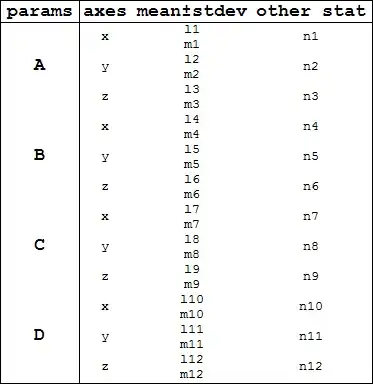
Visualizing the table:

TableForm[mytable] 
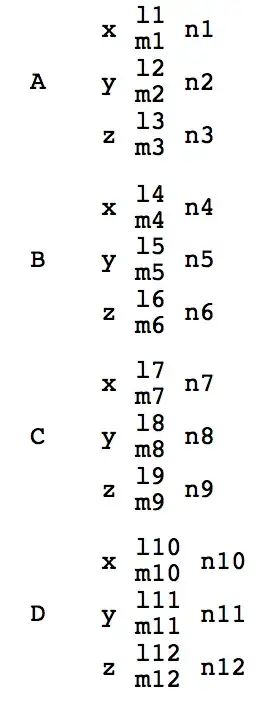
TableForm output

I’ve been banging my head on how to format this table using Grid while maintaining the general structure of the table.

Q1. What is the best way to convert this from TableForm to a Grid.

Q2. Is there a better data structure I could use that would allow me to use TableForm or Grid interchangeably?

Related Question:

Grid - sizing and spacing problems with spanning cells

Pam
  • 1,867
  • 11
  • 24

2 Answers2

4

This is not the shortest one but I like to use it when I'm making complicated grid layouts.

Basically it is about creating empty grid and fill it with the content you want step by step.

m = ConstantArray["", {12, 4}];
m[[2 ;; ;; 3, 1]] = params; 
m[[;; , 2]] = Join @@ ConstantArray[axes, 4];
m[[;; , 3]] = Column /@ Transpose[{mean, stdev}];
m[[;; , 4]] = stat;
m = Join[{labels}, m];


Grid[m, Dividers -> {Thread[{1, 2, -1} -> 1], Thread[{1, 2, -1} -> 1]},
        ItemStyle -> {{Directive[Bold, 18]}, {Directive[Bold, 18]}}]

enter image description here

Kuba
  • 136,707
  • 13
  • 279
  • 740
  • thanks. This is a good starting point. Any hints on best practice for formatting the above grid? Say drawing grid lines, applying formatting to labels and aligning various columns and numbers? – Pam Mar 03 '14 at 23:36
  • @Pam I've made an edit. Also take a look at related – Kuba Mar 04 '14 at 00:03
  • Thanks for the help. I appreciate it. I have a couple more questions. Specifically dealing with very long text and formatting column sizes. For instance, if I change params to params = {"Some Very Very Very Long Text", "B", "C", "D”}; and have to size the columns by adding ItemSize -> {{18, 5, 10, 5}, {}} it seems to produce some strange behavior in the columns. Specifically the spacing between x,y and z changes… how do I get around this? – Pam Mar 04 '14 at 15:47
4

The following method is not fast, but very flexible if you have complicated nested Grid :

mytable //
   ReplacePart[#, x : {_, _, _, 2} :> Column[ Extract[#, x], Dividers -> None]] & //
   ReplacePart[#, x : {_, 2} :> Grid[ Extract[#, x], Dividers -> None]] & // 
 Grid [#, Dividers -> None, ItemSize -> {{0, 7}, 7}] & 

enter image description here

andre314
  • 18,474
  • 1
  • 36
  • 69