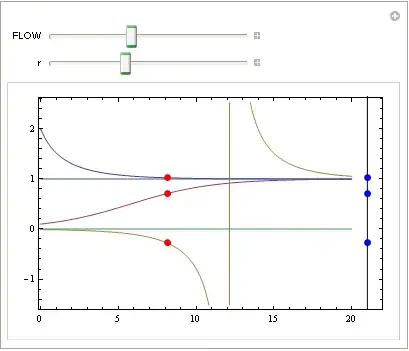
The following code displays three solutions to the logistic ODE with an animated points that follow the solutions.. My goal is to project the solutions on to a vertical phase line. I need to be able to create a phase line of exactly length as the x-axis and have the projected solutions move appropriately. As you can see my projections do not lie on a fixed length copy of the x-axis. Additionally, I want to plot fixed points at x=0 and x=1 and be able to set any color I want to the fixed and moving points. The phase line needs to be closer to the tx-plot as well.
Finally, I'd like to be able vary the parameter r and the initial value x0 in the solution formula (see Initialization code)
Please help relieve my frustration.
Manipulate[

 y1[t_] = y[t, 0.2, 2];
 y2[t_] = y[t, 0.2, 0.1];
 y3[t_] = y[t, 0.2, -0.01];

 If[s == 20, s = 0];

 GraphicsRow[{
   Plot[{y1[t], y2[t], y3[t], 0, 1}, {t, 0, 20},
    ImageSize -> {600, 400}, PlotRange -> {{0, 20}, {-1, 2}},
    PlotStyle -> {{Thick, Black}, {Thick, Black}, {Thick,
       Black}, {Thick, Black, Dashed}, {Thick, Black, Dashed}},
    BaseStyle -> {FontSize -> 16}, Frame -> True, Axes -> False,
    FrameLabel -> {t, x}, RotateLabel -> False, AspectRatio -> 0.75,
    PlotRangePadding -> 0.1,
    Epilog -> {PointSize[0.02], Red,
      Point[{{s, y1[s]}, {s, y2[s]}, {s, y3[s]} }]}],

   Graphics[{PointSize[0.02], Red,
     Point[{{0, y1[s]}, {0, y2[s]}, {0, y3[s]} }]}]}
  ],

 {{s, 0, "FLOW"}, 0, 20, .01, ControlType -> Trigger,
  AnimationRate -> 3,
  AppearanceElements -> {"StepLeftButton", "StepRightButton",
    "PlayPauseButton", "ResetButton", "FasterSlowerButtons"}},

 FrameLabel ->
  Style["One dimensional flow associated with logistic equation", 16,
   FontFamily -> "Helv"],

 Initialization -> (y[t_, r_, x0_] := 1/(1 + (1/x0 - 1) Exp[-r t]))
 ]