5

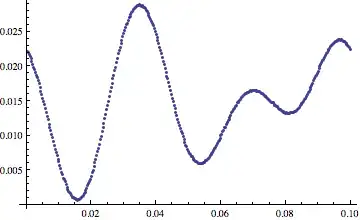
I've got some image data that I've binarized. The image contains two curves, from which I'd like to compute the distance between (eventually computing an average radius for each point in the picture). I've done the computation, but it's done in C programmer style, and fairly ugly

data = ImageData[ b ] ;
{h, w} = Dimensions[data] ;

min = Table[0, {w}] ;
max = Table[0, {w}] ;
averageRadiusList = {} ;
scale = 0.1 / w  ;

For [ column = 1, column < w + 1, column++,
 For [ row = 1, row < h/2, row++,
   If [
    data[[row, column]] != 1,
       min[[column]] =  row ; Break
    ]
   ]
  For [ row = h, row > h/2, row--,
   If [
    data[[row, column]] != 1,
      max[[column]] =  row ; Break
    ]
   ]
  If [ min[[column]] !=  0  && max[[column]] != 0,

   AppendTo[
    averageRadiusList, {column * scale,
     scale * (max[[column]] - min[[column]])/2} ]
   ]
 ]

I was wondering if there's a more natural "Mathematica way" of doing things ... something that is presumably more elegant, efficient, compact, and more general?

Peeter Joot
  • 6,398
  • 4
  • 36
  • 55
  • 1
    Can use "fast marching" to move from one curve equidistantly outward, stopping when you hit the other. Code for this sort of thing can be found at

    http://blog.wolfram.com/data/uploads/2010/12/NavigatingtheBlenheimMaze.nb

    That notebook is explained, to an extent, in the corresponding company blog from a while back.

    http://blog.wolfram.com/2010/12/07/navigating-the-blenheim-maze/

    – Daniel Lichtblau Apr 18 '12 at 23:34
  • Or can use Nearest on the first set of pixels to create a NearestFunction object. Then iterate over the second set using that NearestFunction, taking the closest in set 1 to each pixel in set 2. Finally take the pair that gives the min distance. – Daniel Lichtblau Apr 18 '12 at 23:37
  • For speed, it looks like this code would benefit from compiling. Instead of AppendTo you could use a Bag. –  Apr 19 '12 at 07:41
  • I don't find Bag in the help? – Peeter Joot Apr 19 '12 at 08:32
  • 2
    @PeeterJoot Internal`Bag is an undocumented function. You can find some information plus links to other sources in this question – Heike Apr 19 '12 at 09:38
  • Did you check the [question]: http://mathematica.stackexchange.com/questions/1524 which explains some data obtained from a picture with nice mathematica functions. – s.s.o Apr 18 '12 at 23:33
  • I was able to follow and replicate the steps up to producing the table of colour disks, but couldn't get the Image@Replace step to work for me. In that step there's more fancy syntax that I don't understand than I do. I guess what I'm really looking for is a way to extract just the locations of the 0 pixels without using a set of nested For[] loops. – Peeter Joot Apr 19 '12 at 00:57
  • Here is what that syntax means. {col[[3]] -> 1, _ :> 0} suggests we take the color value stored in part 3 of col and replace any instance of that with the number 1. Anything else gets replaced with zero. The rule delayed :> is used because we don't know ahead of time what other things might need replaced. We've manually binarized the image. Replace is done at level 2 only, hence the {2}. This means we will replace the elements in the image data matrix. If I had used {1} it would have operated on the rows and replaced them with 0 since none of the rows match col[[3]]. – Andy Ross Apr 19 '12 at 05:26
  • I think I was also confused about the Image@ part. Looking at @ in the help it appears you are using two different forms of function call syntax in this statement, one function passing params with [] and the other passing with @? Is there a reason for mixing syntax here? – Peeter Joot Apr 19 '12 at 08:31
  • Since you have enough rep to comment, you should make such remarks as comments :) – rm -rf Apr 19 '12 at 08:58

1 Answers1

6

Lets start with an example image

img = Binarize@
  Image[Plot[{Sin[2 x], 2 + Cos[3 x]}, {x, 0, 2 Pi}, Axes -> False, 
    PlotStyle -> Black, Background -> White, ImagePadding -> None, 
    PlotRangePadding -> {None, .1}]]

example image

To find the distance between the two curves you could do something like

data = ImageData[img];
w = Dimensions[data][[2]];
scale = .1/w;

averageRadiusList = Reap[Sow @@@ Position[data, 0], Range[w],
    {scale #1, scale (Max[#2] - Min[#2])/2} &][[2, All, 1]];

ListPlot[averageRadiusList]

radius

What this code does is to find the indices of all black points in img. The combination of Sow and Reap will effectively group these coordinates by their column index and for each group return {scale c, scale (Max[rows]-Min[rows])/2} where c is the column index, and rows is a list of row indices of all black points in the plot that have column index c.

Peeter Joot
  • 6,398
  • 4
  • 36
  • 55
Heike
  • 35,858
  • 3
  • 108
  • 157