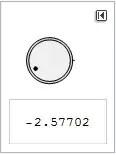
I'm trying to make a control item in a Manipulate that is a simple dial. I'm trying to mimic Manipulate[theta, {theta, 0, 360}], but with a dial instead of a Slider.
I've sort of done this (see code below), but my variable pt doesn't reset to its original value when I hit the ResetButton. Any help would be appreciated.
DynamicModule[
 {pt = {0.5, 0.5}},
 Manipulate[
  ArcTan @@ pt,
  DynamicModule[
   {},
   LocatorPane[
    Dynamic[pt],
    Graphics[
     {
      Line[{{1.1, 0}, {0, 0}}],
      EdgeForm[Thin],
      {LightGray, Disk[]},
      {Lighter@Lighter@LightGray, Disk[{0, 0}, 0.9]},
      Dynamic[Disk[0.7 Normalize[pt], 0.08]]
      },
     PlotRange -> 1.3,
     ImageSize -> 60],
    Appearance -> None
    ]
   ],
  AppearanceElements -> "ResetButton"
  ]
 ]


AngularGaugesuffice as the control? If so, that would save a lot of coding. – murray Mar 25 '14 at 22:35