38

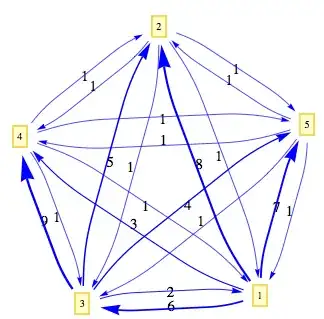
My heart soared to discover that Mathematica 8 offers support for specifying a weighted adjacency matrix in WeightedAdjacencyGraph. But it seems that, regardless of the weights between edges, the plotted layouts of the graphs are the same.

For instance, the graphs produced here are the same:

adjMat1 = {{Infinity, 1, 1, 1, 1},
{1, Infinity, 1, 1, 1},
{1, 1, Infinity, 1, 1},
{1, 1, 1, Infinity, 1},
{1, 1, 1, 1, Infinity}};

adjMat2 = {{Infinity, 8, 6, 3, 7},
{1, Infinity, 1, 1, 1},
{2, 5, Infinity, 9, 4},
{1, 1, 1, Infinity, 1},
{1, 1, 1, 1, Infinity}};

WeightedAdjacencyGraph[adjMat1, DirectedEdges -> True]
WeightedAdjacencyGraph[adjMat2, DirectedEdges -> True]

I've tried specifying different layouts, but can't get them to display differently. Is there any way to get graphs with different edge weights but the same connectivity to render with the edge weights interpreted as distance between the nodes?

shanusmagnus
  • 1,159
  • 10
  • 11

5 Answers5

14

Here's a way to represent the weights of the edges, first using GraphPlotand then Graph.

First, let's grab the edge weights from PlatoManiac's code and format them suitably for GraphPlot. (We'll use the unrasterized values.):

gr = WeightedAdjacencyGraph[adjMat2, DirectedEdges -> True];
weight = AbsoluteOptions[gr, EdgeWeight][[1, 2]];
edge = EdgeList@gr;
k = Graph[edge, EdgeLabels -> (el=MapThread[#1 -> #2 &, {edge, weight}])];
g = (AbsoluteOptions[k, 
  EdgeLabels] /. {(a_ \[DirectedEdge] b_ -> c_) :>  {a -> b, 
    c}})[[1, 2]];

GraphPlot

Now, making use of a technique illustrated here, let's make the thickness of the edges reflect the weights:

GraphPlot[g, 
   EdgeRenderingFunction -> ({Text[Style[#3, 15], Mean[#1]], Blue, 
   AbsoluteThickness[0.5 + #3/5], Arrowheads[0.02 + #3/170], 
   Arrow[#1, 0.075]} &), VertexLabeling -> True]

weighted graph


Graph

{e, w} = Transpose[g]
Graph[e, EdgeWeight -> w, 
EdgeLabelStyle -> Directive[Red, 20, Background -> White], 
EdgeLabels -> el , 
EdgeShapeFunction -> 
   el /. {((a_ \[DirectedEdge] b_) ->  c_) -> ((a \[DirectedEdge] 
    b) -> ({AbsoluteThickness[.9 + c/4], Arrow[#1, 0.025]} &))}]

graph 2

DavidC
  • 16,724
  • 1
  • 42
  • 94
13

Update: Since version 9, weighted layouts are available. See this answer.


The short answer is, unfortunately no, in version 8.0.* at least, the built-in layout algorithms do not take edge weight into account. Consider a version of your example:

Unweighted

adjMat1 = {{Infinity, 1, 1, 1, 1}, {1, Infinity, 1, 1, 1}, {1, 1, 
    Infinity, 1, 1}, {1, 1, 1, Infinity, 1}, {1, 1, 1, 1, Infinity}};

Weighted

adjMat2 = {{Infinity, 8, 6, 3, 7}, {1, Infinity, 1, 1, 1}, {2, 5, 
    Infinity, 9, 4}, {1, 1, 1, Infinity, 1}, {1, 1, 1, 1, Infinity}};

Weighted adjacency matrix converted to multiedge rule form

multiedge = DeleteCases[ Flatten@Table[
    If[i == j, Null, Table[i -> j, {adjMat2[[i, j]]}]], {i, 
     Length[adjMat2]}, {j, Length@First@adjMat2}], Null]

(* Output:   {1 -> 2, 1 -> 2, 1 -> 2, 1 -> 2, 1 -> 2, 1 -> 2, 1 -> 2, 1 -> 2, 
 1 -> 3, 1 -> 3, 1 -> 3, 1 -> 3, 1 -> 3, 1 -> 3, 1 -> 4, 1 -> 4, 
 1 -> 4, 1 -> 5, 1 -> 5, 1 -> 5, 1 -> 5, 1 -> 5, 1 -> 5, 1 -> 5, 
 2 -> 1, 2 -> 3, 2 -> 4, 2 -> 5, 3 -> 1, 3 -> 1, 3 -> 2, 3 -> 2, 
 3 -> 2, 3 -> 2, 3 -> 2, 3 -> 4, 3 -> 4, 3 -> 4, 3 -> 4, 3 -> 4, 
 3 -> 4, 3 -> 4, 3 -> 4, 3 -> 4, 3 -> 5, 3 -> 5, 3 -> 5, 3 -> 5, 
 4 -> 1, 4 -> 2, 4 -> 3, 4 -> 5, 5 -> 1, 5 -> 2, 5 -> 3, 5 -> 4} *)

This shows that any of the three plotting methods give essentially the same layout for the same layout (Method/GraphLayout) option.

Manipulate[
 Row[{GraphPlot[multiedge, MultiedgeStyle -> None, Method -> s], 
   GraphPlot[adjMat1, MultiedgeStyle -> None, Method -> s], 
   AdjacencyGraph[adjMat1 /. \[Infinity] -> 0, 
    GraphLayout -> s]}], {s, {"SpringElectricalEmbedding", 
   "SpringEmbedding", "HighDimensionalEmbedding", "CircularEmbedding",
    "RandomEmbedding", "LinearEmbedding"}}]
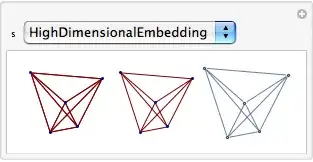
enter image description here

If you were to come up with your own algorithm for allowing for the weights, you could draw graphs using that algorithm using the VertexCoordinateRules option.

There is a Weighted option in the GraphUtilities package, but it doesn't apply to visualisation.

Szabolcs
  • 234,956
  • 30
  • 623
  • 1,263
Verbeia
  • 34,233
  • 9
  • 109
  • 224
11

Here is what you can do

Options[VisualizeNetwork] = Options[Graph];
VisualizeNetwork[{adjMat2_, edgecoloring_: {Green, Red}, 
scaling_: 600, opacity_: 0.5, ShowEdgeWeight_: True}, 
opts : OptionsPattern[]] :=
Block[{gr, weight, Nweight, edge, nodes, vertexStyle, EdgeBlendColor,edgeStyle, g},
gr = WeightedAdjacencyGraph[adjMat2, DirectedEdges -> True];
(*Lets extract the edge weight list from your graph object*)
weight = AbsoluteOptions[gr, EdgeWeight][[1, 2]];
(*Extract the edge list*)
edge = EdgeList@gr;
(*Extract the vertex list*)
nodes = VertexList@gr;
(* Make a color blend by scaling all the edge weight with the maximum edge weight *)
EdgeBlendColor = Map[ Blend[edgecoloring, #/Max[weight]] &, weight];
(* Make a thickness by scaling all the edge weight with the maximum edge weight *)
edgeStyle = 
MapThread[(#1 -> {Opacity[opacity], #3, 
     Thickness[#2/scaling]}) &, {edge, weight, EdgeBlendColor}];
Nweight = MapThread[
 Rasterize[#1, ImageSize -> 9, 
   Background -> Lighter@#2] &, {weight, EdgeBlendColor}];
 g = If[ShowEdgeWeight == True,
 Graph[nodes, edge, EdgeStyle -> edgeStyle, 
  EdgeLabels -> Flatten@MapThread[#1 -> #2 &, {edge, Nweight}], 
  VertexLabels -> 
   Table[i -> Placed["Name", {1/2, 1/2}], {i, nodes}], opts], 
 Graph[nodes, edge, EdgeStyle -> edgeStyle, 
  VertexLabels -> 
   Table[i -> Placed["Name", {1/2, 1/2}], {i, nodes}], opts]
 ];
g
];

You can call the function with all options available to Graph object and it returns a Mathematica 8.0 Graph object.Hence you don't need to call GraphPlot to tweak the visualization the default Graph object comes with this lay out where edge weight is evidently visible.

Given a weighted adjacency matrix it gives you the graph where you now see the edge weight in the lay out. We use color blend for edge color and control the edge thickness by scaling the all the edge weights by their maximum. There is also a True or False choice to show the edge weights explicitly or not.

adjMat1 = {{Infinity, 1, 1, 1, 1}, {1, Infinity, 1, 1, 1}, {1, 1, 
Infinity, 1, 1}, {1, 1, 1, Infinity, 1}, {1, 1, 1, 1, Infinity}};
adjMat2 = {{Infinity, 8, 6, 3, 7}, {1, Infinity, 1, 1, 1},
{2, 5,Infinity, 9, 4}, {1, 1, 1, Infinity, 1}, {1, 1, 1, 1, Infinity}};
(* Some Graph visualization option *)
opts = {VertexSize -> Medium, VertexSize -> Medium,
VertexStyle ->Directive[Opacity[0.65`], Blue, EdgeForm[None]], 
VertexLabelStyle -> Directive[GrayLevel[0], 12], 
VertexSize -> {"Scaled", 0.3`}, 
GraphLayout -> "SpringElectricalEmbedding"};
(* Call the function *)
GraphicsGrid@{{VisualizeNetwork[{adjMat1, {Yellow, Red}, 600, 0.5, 
 True}, opts], 
VisualizeNetwork[{adjMat2, {Yellow, Red}, 600, 0.5, True}, opts]}}

enter image description here

PlatoManiac
  • 14,723
  • 2
  • 42
  • 74
  • 3
    This doesn't really answer the question. The OP would like the layout of the graph to reflect the weight of the connection, i.e. for distances between nodes to be shorter, the higher the weight. I'm also interested in the answer. – Verbeia Apr 20 '12 at 02:52
  • 1
    @Verbeia sorry for being inattentive while reading the actual question. I updated the solution. – PlatoManiac Apr 20 '12 at 14:15
  • 1
    Thank you for taking the time to come up with this workaround. – shanusmagnus Apr 20 '12 at 16:34
11

Some of the built-in layout algorithms can take weights into account since Mathematica version 9.

Graph[{1 <-> 2, 2 <-> 3}, EdgeWeight -> {1, 2}, 
 VertexLabels -> "Name", 
 GraphLayout -> {"SpringElectricalEmbedding", "EdgeWeighted" -> True}]

Mathematica graphics

It also works for "SpringEmbedding". Sub-options for graph layouts, such as "EdgeWeighted", are documented in the Scope section of the GraphLayout page.

With both layouts, a higher weight causes the vertices to be drawing further apart.


Alternatively, the IGraph/M package has a few layout algorithms that take weights into account.

<< IGraphM`
g = Graph[{1 <-> 2, 2 <-> 3}, EdgeWeight -> {1, 2}, VertexLabels -> "Name"];
IGLayoutFruchtermanReingold[g]

Mathematica graphics

Notice that with this layout, a higher weight causes the vertices to be drawn closer together.

Szabolcs
  • 234,956
  • 30
  • 623
  • 1,263
5

Further to Szabolcs's post, EdgeWeight with SpringElectricalEmbedding works the opposite way to what you might expect. A weight of 2 results in an edge that is twice as long as for a weight of 1. In other words, the higher the weight, the weaker the spring and the more separation between the nodes. If you want a higher value to represent a stronger, shorter edge, you need to invert it, i.e. EdgeWeight -> 1/strength.

Parsifal
  • 136
  • 2
  • 2