0

What is the best way to get data from Matlab to Mathematica?

For a new project I want to copy/paste a table (or part of it) of datas from Matlab to Mathematica.

Copyed from Matlab it is:

0   0
1,00000000000000e-20    0,100000000000000
1,78810000000000e-09    0,300000000000000
2,94930000000000e-09    0,500000000000000
4,37810000000000e-09    0,700000000000000
5,58330000000000e-09    0,900000000000000
5,60570000000000e-09    1

In Mathematica I get the following:

0 0
1, 00000000000000 e - 20 0, 100000000000000
1, 78810000000000 e - 09 0, 300000000000000
2, 94930000000000 e - 09 0, 500000000000000
4, 37810000000000 e - 09 0, 700000000000000
5, 58330000000000 e - 09 0, 900000000000000
5, 60570000000000 e - 09 1

(In my Mathematica, there are little "x"s between the exponents and the zeros, I guess it is the columns seperator.)

So now I have to replace the "," by "." and the "e-" by "*10^-" and so on ... I could, but I don't want to do it manualy, but till now I had no success with any Mma functions. Or is there a better way to do things like this?

... in the end it should look like this:

 {{0, 0},
 {1.00000000000000*10^-20, 0.100000000000000},
 {1.78810000000000*10^-09, 0.300000000000000},
 {2.94930000000000*10^-09, 0.500000000000000},
 {4.37810000000000*10^-09, 0.700000000000000},
 {5.58330000000000*10^-09, 0.900000000000000},
 {5.60570000000000*10^-09, 1}}
Phab
  • 1,623
  • 9
  • 15
  • Related/duplicate: http://mathematica.stackexchange.com/q/10231/5 – rm -rf Apr 04 '14 at 06:56
  • @rm-rf Can't use MATLink, because it opens another instance of Matlab, so I can't access the workspace with variables I need to. – Phab Apr 04 '14 at 07:10
  • Why not use a .dat or similar file together with Import? – Yves Klett Apr 04 '14 at 07:20
  • @Phab What's your operating system? – rm -rf Apr 04 '14 at 07:25
  • Closely related for file import: http://mathematica.stackexchange.com/q/14329/131 – Yves Klett Apr 04 '14 at 07:29
  • @rm-rf I'm working with Win7. – Phab Apr 04 '14 at 07:41
  • @YvesKlett I get an error using Import .mat (Didn't know I can save .dat files!?) files. The data is created by Simulink. Interessting fact is: If I load the generated .mat file and save it from workspace again, Import with Mma works. But it's way to much manual effort. – Phab Apr 04 '14 at 07:44
  • 1
    @Phab Ok, then please write to matlink.m@gmail.com or support@matlink.org for a possible solution. – rm -rf Apr 04 '14 at 07:53

1 Answers1

3

Paste into "" and try this:

str = "0   0
  1,00000000000000e-20    0,100000000000000
  1,78810000000000e-09    0,300000000000000
  2,94930000000000e-09    0,500000000000000
  4,37810000000000e-09    0,700000000000000
  5,58330000000000e-09    0,900000000000000
  5,60570000000000e-09    1";

imp[s_String] := ImportString[s, "Table", "NumberPoint" -> ","]

imp[str]
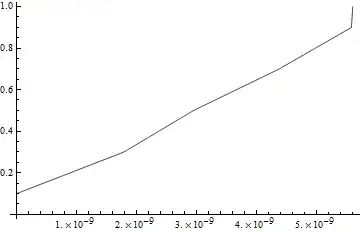
% // ListLinePlot

{{0, 0}, {1.*10^-20, 0.1}, {1.7881*10^-9, 0.3}, {2.9493*10^-9, 0.5}, {4.3781*10^-9, 0.7}, {5.5833*10^-9, 0.9}, {5.6057*10^-9, 1}}

Mathematica graphics

If you want all reals, just add N

imp[s_String] := ImportString[s, "Table", "NumberPoint" -> ","]//N

imp[str]

{{0., 0.}, {1.*10^-20, 0.1}, {1.7881*10^-9, 0.3}, {2.9493*10^-9, 0.5}, {4.3781*10^-9, 0.7}, {5.5833*10^-9, 0.9}, {5.6057*10^-9, 1.}}

Yves Klett
  • 15,383
  • 5
  • 57
  • 124
  • Simple solution for copy/paste! That's what I need for the moment. I'll keep trying to find a nicer solution for importing my data with MATLink or Import. – Phab Apr 04 '14 at 08:24
  • Excellent. Perhaps better answers are on the way - it should be doable to write a menu entry to "paste as mat from clipboard" or similar, but no time right now. – Yves Klett Apr 04 '14 at 08:25
  • Just one little problem: when importing, all numbers are reals, with your string method the zeros and ones (in the example) are integers. ... later I'm doing a replacement with data=data/.{a_Real, b_Real}:>{b, a} ... so you see the problem: it does not switch the integers. – Phab Apr 04 '14 at 08:47
  • SOLVED THE PROBLEM: dont use the heads: data=data/.{a_, b_}:>{b, a} works fine! – Phab Apr 04 '14 at 08:55
  • 1
    @Phab see my edit, all you need is N ;-) Oh, and you could use Reverse to efficiently reverse, e.g. try Reverse[{{a, b}, {c, d}}, 2]. Your replacement-based solution can be dangerous, e.g. for 2x2 matrices... – Yves Klett Apr 04 '14 at 08:56