7

I am trying to output a simple plot with a legend and the output keeps coming out with a gray background. A simple example is the following:

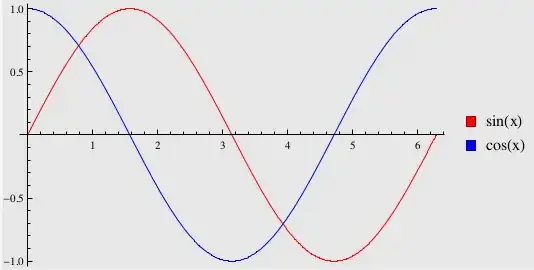
Plot[{Sin[x], Cos[x]}, {x, 0, 2*3.14}, PlotStyle -> {Red, Blue}, 
PlotLegends -> SwatchLegend[{Red, Blue}, {"sin(x)", "cos(x)"}]]
Export["trig.pdf", %]

which outputs (notice the gray background!),

$\hspace{1cm}$enter image description here
I have tried setting "Background->White" in different places, but only managed to have certain regions to get a white background. How can I get an export the image with a white background (and keeping it in pdf format)?

I am using Mathematica V9 on Linux.

Edit:

  1. I just upgraded to V10 with hopes that it would fix the issue and the problem still persists.
  2. pdf and eps both show the gray background while image formats such as jpg don't. Oddly enough svg also doesn't show the gray background.
  3. I'm using Ubuntu 14.04 with Intel 4th generation graphics card.
  4. I tried using different pdf viewers and they all showed the same gray background.
JeffDror
  • 1,880
  • 1
  • 13
  • 29
  • Doesn't happen with M9.0.1 on OSX – halirutan Apr 04 '14 at 13:46
  • 1
    I cannot reproduce this with M9.0.1 on Linux. Are you using a non-default style sheet in your notebook? – Szabolcs Apr 04 '14 at 14:02
  • I sometimes have problems with pdf exports. Not the same. Have you tried exporting it to another format and get the same problem? – Mockup Dungeon Apr 04 '14 at 14:39
  • @Szabolcs: I was using a non-default stylesheet but I just checked with the default one and it still didn't work. – JeffDror Apr 04 '14 at 15:27
  • @MockupDungeon: I just tried other formats and they all seem to be working well (no gray background) except for eps which also shows the gray background. I thought maybe its something because a pdf output is actually empty while other formats paint empty sections white? – JeffDror Apr 04 '14 at 15:34
  • @JeffDror Do figure that out, try a different PDF viewer. Yes, the background of the PDF should be transparent, but I have never seen a viewer which shows gray there, so I find it unlikely. – Szabolcs Apr 04 '14 at 15:42
  • 2
    FWIW, I have the same problem with MMA 9.0.0 on Win7 64bit. Shows grey in both SumatraPDF and Adobe Reader. I assumed it might be fixed with 9.0.1... – tkott Apr 04 '14 at 16:57
  • @Szabolcs: Just checked. It is independent of pdf viewer, but I thought that maybe Mathematica wasn't dealing with the empty space in the pdf properly (though I don't know much about how it actually works). – JeffDror Apr 04 '14 at 17:24
  • @JeffDror Do you have v9.0.0 or v9.0.1? – Szabolcs Apr 04 '14 at 17:28
  • @Szabolcs: I think its v9.0.0. When I type "$Version" in Mathematica I get, "9.0 for Linux x86 (32-bit) (November 20, 2012)" – JeffDror Apr 04 '14 at 17:38
  • @JeffDror Just use Help -> About, like in any other program ... but yes, that's 9.0.0, based on the date. You should upgrade to 9.0.1. – Szabolcs Apr 04 '14 at 18:57
  • I cannot reproduce it on OS X with 9.0.0.0 though... but sure, might be worth a try. – C. E. Apr 05 '14 at 08:51
  • 1
    @JeffDror If you are around, would you mind joining [chat] to discuss this problem? – halirutan Jul 15 '14 at 02:16
  • @JeffDror Don't forget to award the bounty. – Mr.Wizard Jul 18 '14 at 08:02

2 Answers2

12

After a rather long debugging session in our chat we could determine the reason of the problem and come up with a workaround.

In short, we first tried whether the issue appears for the most basic Graphics[], which it didn't. As it turned out the gray background is introduced by using PlotLegends as in the example above. We went further by comparing AbsoluteOptions of the created graphics and the Options[SwatchLegend] settings. Everything looked the same on the OP's and my machine.

I then kind of remembered (guessed, whatever) that graphics export is done with the printing style sheet and we tried to set Format => Screen Environment to Printout. This was the first success, because this turned the graphics indeed gray.

Now, we knew the reason, but we couldn't find the exact source. Making a complete diff between our Core.nb stylesheet files showed nothing at all. I guess that this setting can be found somewhere else, although the OP stated that this issue persists for over 2 years and has survived even complete operating system changes.

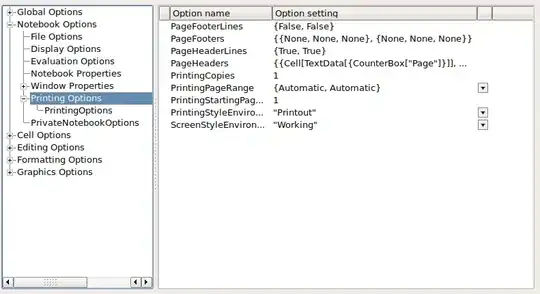
The workaround is as simple as it is intuitive. Open the Preferences and then the Options Inspector and set the PrintingStyleEnvironment to Printout Gray (Is this awesome? It is, isn't it?)

inspector

If this issue would appear on my machine, I would probably take a closer look at my

FileNameJoin[{$InstallationDirectory,"SystemFiles","FrontEnd","StyleSheets"}]

directory and grep through the Default.nb and the other things to find where this is set. I hope the workaround and the information help someone to track this down.

halirutan
  • 112,764
  • 7
  • 263
  • 474
  • I have exactly the same problem, and also only with PlotLegends.. However I don't get your workaround to work, the only three options for PrintingStyleEnvironment are "SlideShow", "Working", and "Printout". None of these three solve the problem, neither does manually typing "Printout Gray". Did I need to install another stylesheet first to get that to work? – freddieknets Dec 04 '17 at 10:58
  • @freddieknets It is really hard to say what is happening on your machine. You don't need to install a style-sheet. The problem should be in your existing one. What exact operating system and Mathematica version are you using? – halirutan Dec 04 '17 at 12:56
  • I am using Mathematica 11.1.0.0 on macOS 10.12.6 – freddieknets Dec 04 '17 at 14:15
  • Unfortunately, I have only 11.1.1.0 on my OSX here. Otherwise, if we had the exact same versions, you could send my your stylesheet directory packed as zip and I would try to make a complete diff of the files. Do you have the possibility to update to 11.2 or 11.1.1? – halirutan Dec 04 '17 at 14:29
  • Unfortunately I don't have premier service, so no (unless I am misunderstanding conditions to upgrade). – freddieknets Dec 05 '17 at 19:27
4

I recently encountered this problem, and none of the above solutions solved my problems (on version 10.3.1.0). However, I have found a solution which worked for me and should be independant of version.

On my version, the problem specifically occurred when using the Report stylesheet, but vanished with the Default one. The trick was to make a custom stylesheet that includes all of the style definitions from Report except the offending Graphics cell definition.

To achieve this practically, I switched to the Default stylesheet on the target notebook, opened a new mathematica notebook with a Report stylesheet , went to Format > Edit stylesheet on both and clicked Report/StandardReport.nb on the latter to load the Report's default cell definitions. Then I copied all the Report's cell definitions over to the Private Style Definitions for XXX.nb notebook and then went in and removed the offending local definition for graphics in Styles for Input and Output Cells as well as changing the background color for Output to white (select the cell then Format > Background Color > White).

Graphics now have a white background for both the image and text labels (an issue raised in another StackMMA question).

This new stylesheet can then be saved Default by following these instructions.

SLesslyTall
  • 333
  • 1
  • 8
  • I think this is the problem in my case as well. I was using StandardReport and any plot with legends came out with a gray background. I switched to Default and everything was fine. I'll try your fix, thanks. – amzon-ex Sep 26 '22 at 12:46