4

I have been attempting several methods to plot a 3D diagram of a n by n boolean array in Mathematica but none of them produced satisfactory result. I want the $3D$ plot to have a cube when M[i,j,k] == 1 and when M[i,j,k] == 0 just leaves as blank. Below is the best result I got.

L=10
M = RandomReal[{0, 1}, {L, L, L}];
For[k = 1, k <= L, k++,
  For[j = 1, j <= L, j++,
   For[i = 1, i <= L, i++,
    If[M[[i, j, k]] < 0.5,
     M[[i, j, k]] = 1,
     M[[i, j, k]] = 0
     ]]]];
Image3D[M, ImageSize -> 500, Boxed -> True]

enter image description here

The Image3D function gives a very fluffy and opaque look on the cubes which I couldn't change!!

Is there someway I can change the opacity and color of the Image3D function in this case? Or is there a better way to plot this matrix?

VividD
  • 3,660
  • 4
  • 26
  • 42

2 Answers2

6
L = 10;

First of all you could get Booolian array simply as (thx. to @Kuba)

RandomInteger[1,{L,L,L}]

But if you are interested in thresholding:

M = RandomReal[{0, 1}, {L, L, L}];

First of all do not binarize procedurally, use functional style, say:

bM = M /. x_ -> UnitStep[x - .5];

or image processing:

bM = ImageData[Binarize[Image3D[bM], .5]];

Then if you don't like Image3D - which I think is totally fine, use Graphics3D:

Table[Graphics3D[{Hue[RandomReal[]], {Opacity[k], Cuboid[#]} & /@ 
    Position[bM, 1]}], {k, .01, 1, .19}]

enter image description here

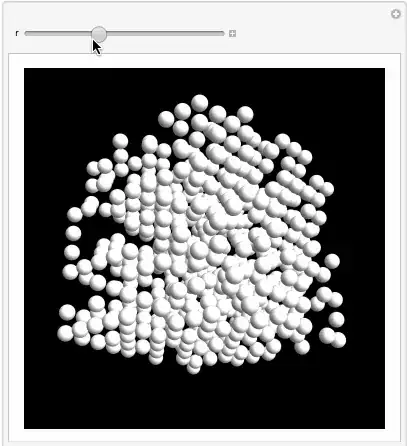
Manipulate[
 Graphics3D[Sphere[#, r] & /@ Position[bM, 1], 
  ViewVertical -> {-1, 0, 0}, Boxed -> False, Lighting -> "Neutral", 
  Background -> Black, SphericalRegion -> True]
 , {r, .03, 1}]

enter image description here

Vitaliy Kaurov
  • 73,078
  • 9
  • 204
  • 355
2

enter image description here

L = 10;
ArrayPlot3D[
 RandomChoice[{0.5, 0.5} -> {0, 1}, {L, L, L}]
 , OpacityFunction -> (0.5 # &)
 , Mesh -> False
 , DataReversed -> {False, True, False}
 , ColorRules -> {1 -> Nest[Lighter, Green, 4]}
 , Boxed -> True
 , Axes -> True
 ]

enter image description here

Syed
  • 52,495
  • 4
  • 30
  • 85