I went to a Wolfram Technologies workshop a few weeks ago and the presenter showed us a keyboard shortcut that when a block of input is selected, the shortcut puts the block of selected input in (* comment *) brackets. I've forgotten what the shortcut is though. Does anyone know what it is?
Asked
Active
Viewed 2.5k times
22

Aron
- 1,722
- 1
- 12
- 30
1 Answers
26
The short-cut keys for various actions can usually be found directly in the menu. Here on OS X you see the ⌘+/ at the right side under Un/Comment Selection:
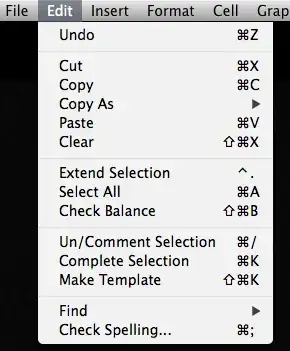
As pointed out in the comments for various systems the short-cuts to comment a selection are
Mac OS X
- ⌘+/
Windows
- Alt+/
- Right click + u which uses the context menu short-cut
Linux
- Alt+/
- Alt+Shift+7 on a German keyboard

Mateusz Piotrowski
- 147
- 8

halirutan
- 112,764
- 7
- 263
- 474
-
3Unfortunately on a german keyboard it's impossible to get [Alt]+[/]. It behaves like [Alt]+[7] and you'll change the style to "Text". But somewhere on SE there is a solution for mapping the commands to other keys. – Phab Oct 23 '14 at 09:17
-
@Phab: can you tell where on SE I can find this? – riddleculous Feb 24 '17 at 11:09
-
@riddleculous Have a look at these SE topics: Link1, Link2 and Link3. With this information I changed a lot of my shortcuts. – Phab Feb 28 '17 at 07:03
-
1@Phab: Why not simply use [Alt]+[Shift]+[/]. For me it works even with the German keyboard layout. – NeverMind Feb 08 '18 at 12:14
-
@DisplayName Didn't work back in 2014 ;) – Phab Mar 16 '18 at 09:27