I have a problem with a must-be simple streamplot. The potential function governing the motion is U, and I have the following code in Mathematica:
U = -((1000.` x (1.25` - 1.` Sqrt[1 + 625.` x^2]))/Sqrt[1 + 625.` x^2])
StreamPlot[{Φ, -U}, {x, -0.05, 0.05}, {Φ, -1.5, 1.5}, StreamPoints -> Fine]
The problem is that I get the following plot:
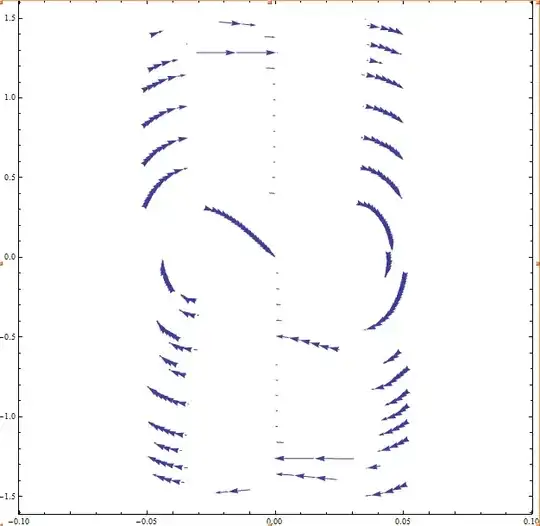
What did I do wrong, or how should I overcome this horror?
EDIT
The result should look like the following phase plane plot created by MatLab:

The MatLab code snippet:
f=@(Y) [Y(2); -1/2*Y(1)*(1000-1250/sqrt(1+625*Y(1)^2))];
y1=linspace(-0.06,0.06,20);
y2=linspace(-0.5,0.5,20);
[x,y]=meshgrid(y1,y2);

u=zeros(size(x));
v=zeros(size(y));

for i=1:numel(x)
    Yprime=f([x(i); y(i)]);
    u(i)=Yprime(1);
    v(i)=Yprime(2);
end

quiver(x,y,u,v,'r');
figure(gcf)
xlabel('x')
ylabel('xdot')
axis([-0.08 0.08 -0.6 0.6])
I used the same equation here, unfortunately due to the aspect ratio the arrows are a bit distorted.
I would like the Mathematica plot to have arrows 'all over the place' as in MatLab, so somehow the seeding should be altered. I would prefer the streamplot of mathematica rather than the MatLab version, as the StreamPlot shows the arrows along trajectories, whereas MatLab generates only a vectorfield.

a must-be simple streamplot.what does asimplestreamplot mean? do you have an example of what the output is supposed to be from your book to compare? or explain more what is wrong with this. You need more lines? Scale is off? etc... – Nasser Apr 19 '14 at 14:04f=@(t,Y) [Y(2); -1/2*Y(1)*(1000-1250/sqrt(1+625*Y(1)^2))];but where istin the RHS of the function f? Why are you definingfto accept(t,y)whentis not used in the function body? as for the main issue, I think one needs to understand your matlab code more to make sure what you are doing there and in Mathematica are mathematically equivalent. Having the Matlab code there helps. – Nasser Apr 19 '14 at 16:21