7

I feel hesitated to ask this question, but I cannot figure out a way to increase the performance.

enter image description here

The problem is about running this featured example on a computer with both Intel HD GPU and Nvidia GPU. If the computer only has a Nvidia GPU, everything is smooth and fine. However, if both GPUs are installed on the computer, the performance will be very poor due to the transparent rendering and the fact that Mathematica always use the Intel GPU for rendering. Even if I set Nvidia GPU as the default one to use for all programs and explicitly run Mathematica with Nvidia GPU, this example is still run with the Intel GPU...

I wonder if there is a way to fix this? Furthermore, can we explicitly tell Mathematica which GPU it should try to use by using a Style-like statement similar to this answer?

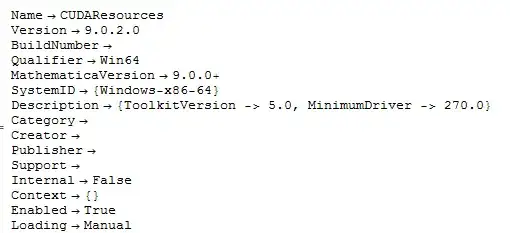
I am running on a windows 7 laptop with following configurations,
enter image description here enter image description here


Edit

I have reported this problem to Wolfram.

saturasl
  • 1,429
  • 7
  • 18
  • Sounds like something of a driver problem - can you switch graphics cards on the OS-level? How can you tell which card is running the show at any given moment? Does switching the power supply change anything performance-wise? – Yves Klett Apr 29 '14 at 04:55
  • @Yves Klett, As to my knowledge, switching on OS-level can be somewhat dangerous, and I think this could be the last thing to try. Actually a possible Style-like statement can be very helpful in general sense. – saturasl Apr 29 '14 at 04:59
  • If you have dual graphics, then there is bound to be some mechanism to switch, and the OS/drivers will have a word in that, and it should not be too risky (unless your setup is really screwed). Can you switch manually? – Yves Klett Apr 29 '14 at 05:04
  • @Yves Klett, No I cannot switch it manually. This is a pitty. – saturasl Apr 29 '14 at 05:08
  • You should post your system type and setup. Even though I do have a dedicated gfx card, my performance also drops badly when just running on battery. Same for you? – Yves Klett Apr 29 '14 at 05:14
  • 2
    I'm noticing the same thing on my system even though I have a dedicated NVIDIA GTX 660Ti, Mathematica does not use it for rendering. This is stupid and there should be a way to fix this. – RunnyKine Apr 29 '14 at 05:24
  • @Yves Klett, Configuration posted. On my machine the performance is always bad no matter using battery or not. – saturasl Apr 29 '14 at 05:31
  • @RunnyKine sounds like a problem for WRI support, then? I just have a GTX485M with current 335 drivers which runs fine (apart from the power-drain, that is). – Yves Klett Apr 29 '14 at 06:10
  • 2
    Have you gone into the Nvidia control panel, under "manage 3d settings", and used the "program settings" to add the mathematica EXEs with the "High performance Nvidia..." as the preferred GPU? Has worked for me with stubborn programs that for whatever reason kept defaulting to CPU GPU... – ciao Apr 29 '14 at 07:41
  • @rasher sounds like answer material. – Yves Klett Apr 29 '14 at 09:50
  • 2
    Addition of mathematica.exe to the list of programs that should use NVidia doesn't change anything. It looks that rendering engine of Mathematica doesn't use 3D-optimized functions but use default basic rendering instruction which are much common and simple for better compatibility. I've tried draw 3D plots at high-power graphics cards but there is not evident changes in performance relatively to built-in Intel card of my laptop.

    So the answer is still hidden..

    – Rom38 Apr 29 '14 at 14:20
  • 1
    @rasher, As Rom38 said, I already did this but it had no effect. The very easy way to see if Nvidia GPU is running is to use the GPU meter, http://addgadgets.com/gpu_meter/ – saturasl Apr 29 '14 at 17:48
  • Doesn't the computer use only one of the GPUs at a time? If so you should look for how to switch it to the NVIDIA GPU and start Mathematica afterwards. I've only used a Windows computer with switchable graphics once for a short time. There was a way to trigger the switch manually. – Szabolcs Apr 29 '14 at 18:36
  • @Szabolcs, That would probably be a computer with AMD GPU, which can be manually switched on/off wth its Dynamic Switchable Graphics technique. There is no way to do this with Nvidia GPU due to the Optimus technique, cause Nvidia and AMD perfer to be different from each other. Sigh... – saturasl Apr 30 '14 at 03:04

0 Answers0