6

I need to stack three objects on top of each other and align the first two to the center and the third one to the left. I've been trying to do this with Column, but it won't let me align the objects differently. The code below should make clear what I'm trying to do:

Column[{Style["Title", FontSize -> 20, "Title"],Graphics@Disk[],Style["Footnote text..."]}, 
  {Center, Center, Left}]

I want the title and the disk to be centered, but the footnotes aligned to the left. Anyone know how to do this?

Öskå
  • 8,587
  • 4
  • 30
  • 49
Mas
  • 177
  • 7

2 Answers2

10

You can use Item to specify and individual alignment:

Column[{
  Style["Title", FontSize -> 20, "Title"],
  Graphics@Disk[],
  Item[Style["Footnote text..."], Alignment -> Left]
  }, 
Alignment -> Center]

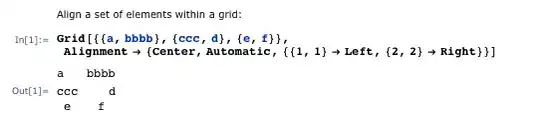
or use the Alignment specification as per @Oska example. Remember that Column is a GridBox so also see Grid docs for a larger number of options examples.

enter image description here

Column[{
  Style["Title", FontSize -> 20, "Title"],
  Graphics@Disk[],
  Style["Footnote text..."]
  },
 Alignment -> {Center, Center, {{-1, 1} -> Left}}]
Mike Honeychurch
  • 37,541
  • 3
  • 85
  • 158
5

You can define a list of the expressions you want in your Column and an other, listAlign, of the placement that you wish:

list = {Style["Title", FontSize -> 20, "Title"], Graphics@Disk[], Style["Footnote text..."]};
listAlign = {Center, Center, Left};
Panel@Column[list, Alignment -> {{}, {}, 
  Rule @@@ Thread[{{#, 1} & /@ Range@Length@list, listAlign}]}]

enter image description here

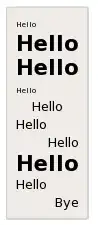
Then, working on a bigger list is much easier:

list = RandomChoice[{Style["Hello", FontSize -> 20, Bold], 
  Style["Hello"], Style["Hello", Tiny]}, 9]~Join~{"Bye"};
listAlign = RandomChoice[{Left, Center, Right}, 10];
Panel@Column[list, 
  Alignment -> {{}, {}, 
    Rule @@@ Thread[{{#, 1} & /@ Range@Length@list, listAlign}]}]

enter image description here

Öskå
  • 8,587
  • 4
  • 30
  • 49