6

If I am using TraditionalForm, how do I make the output larger in size? I don't want to change the general font size of the GUI, just make the output of one expression larger. I tried:

TraditionalForm[x^3 + y^3 == 22 z^3, FontSize -> Large]

but this does not work. FontSize is apparently not allowed as an attribute here.

Tyler Durden
  • 4,090
  • 14
  • 43

3 Answers3

6

Just use Style whenever you want to change the style of something:

TraditionalForm[Style[x^3 + y^3 == 22 z^3, FontSize -> 24]]

enter image description here

Mike Honeychurch
  • 37,541
  • 3
  • 85
  • 158
4

e.g.:

Magnify[TraditionalForm[x^3 + y^3 == 22 z^3], 2]

or

TraditionalForm[Magnify[x^3 + y^3 == 22 z^3, 2]]

Depending on if you want to maintain TF.

ciao
  • 25,774
  • 2
  • 58
  • 139
3

Alternative solution:

Text[TraditionalForm[-1 + x^3 + y^3 == 22 z^3], BaseStyle -> {FontSize -> 24}]

or equivalently

Text[TraditionalForm[-1 + x^3 + y^3 == 22 z^3], BaseStyle -> {24}]

or

Text[TraditionalForm[-1 + x^3 + y^3 == 22 z^3], BaseStyle -> {Large}]

The advantage of this version is that it can be Printed and embedded inside any costructs like Row, Grid etc. without loosing the default appearance. Compare:
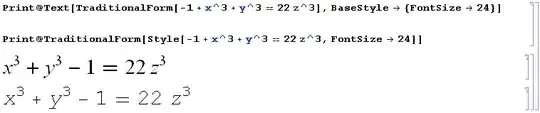
screenshot

Of course one can achieve the same with Style:

Print@TraditionalForm[Style[-1 + x^3 + y^3 == 22 z^3, 24, FontFamily -> "Times"]]

Or even shorter using built-in named styles defined in the Core.nb stylesheet:

Print@TraditionalForm[Style[-1 + x^3 + y^3 == 22 z^3, "Graphics", 24]]
Print@TraditionalForm[Style[-1 + x^3 + y^3 == 22 z^3, "TR", 24]]

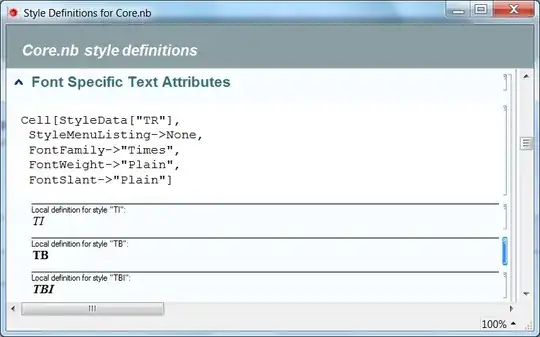
The style "Graphics" is the default style for displaying Graphics (see detailed explanations here) and the "TR" style just sets the base font to be "Times" and "Plain" (i.e. "Times Regular"):
screenshot

Alexey Popkov
  • 61,809
  • 7
  • 149
  • 368
  • "Of course we can achieve the same with Style but the Text - version is shorter:" ...not really. FontFamily->Times is redundant as shown in my answer. The OP wants to change the appearance in his output, i.e. Output cell. You are printing stuff into Print cells which have completely different styling settings to Output cells ...hence your need to specify font family etc. which is unnecessary when rendering "proper" output. – Mike Honeychurch May 08 '14 at 08:36
  • @Mike You misunderstood my statement: it is related to the previous paragraph in my answer where I demonstrate that the default appearance is preserved with Text when it is Printed and/or embedded in other constructs like Row or even List. From the other side, without Text the font is changed when TraditionalForm is Printed. I use Mathematica 8.0.4. – Alexey Popkov May 08 '14 at 08:40
  • If the OP had wanted to know how to preserve font family in various renderings, i.e. override default styles, then that would be relevant. But the question is about font size. – Mike Honeychurch May 08 '14 at 08:53
  • Yes, but why do not post additional way which has its own advantages (not related to the question but potentially useful to know). Your solution gives the standard and straightforward approach, mine is an alternative. – Alexey Popkov May 08 '14 at 09:00
  • I have removed the statement that the Text solution is shorter since I have found even shorter ways to achieve the same with Style (see at the bottom of the answer). – Alexey Popkov May 08 '14 at 09:04
  • In that case you should probably explain to the OP why "TR" and "Graphics" works. I know (short answer: see stylesheet) but new users probably don't. – Mike Honeychurch May 08 '14 at 09:36
  • Added explanations on the use of named styles. – Alexey Popkov May 08 '14 at 10:05