I'm trying to make a iso surface plot from some data using ContourPlot3d. My data is a 3 dimension data with form like {{x,y,f[x,y]},...}. I first make this data into 4d by rotating it along the x axis, so that {x,y,f[x,y]} becomes {x,y,z,f[x,y,z]}. Then interpolate them and plot the interpolated function. But sometimes I get a broken surface.
Here is the detail:
Get["https://dl.dropboxusercontent.com/u/24667921/data.dat"];
f = Interpolation[data];
f3d[x_, y_, z_] := f[x, Sqrt[y^2 + z^2]];

ContourPlot3D[
 Abs[f3d[x, y, z]]^2, {x, -15, 15}, {y, -15, 15}, {z, -15, 15},
 Mesh -> None, PlotPoints -> 20, Contours -> {1*^-6},
 ViewPoint -> {1.3, -1.3, 2.9}, ViewVertical -> {0.2, -1, 0.2},
 Axes -> False, Boxed -> False, ImageSize -> 300]
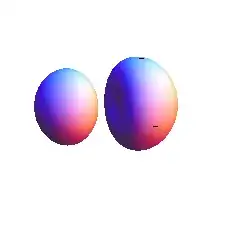
We can see two dark spot on the surface. If I remove the PlotPoints->20, the holes are gone. And this seems not caused by the same reason from this post, because I still see the broken surface as I exported to pov file and rendered in povray.
For my problem I can't just remove the PlotPoints->20 option, because I have to generate the same kind of plots from a serial of data. And I have to set a PlotPoints to a number to make sure the contour can be found.
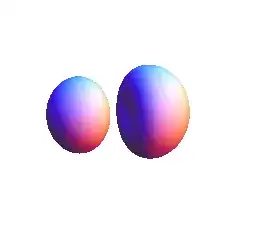





InterpolatingFunctionjust does not work with yourdata: calling for examplef[data[[1, {1, 2}]]]returns wholeInterpolatingFunctionunevaluated. – Alexey Popkov May 16 '14 at 17:27MaxRecursion -> 1(along withPlotPoints -> 20) gives me an artifact-less graphic in 32-bit 9.0.1 (on Lubuntu 14.04, fwiw). I don't have an answer to your actual question (why it otherwise breaks), though. Possibly a bug in the adaptive sampling algorithm controlled byMaxRecursion... maybe worth a report to WRI Support? – William May 28 '14 at 02:06RegionPlot3Dworks much faster and also doesn't show the artifacts (using e.g.,PlotPoints->90), as I mentioned in this answer. – Jens Jun 20 '15 at 21:46