Bug introduced in 9 and fixed in 11.1
I get a hit on performance with the Exp function depending on the range of my inputs. for example, with:
w1 = RandomComplex[-20000 I, {10000000}];
Exp[w1]; // Timing

w2 = RandomComplex[-20 I, {10000000}];
Exp[w2]; // Timing
Results in 2.4 and 0.4 sec respectively. What mystifies me is that the involved numbers are not in a numerically "interesting" range.
The transition to slower times starts gradually at about -500 I and asymptotically stabilizes by about -10000 I. Past these ranges the timings are stable:
w = RandomComplex[-I, {1000000}];
t = Table[{10^n, Timing[Exp[10^n w]][[1]]}, {n, 1.5, 5, .01}];
ListLogLinearPlot[t, AxesLabel -> {"Scaling", "Time"}]
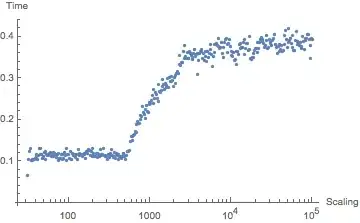
Any ideas what might be happening here? Any simple fixes to get faster performance with high scaling factors?


Sin/Cos. – Szabolcs May 16 '14 at 17:56.066on my computer. – Jens May 16 '14 at 18:20$TimeUnit(it's typically incorrect). – Szabolcs May 16 '14 at 18:58Exp[I x]slows down forAbs[x] >= 512.The transition is clearer like this:w = ConstantArray[N[I], {5000000}]; t = Table[{n, Timing[Exp[n w]][[1]]}, {n, 510, 514, 0.1}]– Simon Woods May 17 '14 at 13:14nExpofExpsimilar to my answer to Slow exponential evaluation over lists, but with_Complexinstead of_RealinsideCompileI only get the long timings independent ofScaling. Plot – Karsten7 Mar 18 '15 at 02:18