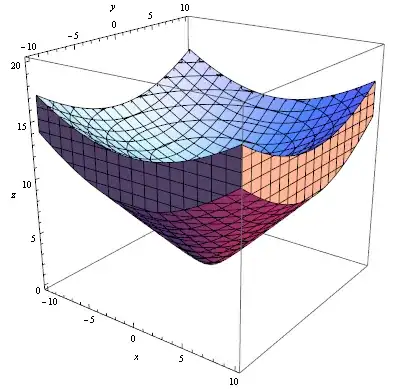
I'm trying to graph a series of planes as a solid object in Mathematica. I first tried to use the Plot3D options as well as the fill options to plot a $3D$ volume, but was unable to find a working result.
The graphics I'm trying to create will show the deviation between the $z$ axis and the radius from the origin of a $3D$ cuboid. The current equation I'm using is this:
Plot3D[Evaluate[{ Sqrt[(C[1])^2 + x^2 + y^2]} /. C[1] -> Range[6378100, 6379120]],
         {x, -1000000, 1000000}, {y, -1000000, 1000000}, AxesLabel -> Automatic]
Where C1 was the original $z$-value at each plane and the result of this equation is $\; z+(r-z)\;$ for any point on the $(x,y)$-plane.
Output for more manageable range looks as follows
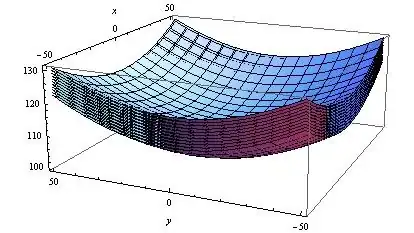
However this method is incredibly inefficient. Because this will be used to model large objects with an original $z$-values of $>6,000,000$ and heights above $1000$, Mathematica is unable to graph thousands of planes and represent them in a responsive method.
Additionally, because the Range of C1 only includes integer values, there is discontinuity between these planes.
Is there a way to rewrite this using different Mathematica functionality that will generate a $3D$-plot that is both a reasonable load on my system and is a smooth object?
2nd, What can I do to improve my perforamance? when computing the above input for $>30$min, Mathematica was only utilizing about $30$% CPU and $4$GB of ram with a light load on my graphics card as well. This is only about twice as much as Chrome is using right now on my system.
I attempted to enable CUDALink, but it wouldn't enable properly. Would this offer a performance boost for this type of processing?
For a reference, my system build is: $16$GB Ram Intel i7 4770K running at stock settings Nvidia GeForce 760GTX 256 Samsung SSD
I'm running Mathematica 9.