2

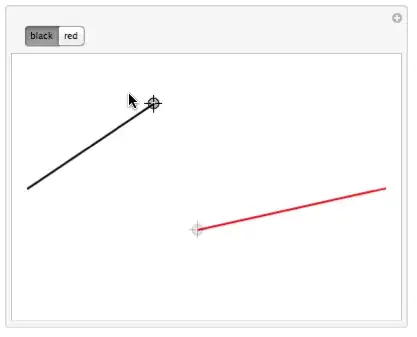
This post helped me out somewhat but it is missing a piece that I really need for something that I am working on that's more complex than what I've shown below. I want to disable a Locator when its corresponding tab is not selected, I've achieved this using the method in the link, however it is slow (not with this simple code), ContinuousAction->False doesn't affect it, and when I click anywhere within the plot range the Locator does not move there and I haven't been able to change this.

clip[pt : {x_, y_}, {xMin_, yMin_}, {xMax_, yMax_}] := {Clip[
   x, {xMin, xMax}], Clip[y, {yMin, yMax}]}

Manipulate[
 Switch[ctrl,
  1, Show[
   Graphics[{
     {Thick, Line[{{-3, 0}, {point1[[1]], point1[[2]]}}]},
     Locator[Dynamic[point1, (point1 = clip[#, {-3, -2}, {3, 2}]) &], 
      Enabled -> True]
     }, PlotRange -> {{-3, 3}, {-2, 2}}]
   ],
  2, Show[
   Graphics[{
     {Thick, Red, Line[{{3, 0}, {point2[[1]], point2[[2]]}}]},
     Locator[Dynamic[point2, (point2 = clip[#, {-3, -2}, {3, 2}]) &], 
      Enabled -> True]
     },
    PlotRange -> {{-3, 3}, {-2, 2}}]
   ]
  ],
 {{ctrl, 1, ""}, {1 -> "black", 2 -> "red"}, SetterBar},
 {{point1, {0, 1}}, None},
 {{point2, {0, -1}}, None}]

I'm not sure if it's possible, or if there is a completely different way of going about enabling/disabling individual locators (that isn't super messy). I just want to do that and also be able to use options like ContinuousAction->False and be able to click anywhere within the plot range and have the locator "jump" there.

What I've provided above is more or less what I learned from the other post, below is a short example of what I originally had.

Manipulate[
 Switch[ctrl,
  1, Show[
   Graphics[{Thick, Line[{{-3, 0}, {point1[[1]], point1[[2]]}}]}, 
    PlotRange -> {{-3, 3}, {-2, 2}}]
   ],
  2, Show[
   Graphics[{Thick, Red, Line[{{3, 0}, {point2[[1]], point2[[2]]}}]}, 
    PlotRange -> {{-3, 3}, {-2, 2}}]
   ]
  ],
 {{ctrl, 1, ""}, {1 -> "black", 2 -> "red"}, SetterBar},
 {{point1, {0, 1}}, Locator},
 {{point2, {0, -1}}, Locator}]
baumannr
  • 787
  • 3
  • 10
  • For anyone coming across this answer in the future, other options using LocatorPane can be found at http://mathematica.stackexchange.com/questions/9148/can-individual-locators-in-locatorpane-be-temporarily-disabled. These will behave slightly differently, allowing you to click on a point to move the nearest enabled locator to it, rather than having to click and drag the locator. – Ruvi Lecamwasam May 26 '16 at 09:53

2 Answers2

2

Based on M.Goldbergs answer it appears that you want both lines displayed? The way you had constructed your code was to only display one line at a time, therefore the enabling/disabling was redundant. There are other redundancies (e.g.Switch, Part), which when removed, and after a few small changes, gives you:

Manipulate[
 Graphics[{Thick, Line[{{-3, 0}, point1}], 
   Locator[Dynamic[point1], Enabled -> ctrl], Red, 
   Line[{{3, 0}, point2}], 
   Locator[Dynamic[point2], Enabled -> ! ctrl]}, 
  PlotRange -> {{-3, 3}, {-2, 2}}],
 {{ctrl, True, ""}, {True -> "black", False -> "red"}, SetterBar},
 {{point1, {0, 1}}, None},
 {{point2, {0, -1}}, None}]

Your function should be included within Initialization or alternatively use SaveDefinitions->True.

enter image description here

enter image description here

Mike Honeychurch
  • 37,541
  • 3
  • 85
  • 158
  • I just had Switch in there because the notebook I am having trouble with contains it and needs it. I like your way of writing it better, it's faster too. I need to be able to use ContinuousAction->False and have it affect the locators too (if that's even possible) or have the locators "snap" to a point that I randomly click on within the plot range. – baumannr May 29 '14 at 16:54
1

You should write your Switch expression so it only controls the enabling and disabling of the locators. Further, you don't need to use Show. With such changes you get

With[{xRange = {-3, 3}, yRange = {-2, 2}},
 Manipulate[
   Switch[ctrl,
     1, redEnable = False; blackEnable = True,
     2, redEnable = True; blackEnable = False];
   Graphics[{
     Thick, Black, Line[{{-3, 0}, pt1}],
     Thick, Red, Line[{{3, 0}, pt2}],
     Locator[Dynamic[pt1, (pt1 = clip[#]) &], Enabled :> blackEnable],
     Locator[Dynamic[pt2, (pt2 = clip[#]) &], Enabled :> redEnable]},
     PlotRange -> {xRange, yRange}], 
   {{ctrl, 1, ""}, {1 -> "black", 2 -> "red"}, SetterBar},
   {{blackEnable, False}, None},
   {{redEnable, False}, None},
   {{pt1, {0, 1}}, None},
   {{pt2, {0, -1}}, None},
   Initialization :> (clip = {Clip[#[[1]], xRange], Clip[#[[2]], yRange]} &)]]

black-selected

red-selected

m_goldberg
  • 107,779
  • 16
  • 103
  • 257