9

Lately, my installation of Mathematica has decided not to highlight any symbols loaded from packages. The picture below is a good representation of this:
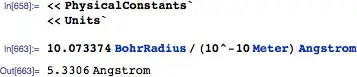
enter image description here

where after loading both PhysicalConstants` and Units` BohrRadius, Meter, and Angstrom should all be black. Yet, they retain their "unknown symbol" color. This occurs for all packages and is persistent across restarting the front-end and rebooting the entire system. Any suggestions for correcting this?

I am running the student version of 8.0.4 on MacOS 10.6.8.

Szabolcs
  • 234,956
  • 30
  • 623
  • 1,263
rcollyer
  • 33,976
  • 7
  • 92
  • 191
  • What happens when you deselect highlighting of "Global symbols that have no value assigned" in the Preferences dialog? Does my suggestion below function then? – Mr.Wizard Apr 29 '12 at 14:49
  • @Mr.Wizard no it doesn't. – rcollyer Apr 29 '12 at 15:12
  • I just want to add this happens constantly to me, especially if I have aborted a calculation using Command + period. The only remedy is to restart Mathematica entirely (restarting the kernel alone does not work). I'm pretty sure this is just a bug in Mathematica. – Guillochon Apr 29 '12 at 21:10
  • @Guillochon yes, I have that happen, also. But, this was persisting beyond restarting mathematica. – rcollyer Apr 30 '12 at 00:58
  • Was this ever resolved? – Mr.Wizard Oct 14 '12 at 10:38
  • @Mr.Wizard only in the short term. It still recurs. I've given up fixing it. – rcollyer Oct 14 '12 at 12:29

1 Answers1

11

I don't know what is causing your problem, but presumably you can still specially color the symbols in those contexts as I do. For example:

SetOptions[$FrontEnd, 
  AutoStyleOptions -> {"SymbolContextStyles" ->
     {"Units`" -> Brown, "PhysicalConstants`" -> Orange}
   }
]

Since the above suggestion doesn't have effect on your machine even when you deselect highlighting of "Global symbols that have no value assigned" in the Preferences dialog, it sounds like something is really broken. Obviously backing things up first, try deleting the user configuration files.

Mr.Wizard
  • 271,378
  • 34
  • 587
  • 1,371
  • No dice. I think the highlighter is viewing them as not having any values assigned to them, so it is not moving off of the blue. – rcollyer Apr 29 '12 at 14:37
  • @rcollyer I'm doing it directly in the Options Inspector (or perhaps I should say the settings reside in the FrontEnd/init.m file), but really it's just a matter of preference, isn't it? – Mr.Wizard Apr 29 '12 at 14:39
  • Which files in particular? The $UserBaseDirectory/FrontEnd/8.0 Caches? – rcollyer Apr 29 '12 at 15:13
  • 1
    I moved both $UserBaseDirectory/FrontEnd/8.0 Caches and init.m from $UserBaseDirectory/FrontEnd, restarted, and it appears to have worked. I'm wondering what got fubared ... Any way, edit you comment in to your answer, and I'll accept it. – rcollyer Apr 29 '12 at 15:18
  • No real customizations to speak of. – rcollyer Apr 29 '12 at 15:58
  • It seems it is something in init.m that is going funny, but I'll be damned if I know what it is. – rcollyer Oct 29 '12 at 19:39
  • Here's a question for you. If I wanted to highlight Global`, that is straightforward, but what if I have the default Context set to notebook or cell grouping, how would I go about automatically highlighting the user defined symbols? Let me know if I should post this as a separate question. – rcollyer Mar 04 '13 at 15:26
  • @rcollyer Give me some time to think about that, please. – Mr.Wizard Mar 04 '13 at 15:27
  • I figured it wouldn't be an immediate answer, so take as much time as you need. – rcollyer Mar 04 '13 at 15:28
  • @rcollyer I never thought of a solution and frankly it slipped my mind. Did you post a new question about this? – Mr.Wizard Apr 06 '13 at 09:54
  • slipped my mind, too, so no I haven't. – rcollyer Apr 06 '13 at 21:46