7

I need Mathematica to access an online public directory via some URL (fake in this case)

http://example.com/images

and perform operations similar to those Mathematica can do on OS directories and files. Examples:

  1. Get all files names - like: {image1.png, image2.png, ...}

  2. Import files into Mathematica

  3. Get various files info

What is an efficient way to do it if it's possible at all?

RunnyKine
  • 33,088
  • 3
  • 109
  • 176
Vitaliy Kaurov
  • 73,078
  • 9
  • 204
  • 355
  • If you know the files names already this is straight forward but it looks like you want to find out the file names ...right? I think you probably need to use a terminal command -- don't know which one but maybe wget or curl will let you do this -- with Run. – Mike Honeychurch Jan 22 '12 at 22:43
  • Thanks for the idea @MikeHoneychurch , I passed it as a comment to small discussion we have under the Brett's answer. Maybe David Zaslavsky can comment on this. – Vitaliy Kaurov Jan 22 '12 at 23:28
  • I use wget quite a lot which is why something like this seems possible but I am unsure if it can get you a list of files in a directory -- but if it cannot then there would be another terminal command that should be able to do it I suspect. – Mike Honeychurch Jan 22 '12 at 23:31
  • I use a GUI FTP but does the terminal ftp give you a list of files in a directory? – Mike Honeychurch Jan 22 '12 at 23:32
  • @Mike: FTP will do it, but only if you have FTP access to the site. See also the comment under Brett's answer. It might be wise to take this to the chat room though if the discussion is going to continue for long. – David Z Jan 23 '12 at 00:16

1 Answers1

7

Here's one approach, though it's hard to say without knowing the site and what additional information you want for the files.

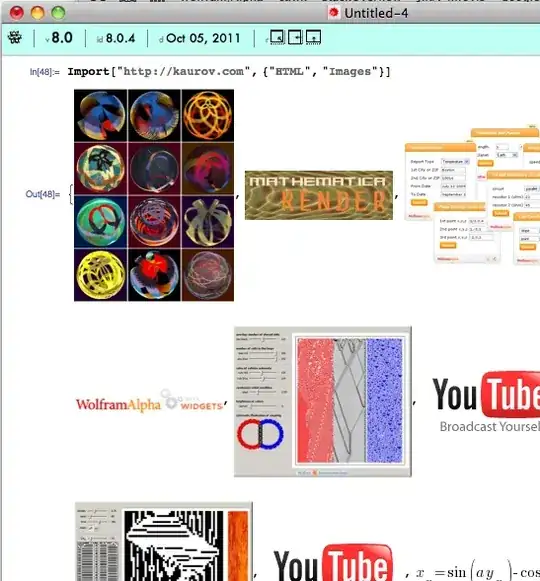
Import["http://kaurov.com", {"HTML", "Images"}]

enter image description here

There are several other items you can ask for (including what elements you can ask for!)

In[53]:= Import["http://kaurov.com", {"HTML", "Elements"}]

Out[53]= {"Data", "FullData", "Hyperlinks", "ImageLinks", "Images",
"Plaintext", "Source", "Title", "XMLObject"}

In[54]:= Import["http://kaurov.com", {"HTML", "ImageLinks"}]

Out[54]= {"http://kaurov.com/wordpress/wp-content/uploads/2011/10/masterimagelfss.jpg",            
   ...
   "http://kaurov.com/wordpress/wp-content/uploads/2009/11/life-death-spinner.gif"}
Brett Champion
  • 20,779
  • 2
  • 64
  • 121
  • Haha, neat - a rather cunning reply. Is it possible to somehow get the file list and information? – Vitaliy Kaurov Jan 22 '12 at 21:12
  • Off topic, but: I wonder how you update all that information in the docked cell. Even if one uses Refresh, doesn't it stop updating after the kernel quits? What if you quit the v8 kernel and start a v7 kernel? --> http://stackoverflow.com/questions/8756565/creating-robust-real-time-monitors-for-variables – Szabolcs Jan 22 '12 at 21:14
  • 1
    @Vitaliy If the server gives you a file listing, it should be as easy as Import["http://kaurov.com", {"HTML", "Hyperlinks"}] If it doesn't, then perhaps impossible? – Szabolcs Jan 22 '12 at 21:16
  • 5
    The HTTP protocol doesn't contain a method for listing files in a directory. In many cases URLs don't even correspond to actual files, so it may be impossible to tell what pages exist or not without actually trying to access them. So in general, it is impossible to produce a directory listing for a website. Some server administrators choose to publish such a listing as an index page, but you can't count on every website doing this, and the format used can vary from one site to another. – David Z Jan 22 '12 at 21:23
  • @Szabolcs the elements in the docked cell are static (except for some buttons) and get generated at launch. – Brett Champion Jan 22 '12 at 22:23
  • @DavidZaslavsky I wonder if what Mike Honeychurch said in the comment to the original question somehow offers a solution. – Vitaliy Kaurov Jan 22 '12 at 23:26
  • 3
    @Vitaliy: Regarding Mike's comment, no, using wget or curl won't help. It's a limitation of the underlying communication protocol, so you can't get around it by switching which program you use. This only applies to HTTP URLs, though. If you are accessing the server with an FTP client (whether command-line or GUI), then you can get a directory listing. But most servers do not allow FTP access (except by the person who maintains the website). – David Z Jan 23 '12 at 00:15