I have a file with the following structure:
GAME
{
    version = 0.23.5
    linkURL =
    Mode = 1
    PARAMETERS
    {
        FLIGHT
        {
            CanQuickSave = True
            CanQuickLoad = True
        }
    }
    SCENARIO
    {
        name = ScenarioDiscoverableObjects
        scene = 7, 8, 5
         = 703987854
        sizeCurve
        {
            key = 0 0 1.5 1.5
            key = 0.3 0.45 0.875 0.875
        }
    }
}
I'd like to create a nested menu for easy visualization of the file's contents. I've managed to parse the file to the following structure:
data = {"GAME", {"version", "0.23.5"}, {"linkURL", ""}, {"Mode",
  "1"}, {"PARAMETERS", {"FLIGHT", {"CanQuickSave",
    "True"}, {"CanQuickLoad", "True"}}}, {"SCENARIO", {"name",
   "ScenarioDiscoverableObjects"}, {"scene", "7, 8, 5"}, {"",
   "703987854"}, {"sizeCurve", {"key", "0 0 1.5 1.5"}, {"key",
    "0.3 0.45 0.875 0.875"}}}}
I then started to make the menu using OpenerView:
OpenerView[{First[#], Column[Rest[#]]}] &@data
However, I can't manage to apply this function over all levels of data.
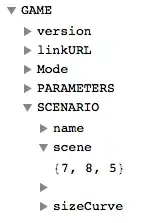
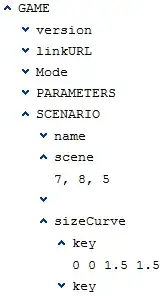
edit: Here's a screenshot of what I'm trying to achieve:



Maphas a level specification option. You could set that at Infinity. – Sjoerd C. de Vries Jul 04 '14 at 16:23