Compare the two dialog windows, created by the same code except in the first WindowSize has a value while I omit it in the second one. Note, that CreateDialog (and especially its default option WindowSize -> All) can lead to unexpected behaviour.
DynamicModule[{switch = 1},
  CreateDialog[
   DocumentNotebook@TextCell@Dynamic@Switch[switch, 1, "A", 2, "B"],
   WindowSize -> {200, 100}]];

DynamicModule[{switch = 1},
  CreateDialog[
   DocumentNotebook@TextCell@Dynamic@Switch[switch, 1, "A", 2, "B"]
   ]];

While the value of the WindowSize option is recognized and used on the left, any explicit value prevents the evaluation of the dynamic content (be it a number, list of numbers, Automatic, Full, etc.). The same behavior is experience if Module is used instead of DynamicModule. Is it a bug? I need a workaround that works with a fullscreen window (i.e. WindowSize -> Full), any idea?
1. Update
Even more strange is the workaround that I've found by eliminating part of my code, expression-by-expression. I ended up with the following stripped piece:
DynamicModule[{a = 1, b, c, d, e, f, g, h, i, j, k},
  b = Plot3D[Join@{x, y}, {x, 0, 1}, {y, 0, 1}];
  CreateDialog[Dynamic@Switch[a, 1, "A"], WindowSize -> {200, 100}]
  ];
which correctly produces the dialog on the left, while (and this is the strangest bug I've ever experienced in Mathematica so far) when I comment out any part of this code it results in an unevaluated Switch in the dialog window (on the right)!

Below are some examples, that obviously should not change the output, but they do, and are producing the above right dialog. I think this behaviour has something to do with the parsing of DynamicModule, but I am quite clueless...
DynamicModule[{a = 1, b(*,c,d,e,f,g,h,i,j,k*)},
  b = Plot3D[Join@{x, y}, {x, 0, 1}, {y, 0, 1}];
  CreateDialog[Dynamic@Switch[a, 1, "A"], WindowSize -> {200, 100}]
  ];

DynamicModule[{a = 1, b, c, d, e, f, g, h, i, j(*,k*)},
  b = Plot3D[Join@{x, y}, {x, 0, 1}, {y, 0, 1}];
  CreateDialog[Dynamic@Switch[a, 1, "A"], WindowSize -> {200, 100}]
  ];

DynamicModule[{a = 1, b, c, d, e, f, g, h, i, j, k},
  b = Plot3D[(*Join@*){x, y}, {x, 0, 1}, {y, 0, 1}];
  CreateDialog[Dynamic@Switch[a, 1, "A"], WindowSize -> {200, 100}]
  ];

DynamicModule[{a = 1, b, c, d, e, f, g, h, i, j, k},
  (*b =*)Plot3D[Join@{x, y}, {x, 0, 1}, {y, 0, 1}];
  CreateDialog[Dynamic@Switch[a, 1, "A"], WindowSize -> {200, 100}]
  ];

DynamicModule[{a = 1, b, c, d, e, f, g, h, i, j, k},
  (*b=Plot3D[Join@{x,y},{x,0,1},{y,0,1}];*)
  b = Plot3D[x, {x, 0, 1}, {y, 0, 1}];
  CreateDialog[Dynamic@Switch[a, 1, "A"], WindowSize -> {200, 100}]
  ];
Each of these were tried with a fresh kernel, without any user package loaded.
2. Update
The following example shows that the variable a displayed in the dialog has no initial value in spite of defining it two times (note however that the Initialization code is not evaluated at all, you can make sure about that by putting any Print in it):
DynamicModule[{a = None},
  Print[a];
  CreateDialog[{
    Dynamic@a,
    Dynamic@Switch[a, True, "A", False, "B", None, "C"],
    (*Checkbox@Dynamic@a*)
    }, WindowSize -> {200, 100}],
  Initialization :> (a = None)
  ];
None

Thus a has a value (None) inside the DynamicModule but not inside the dialog. Uncommenting the commented line proves that the a displayed in the dialog is not the same as the a being locally defined in DynamicModule:
DynamicModule[{a = None},
  Print[a];
  CreateDialog[{
    Dynamic@a,
    Dynamic@Switch[a, True, "A", False, "B", None, "C"],
    Checkbox@Dynamic@a
    }, WindowSize -> {200, 100}],
  Initialization :> (a = None)
  ];
None
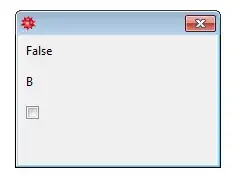
that is: still printing None as the value of the DynamicModule-a, but displaying False as the dialog-a, which is the default value that Checkbox assignes to a variable without any value.
To conclude: a dialog does not necessarily inherit the variables of its enclosing (Dynamic)Module.
Printing Dynamic@a instead of simply a helps, as it forces the front-end to claim the dynamically displayed a of the wrapping module. Please correct me if I'm wrong.
DynamicModule[{a = None},
  Print[Dynamic@a];
  CreateDialog[{
    Dynamic@a,
    Dynamic@Switch[a, True, "A", False, "B", None, "C"],
    Checkbox@Dynamic@a
    }, WindowSize -> {200, 130}],
  Initialization :> (a = None)
  ];

**3. Update: **
The purpose of this construction is to design a gui where the displayed content switches according to user interaction. While there might be easier ways to do this, I am now inclined to solve the underlyings of this behavior. The following example uses three "screens" as different contents (first, second, third). Changes made to dynamic controls in one screen should affect other screens (hence the variable x).
DynamicModule[{a = 1, x = .5, first, second, third},
  first := Column@{"First", Row@{"x: ", Slider@Dynamic@x}, Button["Next", a = 2]};
  second := Column@{"Second", Row@{"x: ", Dynamic@x}, Button["Next", a = 3]};
  third := Column@{"Third", Button["Reset x", x = .5], Button["Next", a = 1]};
  CreateDialog[Dynamic@Switch[a,
     1, first,
     2, second,
     3, third
     ], WindowSize -> {300, 200}]];


Contextworks as I described, whereas a standard window does what you reported. – Sjoerd C. de Vries May 09 '12 at 20:06nb=DocumentNotebook[...]and thenCreateDialog[nb,...]. – Simon Woods May 09 '12 at 20:12CreateDialogdoc page says: "CreateDialog by default creates a notebook with options set so as to be suitable for the appearance and behavior of a typical dialog box. The option settings include Deployed->True, ShowCellBracket->False, WindowFloating->False and WindowSize->All." So, it seems as ifWindowSizeisn't an option ofCreateDialog(it isn't present in the options section of the doc either). – Sjoerd C. de Vries May 09 '12 at 20:29DynamicModule) or globalnb. Could you perhaps post a working example as an answer? I would appreciate that! – István Zachar May 10 '12 at 08:20