7

Given example tabular data (ie, with rows and columns, or "data frames")

data = Table[<| "key1" -> i, "key2" -> i + 10 , 
   "key3" -> i + 20|>, {i, 4}] //Dataset

enter image description here

The following query operator almost works to associate (the values of) a selected "primary" key at first level:

primaryKey[key_] := Sequence[All, Slot[key] -> KeyDrop[#, key] &] 

This allows the lookup syntax:

data[primaryKey["key1"]][3]

(* 3 -> <|"key2" -> 13, "key3" -> 23|> *)

How to modify this query to handle:

  1. Return only the value <|"key2" -> 13, "key3" -> 23|>, similar to how data[All, #key1 &] // Normal returns only the values {1, 2, 3, 4}.

  2. Dataset doesn't recognize the implicit global association structure, flattening the data by 1 level:

    data[primaryKey["key1"]]
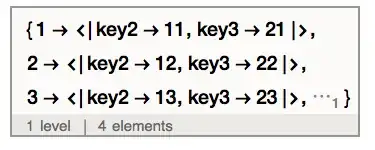
enter image description here

The following workaround works but how to incorporate in the operator?

data[primaryKey["key1"]] // Normal // Association // Dataset
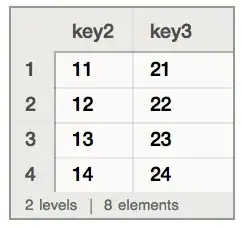
enter image description here

The same issue arises from other restructuring operators, like generating an association from (the values of) two specified keys eg

data[All, #key1 -> #key3 &][2]

(* 2 -> 22 *)

Whereas

data[All, #key1 -> #key3 &] // Normal // Association // 
  Dataset // #[2] &

(* 22 *)
alancalvitti
  • 15,143
  • 3
  • 27
  • 92

3 Answers3

10

Thanks to @Leonid and @Rojo for answering the question.

I want to add that I'll be adding a specialized function to do precisely this operation (and its inverse).

I think it will be called Pivot (the existing, undocumented Pivot will go away), and it will work like this:

In[1]:= Pivot[{<|a -> 1, b -> 2|>, <|a -> 3, b -> 4|>}, Key[a]]
Out[1]= <|1 -> <|b -> 2|>, 3 -> <|b -> 4|>|>

In[2]:= Pivot[<|1 -> <|b -> 2|>, 3 -> <|b -> 4|>|>, Key[a]] 
Out[2]= {<|a -> 1, b -> 2|>, <|a -> 3, b -> 4|>}
Taliesin Beynon
  • 10,639
  • 44
  • 51
  • +1 Nice. And the current undocumented Pivot will exist as some other function, Transpose will be extended, or it will just disappear? – Rojo Jul 15 '14 at 18:04
  • 2
    @Rojo I don't know yet. – Taliesin Beynon Jul 15 '14 at 19:30
  • Pivot no longer works on V10.0.1. – Murta Sep 22 '14 at 13:19
  • @Murta Yes, Pivot is gone. Undocumented functions can be removed at the slightest whim, unfortunately :-). The truth is there is a much simpler and more useful operation that wants the name 'Pivot'. – Taliesin Beynon Sep 24 '14 at 05:22
  • 1
    @TaliesinBeynon I can imagine.. to do something like Excel Pivot Table in Mathematica you have to create your own functions today. Pivot is one of the best Excel utilities, and MMA should have something similar if it really wants to make data science analysis easier. – Murta Sep 24 '14 at 10:44
8

Here is how I'd do this:

transformed = data[GroupBy[Key["key1"]], Delete[Key["key1"]] @* First]

This avoids the round-trip to a list of rules and back to Association.

Leonid Shifrin
  • 114,335
  • 15
  • 329
  • 420
  • Nice use of that peculiar descending operator GroupBy – Rojo Jul 14 '14 at 22:33
  • @Rojo Thanks. Your method is also nice. Shows once again that Dataset is hackable, which is good. – Leonid Shifrin Jul 14 '14 at 22:41
  • @LeonidShifrin, thanks for the paradigm. This works also when the key is duplicate, whereas Slot[key] returns only the last appearance. – alancalvitti Jul 15 '14 at 17:39
  • @LeonidShifrin, how does ascending composition by First work here? Substituting Last for First gives the same result. – alancalvitti Jul 15 '14 at 17:43
  • @alancalvitti Basically, without First, you get a list of all results with this key, as a value for the key in a new assoc. First and Last give the same result only when the keys are unique, because then all groups will be lists with a single element. – Leonid Shifrin Jul 15 '14 at 18:12
  • @LeonidShifrin, without First, data[GroupBy[Key@"key1"], Delete[Key@"key1"]] gives an error "Position specification Key[key1].. is not a machine-sized integer or a list..." – alancalvitti Jul 15 '14 at 18:18
  • KeyDrop works in place of Delete. – alancalvitti Jul 15 '14 at 18:32
  • @alancalvitti Of course. I meant the structure without the Delete part: data[GroupBy[Key@"key1"]]. When we apply First, it removes the list around the value, and then Delete removes they key. Just call Normal on intermediate results and play with it to see what's going on. – Leonid Shifrin Jul 15 '14 at 18:32
  • @alancalvitti My advice to you is to work out this example without Dataset, on the level of pure associations and lists, to see what's going on. This is certainly a much better way to see what's happening, than trial and error with various commands. – Leonid Shifrin Jul 15 '14 at 18:34
  • @LeonidShifrin, thanks, I'm testing with real data - and b/c of limitations of Dataset formatting it is certainly easier to display structure as nested lists and associations. – alancalvitti Jul 15 '14 at 18:44
  • 1
    A different way to write the same thing could be data[GroupBy[Key["key1"] -> KeyDrop["key1"]], First] – Rojo Jul 19 '14 at 16:05
  • @Rojo Good point. – Leonid Shifrin Jul 19 '14 at 16:38
  • This solution no longer works in V10.1 as Key["key1"] doesn't seem to be picked up? – Ronald Monson Jul 12 '15 at 07:28
7

Changing the descending operator All to the ascending Association seems to work at turning the resulting list of rules into an association.

primaryKey[key_] := Sequence[Association, Slot[key] -> KeyDrop[#, key] &] 
Rojo
  • 42,601
  • 7
  • 96
  • 188