2

I'm new in Mathematica 10.

So far, I have a two variable-function and I've use Minimize to find the optimal solution.

Nevertheless, I'd like to make a sensibility analysis and study how this optimal solution behaves, doing a "For" cycle changing some coefficient of this function and keeping all the optimal solution in a table or matrix.

Is that possible to do? I've tried using a For cycle but I don't know how to save the optimal value in an auxiliary variable.

For instance :

Table[NMinimize[{a x + b y, 0.2 x + 0.1 y >= 14, 0.25 x + 0.6 y >= 30, 
    0.1 x + 0.15 y >= 10, x >= 0, y >= 0}, {x, y}][[2]], {a, 0, 3, 1}, {b, 0, 3, 1}]

Does anyone one how to save all of the X and Y Values in only 2 columns? I'd like to associate those columns to de corresponding value of a and b

Mr.Wizard
  • 271,378
  • 34
  • 587
  • 1,371
YoJesseP
  • 87
  • 6
  • 1
    Please read the documentation for Table, then if necessary edit your question with what you tried and in what way it did not work. (I will reopen the question at that time.) – Mr.Wizard Jul 21 '14 at 07:14
  • Perhaps this: TableForm[ Table[NMinimize[{a x+b y,0.2 x+0.1 y>=14,0.25 x+0.6 y>=30,0.1 x+0.15 y>=10,x>=0,y>=0},{x,y}][[1]],{a,0,2,0.2},{b,0,3,0.3}], TableHeadings->{"a = "<>ToString[#]&/@Range[0,2,0.2],"b = "<>ToString[#]&/@Range[0,3,0.3]}]? – seismatica Jul 21 '14 at 07:47
  • Thank you! @seismatica I'd like to save the x and y value too. I've thought in 5 columns, a,b,x,y and CT. I'm gonna review the table information of this software. thanks a lot! – YoJesseP Jul 21 '14 at 21:05
  • @Mr.Wizard I've already modified the post. Is that enough to modify the condition of this post? – YoJesseP Jul 22 '14 at 03:26
  • @YoJesseP Done. – Mr.Wizard Jul 22 '14 at 03:47
  • Is this what you want? TableForm[Table[Grid[NMinimize[{a x+b y,0.2 x+0.1 y>=14,0.25 x+0.6 y>=30,0.1 x+0.15 y>=10,x>=0,y>=0},{x,y}]/.{axby_,{x->xp_,y->yp_}}:>{{"x","y","ax+by"},{xp,yp,axby}},Frame->All],{a,0,3,1},{b,0,3,1}],TableHeadings->{"a = "<>ToString[#]&/@Range[0,2,0.2],"b = "<>ToString[#]&/@Range[0,3,0.3]}]. I don't know what CT is but I assume it is the same as ax + by. – seismatica Jul 22 '14 at 03:48
  • Sorry, the table heading for that is wrong. It should be this: TableForm[Table[Grid[NMinimize[{a x+b y,0.2 x+0.1 y>=14,0.25 x+0.6 y>=30,0.1 x+0.15 y>=10,x>=0,y>=0},{x,y}]/.{axby_,{x->xp_,y->yp_}}:>{{"x","y","ax+by"},{xp,yp,axby}},Frame->All],{a,0,3,1},{b,0,3,1}],TableHeadings->{"a = "<>ToString[#]&/@Range[0,3,1],"b = "<>ToString[#]&/@Range[0,3,1]}] – seismatica Jul 22 '14 at 03:53
  • @seismatica Sorry. I deleted the CT function. Yes, CT[x,y] is ax+by. But what I want, is a table with 5 columns: a,b, x,y and optimal value. Below this headings I'd like to complete the table with the value of a,b and x,y and de Minimal CT – YoJesseP Jul 22 '14 at 06:44

2 Answers2

4

I'm not sure exactly what you want, but in an effort to demonstrate some possibilities:

Join @@ Table[{{a, b}, 
    NMinimize[{a x + b y, 0.2 x + 0.1 y >= 14, 0.25 x + 0.6 y >= 30, 0.1 x + 0.15 y >= 10,
        x >= 0, y >= 0}, {x, y}][[2]]}, {a, 0, 3, 1}, {b, 0, 3, 1}] // Column

Or:

Join @@ Table[{{HoldForm[a] -> a, HoldForm[b] -> b}, 
    NMinimize[{a x + b y, 0.2 x + 0.1 y >= 14, 0.25 x + 0.6 y >= 30, 0.1 x + 0.15 y >= 10,
        x >= 0, y >= 0}, {x, y}][[2]]}, {a, 0, 3, 1}, {b, 0, 3, 1}] // MatrixForm

Based on your comment perhaps:

expr =
  {a x + b y, 0.2 x + 0.1 y >= 14, 0.25 x + 0.6 y >= 30, 0.1 x + 0.15 y >= 10, x >= 0, y >= 0};

tab =
  Table[
    {a, b, x, y, #} /. #2 & @@ NMinimize[expr, {x, y}],
    {a, 0, 3}, {b, 0, 3}
  ] ~Flatten~ 1;

TableForm[tab, TableHeadings -> {None, {"a", "b", "x", "y", "value"}}]
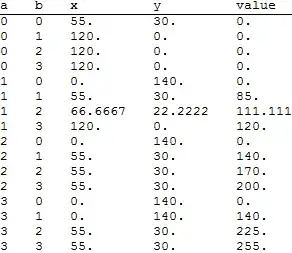
enter image description here

If wish to use specific values rather than a range you merely need this syntax for Table:

enter image description here

For example:

aVals = RandomInteger[{0, 20}, 7]
{3, 9, 4, 5, 18, 13, 3}
expr =
  {a x + b y, 0.2 x + 0.1 y >= 14, 0.25 x + 0.6 y >= 30, 0.1 x + 0.15 y >= 10, x >= 0, y >= 0};

tab =
  Table[
    {a, b, x, y, #} /. #2 & @@ NMinimize[expr, {x, y}],
    {a, aVals}, {b, 0, 3}
  ] ~Flatten~ 1;

TableForm[tab, TableHeadings -> {None, {"a", "b", "x", "y", "value"}}]

enter image description here


Explanation

brama requested an explanation of this code:

I have trouble understanding the role of #2 and ~Flatten~ 1. Also, How does it transfer the optimal x and y values from the NMinimize to the table?

The documentation for NMinimize states:

enter image description here

The first part is the minimum value found, and the second part is a list of replacement rules.

I used the combination of Function, Slot, and Apply to handle these two parts. An independent example:

{a, b, x, y, #} /. #2 & @@ {"part1", "part2"} // Quiet
{a, b, x, y, "part1"} /. "part2"

(I used Quiet to suppress the message informing us that "part2" is not a list of replacement rules.)

With actual output from NMimimize: {0., {x -> 55., y -> 30.}} this becomes:

{a, b, x, y, 0.} /. {x -> 55., y -> 30.}

Then after the ReplaceAll replacements and evaluation of a and b within Table:

{0, 0, 55., 30., 0.}

See this answer for other ways to work with the output of NMinimze.

The final piece of the code is ~Flatten~ 1. First: a ~op~ b is infix notation for op[a, b]. Flatten is used to combine expressions with the same head (by default List) and different levels. Here it is used to combine the lists of solutions for each a value into a single list of solutions. An independent example:

x1 = Array[Plus, {3, 4, 5}]
{{{3, 4, 5, 6, 7}, {4, 5, 6, 7, 8}, {5, 6, 7, 8, 9}, {6, 7, 8, 9, 10}},
 {{4, 5, 6, 7, 8}, {5, 6, 7, 8, 9}, {6, 7, 8, 9, 10}, {7, 8, 9, 10, 11}},
 {{5, 6, 7, 8, 9}, {6, 7, 8, 9, 10}, {7, 8, 9, 10, 11}, {8, 9, 10, 11, 12}}}
x1 ~Flatten~ 1
{{3, 4, 5, 6, 7},
 {4, 5, 6, 7, 8},
 {5, 6, 7, 8, 9},
 {6, 7, 8, 9, 10},
 {4, 5, 6, 7, 8},
 {5,6, 7, 8, 9},
 {6, 7, 8, 9, 10},
 {7, 8, 9, 10, 11},
 {5, 6, 7, 8, 9},
 {6, 7, 8, 9, 10},
 {7, 8, 9, 10, 11},
 {8, 9, 10, 11, 12}}
Mr.Wizard
  • 271,378
  • 34
  • 587
  • 1,371
  • The first one is closer to what I want. I'd like to make a table with the next columns: a|b|x|y|Optimal Value| – YoJesseP Jul 22 '14 at 06:39
  • @YoJesseP Please see the update. – Mr.Wizard Jul 22 '14 at 07:00
  • Yeah!!! this is exactly what I want! thanks a lot!!! – YoJesseP Jul 22 '14 at 07:04
  • @YoJesseP I am glad I could help. If this is a fully satisfying answer please consider Accepting it, though also consider waiting a while to give others a chance to answer too before the question appears concluded. – Mr.Wizard Jul 22 '14 at 07:07
  • @YoJesseP I modified the code of my final method to hopefully make it easier to read and reuse. – Mr.Wizard Jul 22 '14 at 07:12
  • Thanks @Mr.Wizard, it looks like easier to read. What if a and b don't behave as increasing parameters? could I define random values to this parameters and make the same table? For example, instead of {a,0,3} .. having as a random value between 0 and 20. – YoJesseP Jul 22 '14 at 07:17
  • @YoJesseP Yes, that's a simple matter. I'll add an example. – Mr.Wizard Jul 22 '14 at 07:22
  • I've just seen your example @Mr.Wizard Thank you, I'm new using mathematica and I realize that is a powerful tool to learn and program mathematical isues. Thanks for your patience. – YoJesseP Jul 22 '14 at 07:34
  • @Mr.Wizard Your third formulation is very elegant. However, I have trouble understanding the role of #2 and ~Flatten~ 1. Also, How does it transfer the optimal x and y values from the NMinimizer to the table? Will you please add a sentence or two to explain these in your response? – brama Jul 25 '14 at 21:33
  • @brama Explanation appended. It's a bit more than an sentence or two. :^) – Mr.Wizard Jul 26 '14 at 09:18
  • @Mr.Wizard That's more than an "effort", big +1. – Öskå Jul 26 '14 at 09:31
  • @Öskå Thanks! Since you're feeling charitable and I'm not above begging for votes this answer could use some attention (if you like it, of course!): (55830) – Mr.Wizard Jul 26 '14 at 09:36
  • @Mr.Wizard I feel charitable everyday :D – Öskå Jul 26 '14 at 09:39
2

How about this?

Grid[Prepend[
  Flatten[Table[{a, b, 
      Reverse@NMinimize[{a x + b y, 0.2 x + 0.1 y >= 14, 
         0.25 x + 0.6 y >= 30, 0.1 x + 0.15 y >= 10, x >= 0, 
         y >= 0}, {x, y}]}, {a, 0, 3, 1}, {b, 0, 3, 1}] /. {ap_, 
      bp_, {{x -> xp_, y -> yp_}, axbyp_}} :> {ap, bp, xp, yp, axbyp},
    1], {"a", "b", "x", "y", "CT"}], Frame -> All]

Mathematica graphics

seismatica
  • 5,101
  • 1
  • 22
  • 33
  • 1
    This strikes me as a bit more complicated that necessary but it gets the job done. +1 – Mr.Wizard Jul 22 '14 at 07:00
  • I just realized that I didn't need Reverse since I'm pattern-matching the output anyway. I really don't know if post-processing this way is a bad habit or not. – seismatica Jul 22 '14 at 07:04
  • Thank you! this is what I'm looking for. – YoJesseP Jul 22 '14 at 07:08
  • Generally I don't think there is anything wrong with it unless performance is critical (in which case Part will be faster if you can find a way to apply it) but NMinimize is returning Rules specifically to make their substitution easier so you might as well use them. – Mr.Wizard Jul 22 '14 at 07:08
  • True. Thank you for your suggestion. – seismatica Jul 22 '14 at 07:11