16

Bug introduced in 10.0.0 and fixed in 10.0.1


In Mathematica version 10, HoldForm no longer produces the same results as in version 8 (edit: I only have versions 10 and 8 installed, so can't compare to version 9 directly). Here are some examples (on Mac OS X):

Formatting of \[ScriptCapitalE]

This symbol is output correctly:

InputForm[ℰ]

But when wrapped as follows, I get gibberish:

HoldForm[InputForm[ℰ]]

â °

Arguments in HoldFormaren't held

Why would I want to use InputForm inside HoldForm in the first place? Here is one example, using the constant E. I would like it to be displayed as E:

HoldForm[InputForm[E]]

E

On the other hand, the constant is formatted differently if I leave out InputForm:

HoldForm[E]

So why not use InputForm without HoldForm? Because then I can't write assignments like this:

HoldForm[InputForm[E = 1]]

E = 1

Here, I get no error because of HoldForm. So far, so good. But now things become inconsistent again if I put the same construct into a Plot:

Plot[x^2, {x, -2, 2}, AxesLabel -> {x, HoldForm[InputForm[E = 1]]}]
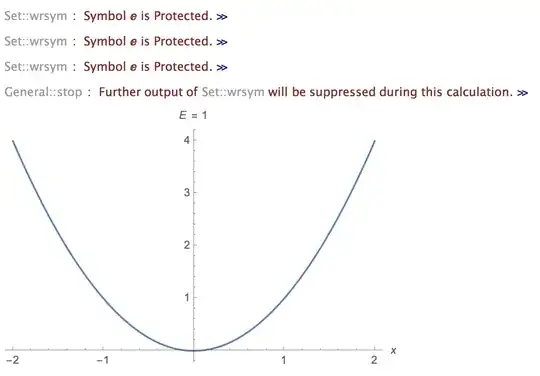
plot error

This used to work in version 8, but now it throws an error. The resulting plot is still correct, but the messages seem to indicate that HoldForm was ignored at some stage.

Indeed, I then proceeded to do a more basic test:

Clear[x];
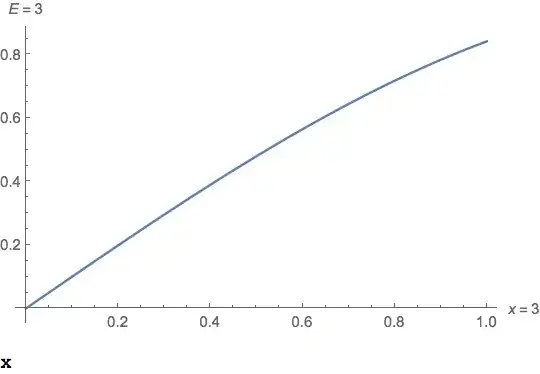
Plot[Sin[x], {x, 0, 1}, AxesLabel -> {"x", HoldForm[x = 3]}];
x

3

Yes, that's right. HoldForm was completely ignored.

What can be done to fix this?

Edit

I tried to report the issue, but am currently receiving web form errors at the Wolfram site, so will have to try again later.

Mr.Wizard
  • 271,378
  • 34
  • 587
  • 1,371
Jens
  • 97,245
  • 7
  • 213
  • 499
  • 2
    I suggest you report this to WRI tech support. Maybe WRI broke HoldForm when they added the new Inactivate. – m_goldberg Jul 22 '14 at 00:19
  • @m_goldberg Will do. There are no change notes for HoldForm in the docs, so I would think this is a regression. – Jens Jul 22 '14 at 00:24
  • 2
    Yes, and it's a nasty one. There is probably a lot of existing code broken by this behavior. And it's worse than even you think. Try substituting Hold[x = 3] for HoldForm[x = 3]. Global x still set to 3 after evaluation. – m_goldberg Jul 22 '14 at 00:30
  • I agree that you should consider contacting support. I'm not convinced that this is not by design, however. I've always found ThisForm[ThatForm[expr]] to be a bit awkward. – Mark McClure Jul 22 '14 at 00:45
  • 2
    Mark I also see your first example failing in V9 as well as V10. – Mike Honeychurch Jul 22 '14 at 00:51
  • @MikeHoneychurch I've updated my answer to address the first example as well. – Mark McClure Jul 22 '14 at 01:28
  • 2
    Mark I meant that the HoldForm[InputForm[ℰ]] renders the same gibberrish for me in V9 as V10 – Mike Honeychurch Jul 22 '14 at 01:33
  • 2
    In V10 on Windows 8.1 HoldForm[InputForm[ℰ]] works as expected. I don't get the gibberish. – RunnyKine Jul 22 '14 at 02:01
  • In v10 under Windows I do not have the HoldForm[InputForm[ℰ]] problem but I do have the problems with HoldForm and Plot. I'm tagging this a bug. – Mr.Wizard Jul 22 '14 at 08:50
  • Off-topic: I usually prefer the \[LongEqual] symbol for (IMO) nicer appearance. – Silvia Jul 25 '14 at 12:13
  • I just noticed that I never had the InputForm problem so I don't know if that has been fixed in 10.0.1 or not. If that still exists please edit the header accordingly. – Mr.Wizard Sep 17 '14 at 15:09
  • @Mr.Wizard I'll look at it when I get a chance to upgrade. I'm currently happily using a computer with only version 8 installed. – Jens Sep 17 '14 at 16:04

4 Answers4

12

I'm not sure what's going on with HoldForm[InputForm[ℰ]], but I think I know what's going on with Plot.

It appears at some point ReleaseHold is called because wrapping HoldForm twice fixes your problem.

Plot[x^2, {x, -2, 2}, AxesLabel -> {x, HoldForm[HoldForm[InputForm[E = 1]]]}]

enter image description here

Greg Hurst
  • 35,921
  • 1
  • 90
  • 136
  • That's a valuable observation, thanks! – Jens Jul 22 '14 at 01:24
  • What you observed also holds for Hold in the same context, so you must have hit the nail on the head. I think this cannot have been done intentionally - it makes no sense. – Jens Jul 22 '14 at 01:44
12

Regarding the plot issue, I tried using HoldForm[x = Stack[_]] as an axis label to capture the stack at the moment of evaluation inside HoldForm. This revealed a problem in a helper function for dealing with units. The function Visualization`Utilities`OptionsDump`unitFormStringQ is applied to the axis labels (in a pattern test). The definition is this:

unitFormStringQ[s_] := Or @@ (MatchQ[#1, $unitFormString]&) /@ {Sequence @@ s}

The problem is clearly coming from {Sequence @@ s} which removes the HoldForm head.

A simple workaround is thus to define:

Visualization`Utilities`OptionsDump`unitFormStringQ[HoldForm[s_]] = False
Simon Woods
  • 84,945
  • 8
  • 175
  • 324
  • Great analysis and solution for the main issue - it also works for FrameLabel where the same issue appeared. – Jens Jul 22 '14 at 15:51
8

I can't comment on exactly why HoldForm has changed but I believe your examples fall under the purview of the new Active/Inactive functionality. For example:

Clear[x];
Plot[Sin[x], {x, 0, 1}, AxesLabel -> {Inactivate[x = 3],
  Inactive[Set][InputForm[E], 3]}]
x

enter image description here

Note, however that Inactivate can't be used with InputForm, since you want InputForm to be applied.

The `[ScriptCapitalE] business has everything to do with your default character encoding. Here are some results on my Mac:

enter image description here

I get the same results in both V9 and V10. If your results are different, you might check the contents of $CharacterEncoding. A list of all possible encodings is contained in $CharacterEncodings.

Mark McClure
  • 32,469
  • 3
  • 103
  • 161
  • comparing the difference in ??Plot between V9 and V10, I noticed only difference is PlotTheme:> was added to V10. I do not know if this has anything to do with this change of behavior or not. This change might break existing code which used HoldForm in labels. – Nasser Jul 22 '14 at 00:19
  • Thanks, that's definitely a workaround in some cases. But unfortunately it doesn't solve the issue with my first Plot example, where I used the (admittedly contrived) label HoldForm[InputForm[E = 1]] to get E instead of the double-struck letter. – Jens Jul 22 '14 at 00:21
  • @Jens Does the edit help? I guess that you've got to selectively apply Inactive to Set but not to InputForm. So Inactivate is a bit too coarse. – Mark McClure Jul 22 '14 at 00:39
  • I suspected that one could find a working character encoding, but of course I would like to keep the default encoding. Anyway, thanks for that find, too! In terms of using Inactive[Set], I would then probably not bother and rewrite everything with FormBoxes. But the fact that Hold has the same issue as HoldForm in AxesLabel really worries me. – Jens Jul 22 '14 at 01:41
1

Considering work-arounds, Style and Inactivate seem to work well together.

Plot[x , {x, 0, 1}, 
 AxesLabel -> 
   {Style["M", Italic], 
    Style[Inactivate[InputForm[E] = M c^2, (Set | Times)], "TraditionalForm"]}]

plot

Inactivating Times keeps M c^2 from being rewritten to c^2 M.

m_goldberg
  • 107,779
  • 16
  • 103
  • 257