I had selected a matrix in a PDF file,

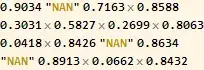
and paste it onto my MMA notebook. Below is the exact copy-pasted content:
0.9034 "NAN" 0.7163 0.8588
0.3031 0.5827 0.2699 0.8063
0.0418 0.8426 "NAN" 0.8634
"NAN" 0.8913 0.0662 0.8432
I want to display this content in the matrix form as shown in the original PDF. Thankfully there was no distortion when the content was transferred; however, the white spaces now became implied multiple signs in MMA.
My solution
1) Convert content to string by simply wrapping it in ""
2) I then ran into the problem of the "NAN"'s becoming apart from the overall string due to its being wrapped by a pair of "" previously. I couldn't find a quick way to assimilate them back into the larger string but to manually modify them (by adding a pair of \'s such that "NAN" became \"NAN\": ref)


3) Use StringSplit twice, first to split the string at each line break "\n" to create 4 "lines"/sublists, and then map it the second time to each line at the "," to create separate elements for each line.
StringSplit[#, {" "}] & /@ StringSplit[%, "\n"]
(* {{"0.9034", "\"NAN\"", "0.7163", "0.8588"}, {"0.3031", "0.5827",
  "0.2699", "0.8063"}, {"0.0418", "0.8426", "\"NAN\"",
  "0.8634"}, {"\"NAN\"", "0.8913", "0.0662", "0.8432"}} *)
4) Replace each "\"NAN\"" with a simple "NAN"
% /. "\"NAN\"" :> "NAN"
(* {{"0.9034", "NAN", "0.7163", "0.8588"}, {"0.3031", "0.5827", "0.2699",
   "0.8063"}, {"0.0418", "0.8426", "NAN", "0.8634"}, {"NAN", "0.8913",
   "0.0662", "0.8432"}} *)
Sidestep: I tried to do this step more generally (since the string enclosed by \" might be more varied in future cases), by doing this:
% /. "\""~~x___~~"\"" :> x
This did not work, probably because ReplaceAll couldn't handle more complex string replacements (e.g. involving blanks). As a result, I tried StringReplace, and it worked as expected:
Map[StringReplace[#, "\"" ~~ x___ ~~ "\"" :> x] &, %, {2}]
(* {{"0.9034", "NAN", "0.7163", "0.8588"}, {"0.3031", "0.5827", "0.2699",
   "0.8063"}, {"0.0418", "0.8426", "NAN", "0.8634"}, {"NAN", "0.8913",
   "0.0662", "0.8432"}} *)
One-step summary
Map[StringReplace[#, "\"" ~~ x___ ~~ "\"" :> x] &,
  StringSplit[#, {" "}] & /@ StringSplit["0.9034 \"NAN\" 0.7163 0.8588
    0.3031 0.5827 0.2699 0.8063
    0.0418 0.8426 \"NAN\" 0.8634
    \"NAN\" 0.8913 0.0662 0.8432", "\n"], {2}] // MatrixForm

My question is:
Could anyone help me think of a more elegant/efficient way to get the same result? The greatest bottleneck, I think, is the manual adding of \'s, so I'd love to hear how you can do that programmatically.


