5

I'm using the HierarchicalClustering package to cluster some data. So let's say I have this:

Needs["HierarchicalClustering`"]

Agglomerate[{1, 1, 2, 10, 4, 8}, Linkage -> "Single"]

(*
Cluster[
    Cluster[Cluster[Cluster[1, 1, 0, 1, 1], 2, 1, 2, 1], 4, 4, 3, 1],
    Cluster[8, 10, 4, 1, 1],
    16, 4, 2
]
*)

Is there a direct way to go from that output to an undirected graph structure?

The HierarchicalClustering package can create graphs as Dendrograms:

DendrogramPlot[{1, 1, 2, 10, 4, 8}, LeafLabels -> (# &),  Linkage -> "Single"]

But I would like to use the graph functions to work with the data. Maybe I'm doing this wrong and I don't even need the HierarchicalClustering to cluster my data.

I would appreciate any ideas.

Thanx!

Carl Woll
  • 130,679
  • 6
  • 243
  • 355
xtian777x
  • 1,018
  • 8
  • 14

2 Answers2

6
data = {1, 1, 2, 10, 4, 8};
leafverts = Table[Symbol["leaf" <> ToString[i]], {i, Length@data}];
Needs["HierarchicalClustering`"]
clusters = Agglomerate[{1, 1, 2, 10, 4, 8} -> leafverts, Linkage -> "Single"];

Re-using this answer to transform expressions to trees:

expr = (i = 1; Replace[clusters, Cluster[a_, b_, ___] :> 
                       Symbol["cluster" <> ToString[i++]][a, b], {0, Infinity}]);
ett = SparseArray`ExpressionToTree[expr]; 
edges = ett[[All, All, 1]];
options = {VertexLabels -> Placed["Name", {Center, Center}], 
           VertexShapeFunction -> "Rectangle", VertexSize -> .6, 
           VertexLabelStyle -> Directive[Red, Italic, 14], ImagePadding -> 20,
           ImageSize -> 400, 
           GraphLayout -> {"LayeredEmbedding",  "RootVertex" -> edges[[1, 1]]}};

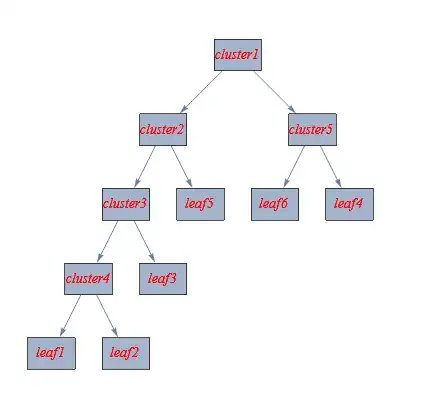
Graph[edges, options]

enter image description here

Update: Several ways to get undirected edges:

Graph[UndirectedEdge @@@ edges, options] (* thanks: xtian777x *)

or

Graph[edges, AppendTo[options, EdgeShapeFunction -> "Line"]]

or

Graph[edges, AppendTo[options, EdgeStyle -> Arrowheads[0]]]

all give

enter image description here

kglr
  • 394,356
  • 18
  • 477
  • 896
  • This is working good enough! The only tiny change I did was on the edges variable:

    edges = UndirectedEdge@@@(ett[[All, All, 1]]);

    – xtian777x Jul 25 '14 at 20:56
  • @xtian777x, i updated the answer with your suggestion to get undirected edges. – kglr Jul 26 '14 at 01:13
  • Cool, thanx! One question...why the leaves in the edges variable turn out as HoldForm of the original expression? (You can see that if you do edges//FullForm) – xtian777x Jul 27 '14 at 00:18
1

You can use ClusteringTree (introduced in M10.4) to do this:

tree = ClusteringTree[{1, 1, 2, 10, 4, 8}]

enter image description here

Check that the output is a Graph:

Head @ tree

Graph

Carl Woll
  • 130,679
  • 6
  • 243
  • 355