6

I execute the same code in Mathematica 9 and MAthematica 10, and have this different results.

Expr1 = -0.7 alfa + 2;
Expr2 = 1.2 alfa + 1.3;

p2 = Plot[{Expr1, Expr2}, {alfa, 0, 1}, 
  BaseStyle -> AbsoluteThickness[9], 
  PlotLegends -> 
   LineLegend["Expressions", BaseStyle -> AbsoluteThickness[4]], 
  PlotRange -> {Automatic, {-5, 10}}, AspectRatio -> 1.5]
Solve[Expr1 == Expr2, alfa]

What options I have use to obtaining in Mathematica10 the same results as en Math9.0

Thickness, and colors series.

enter image description here

Mika Ike
  • 3,241
  • 1
  • 23
  • 38

2 Answers2

5

This issue arises due to the introduction of PlotTheme in Mma v10.
You can disable this behaviour by using PlotTheme -> None, e.g.

Plot[{x^2 + x, x^2}, {x, -1, 1}, BaseStyle -> AbsoluteThickness[4], PlotTheme -> None]

If you have multiple plots in your notebook, than you can execute

$PlotTheme=None;

somewhere before the plots to get the old behaviour for all plots.


To get a "Detailed" plot with the "Classic" colors and thicker lines:

Plot[{x^2+x,x^2},{x,-1,1},PlotStyle->AbsoluteThickness[4],PlotTheme->{"Detailed","Classic"}]
Karsten7
  • 27,448
  • 5
  • 73
  • 134
  • +1 Well, gee, you'd think specific options would override Automatic ones (default $PlotTheme is Automatic). – Michael E2 Jul 25 '14 at 12:28
  • 1
    @MichaelE2 the hole PlotTheme concept seems to be not yet fully integrated. E.g., Some examples in the documentation are broken now and some easy modifications now even don't work after setting PlotTheme -> None BoxWhiskerChart. – Karsten7 Jul 25 '14 at 12:44
  • I like the "Detailed" option but... how could I obtain DETAILED with the lines more thickness?, and with the old colors?. CODE p2 = Plot[{Expr1, Expr2}, {p, 0, 1}, BaseStyle -> AbsoluteThickness[4], PlotTheme -> Detailed] – Mika Ike Jul 25 '14 at 20:40
  • 1
    @MikaIke try Plot[{Expr1, Expr2}, {p, 0, 1}, PlotStyle -> AbsoluteThickness[4], PlotTheme -> {"Classic", "Detailed"}] – Karsten7 Jul 25 '14 at 20:59
  • @Karsten7. Simply, Perfect! Thank you very much. – Mika Ike Jul 26 '14 at 06:28
  • Is there a way to load '$PlotTheme=None;' into the 'Private Style Definitions', such that I don't need to evaluate this additional cell before evaluating my plots? – LBogaardt Aug 10 '14 at 12:11
  • @LBogaardt see the answers to this question. – Karsten7 Aug 10 '14 at 12:25
  • @Karsten 7. Sorry, I'm not familiar enough with style sheets to deduce the method from those answers. Under what style name would 'PlotTheme' fall? – LBogaardt Aug 10 '14 at 13:11
  • @LBogaardt If you go to your $UserBaseDirectory->Kernel, you can open the init.m and put $PlotTheme=None where it says (** User Mathematica initialization file **). This will set the PlotTheme to None for all notebooks. – Karsten7 Aug 10 '14 at 18:17
  • @LBogaardt An other option would be to mark the input cell $PlotTheme = None; in your notebook, then right click on the mark and then left click on "Initialization Cell". You will no more need to evaluate this cell before your plots, as it will be evaluated before the first evaluation of an input cell. – Karsten7 Aug 10 '14 at 18:28
5

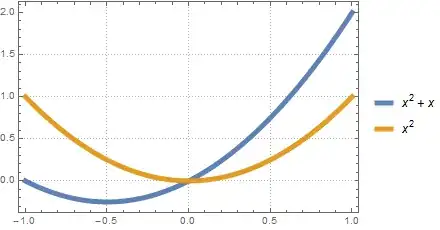
Rather than turning off the Theme capability you could work with it:

Plot[{x^2 + x, x^2}, {x, -1, 1}, PlotTheme -> "ThickLines"]

enter image description here

You can combine Themes allowing additional control. To learn how to create new Themes such as "Thick5" see the Advanced section of my answer to:

Example of use:

Plot[{x^2 + x, x^2}, {x, -1, 1}, PlotTheme -> {"Detailed", "Thick5"}]

Mr.Wizard
  • 271,378
  • 34
  • 587
  • 1,371