Given some data pairs $(x_i,y_i)$, with $i=0,...,m$, and a degree $r$, I wish to build a piecewise polynomial function to interpolate these data. That interpolation should be continuous, and, on every interval $[x_k,x_{k+r}]$, with $k=0, r, 2r, ...$, should be a polynomial of degree $r$. This can be useful for example to represent the solution of a PDE obtained with finite element method of degree $r$.
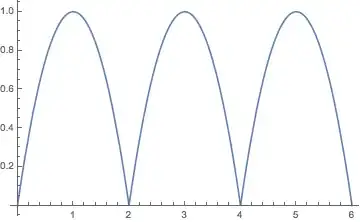
Because with $r=1$ there are no problem I'll refer to $r=2$. For example, given the following data pairs:
$$ \{ (0,0), (1,1), (2,0), (3,1), (4,0) \} $$
I wish to get this result:

The resulting interpolation function need not to have continuous derivative at $x=2$.
I tried with Interpolation and various options:
Interpolation[{{0, 0}, {1, 1}, {2, 0}, {3, 1}, {4, 0}},
 InterpolationOrder -> 2, Method -> "Hermite"]
Plot[%[x], {x, 0, 4}]

Interpolation[{{0, 0}, {1, 1}, {2, 0}, {3, 1}, {4, 0}},
 InterpolationOrder -> 2, Method -> "Spline"]
Plot[%[x], {x, 0, 4}]

As a reference, under MATLAB, I can build a piecewise polynomial interpolation of arbitrary degree, in a some involved way, with mkpp, and later consume the interpolation with ppval. For piecewise linear interpolation there is a more simple and direct interp1 function.
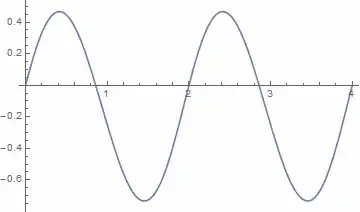
Under MATLAB I give to mkpp the values of the polinomials and their derivatives at $x_0, x_r, x_{2r}, ...$ and I get the expected result. Under Mathematica this approach doesn't work:
Interpolation[{{{0}, 0, 2, -2}, {{2}, 0, 2, -2}, {{4}, 0, 2, -2}},
 InterpolationOrder -> 2, Method -> "Hermite"]
Plot[%[x], {x, 0, 4}]
I considered using Piecewise and constructiong an Interpolation or a polynomial pure function for every interval $[x_k,x_{k+r}]$ but I suspect this become unmanageably complex when there are hundred or thousand of intervals.
There is some builtin way, reasonably simple and fast, to get this result? Naturally I search a general way, for general data and general $r$.
UPDATE
@kguler answer is interesting but I need a way to generalize for every $r$.




splitcan't you just doPartition[list, r+1, r]? – Jul 28 '14 at 17:25Internal`PartitionRagged, except with the overlap like yourPartitionexample. – Michael E2 Jul 28 '14 at 17:26Partition. In the original question the degree is constant, though, soPartitionshould be sufficient. +1 for thePiecewiseandInterpolationOrder -> All. – Jul 28 '14 at 17:28Allmeans as a value for the optionInterpolationOrderof theInterpolationfunction? – unlikely Jul 28 '14 at 18:00Length[pts] - 1.) – Michael E2 Jul 28 '14 at 18:04